
golang网络通信超时设置方式
- 作者: 洗呀么洗刷刷
- 来源: 51数据库
- 2021-08-24
网络通信中,为了防止长时间无响应的情况,经常会用到网络连接超时、读写超时的设置。
本文结合例子简介golang的连接超时和读写超时设置。
1.超时设置
1.1 连接超时
func dialtimeout(network, address string, timeout time.duration) (conn, error)
第三个参数timeout可以用来设置连接超时设置。
如果超过timeout的指定的时间,连接没有完成,会返回超时错误。
1.2 读写超时
在conn定义中,包括读写的超时时间设置。
type conn interface {
 // setdeadline sets the read and write deadlines associated
 // with the connection. it is equivalent to calling both
 // setreaddeadline and setwritedeadline.
 //
 ... ...
 setdeadline(t time.time) error
 // setreaddeadline sets the deadline for future read calls
 // and any currently-blocked read call.
 // a zero value for t means read will not time out.
 setreaddeadline(t time.time) error
 // setwritedeadline sets the deadline for future write calls
 // and any currently-blocked write call.
 // even if write times out, it may return n > 0, indicating that
 // some of the data was successfully written.
 // a zero value for t means write will not time out.
 setwritedeadline(t time.time) error
}
通过上面的函数说明,可以得知,这里的参数t是一个未来的时间点,所以每次读或写之前,都要调用setxxx重新设置超时时间,
如果只设置一次,就会出现总是超时的问题。
2.例子
2.1 server
server端监听连接,如果收到连接请求,就是创建一个goroutine负责这个连接的数据收发。
为了测试超时,我们在写操作之前,sleep 3s。
package main
import (
  "net"
  "log"
  "time"
)
func main() {
  addr := "0.0.0.0:8080"
  tcpaddr, err := net.resolvetcpaddr("tcp",addr)
  if err != nil {
    log.fatalf("net.resovletcpaddr fail:%s", addr)
  }
  listener, err := net.listentcp("tcp", tcpaddr)
  if err != nil {
    log.fatalf("listen %s fail: %s", addr, err)
  } else {
    log.println("listening", addr)
  }
  for {
    conn, err := listener.accept()
    if err != nil {
      log.println("listener.accept error:", err)
      continue
    }
    go handleconnection(conn)
  }
}
func handleconnection(conn net.conn) {
  defer conn.close()
  var buffer []byte = []byte("you are welcome. i'm server.")
  for {
    time.sleep(3*time.second)// sleep 3s
    n, err := conn.write(buffer)
    if err != nil {
      log.println("write error:", err)
      break
    }
    log.println("send:", n)
  }
  log.println("connetion end")
}
2.2 client
client建立连接时,使用的超时时间是3s。
创建连接成功后,设置连接的读超时。
每次读之前,都重新设置超时时间。
package main
import (
  "log"
  "net"
  "os"
  "time"
)
func main() {
  conntimeout := 3*time.second
  conn, err := net.dialtimeout("tcp", "127.0.0.1:8080", conntimeout) // 3s timeout
  if err != nil {
    log.println("dial failed:", err)
    os.exit(1)
  }
  defer conn.close()
  readtimeout := 2*time.second
  buffer := make([]byte, 512)
  for {
    err = conn.setreaddeadline(time.now().add(readtimeout)) // timeout
    if err != nil {
      log.println("setreaddeadline failed:", err)
    }
    n, err := conn.read(buffer)
    if err != nil {
      log.println("read failed:", err)
      //break
    }
    log.println("count:", n, "msg:", string(buffer))
  }
}
输出结果
2019/05/12 16:18:19 read failed: read tcp 127.0.0.1:51718->127.0.0.1:8080: i/o timeout
2019/05/12 16:18:19 count: 0 msg:
2019/05/12 16:18:20 count: 28 msg: you are welcome. i'm server.
2019/05/12 16:18:22 read failed: read tcp 127.0.0.1:51718->127.0.0.1:8080: i/o timeout
2019/05/12 16:18:22 count: 0 msg: you are welcome. i'm server.
2019/05/12 16:18:23 count: 28 msg: you are welcome. i'm server.
2019/05/12 16:18:25 read failed: read tcp 127.0.0.1:51718->127.0.0.1:8080: i/o timeout
2019/05/12 16:18:25 count: 0 msg: you are welcome. i'm server.
2019/05/12 16:18:26 count: 28 msg: you are welcome. i'm server.
补充:golang中的并发限制与超时控制
并发
package main
import (
 "fmt"
 "time"
)
func run(task_id, sleeptime int, ch chan string) {
 time.sleep(time.duration(sleeptime) * time.second)
 ch <- fmt.sprintf("task id %d , sleep %d second", task_id, sleeptime)
 return
}
func main() {
 input := []int{3, 2, 1}
 ch := make(chan string)
 starttime := time.now()
 fmt.println("multirun start")
 for i, sleeptime := range input {
  go run(i, sleeptime, ch)
 }
 for range input {
  fmt.println(<-ch)
 }
 endtime := time.now()
 fmt.printf("multissh finished. process time %s. number of tasks is %d", endtime.sub(starttime), len(input))
}
函数 run() 接受输入的参数,sleep 若干秒。然后通过 go 关键字并发执行,通过 channel 返回结果。
channel 顾名思义,他就是 goroutine 之间通信的“管道"。管道中的数据流通,实际上是 goroutine 之间的一种内存共享。我们通过他可以在 goroutine 之间交互数据。
ch <- xxx // 向 channel 写入数据
<- ch // 从 channel 中读取数据
channel 分为无缓冲(unbuffered)和缓冲(buffered)两种。例如刚才我们通过如下方式创建了一个无缓冲的 channel。
ch := make(chan string)
channel 的缓冲,我们一会再说,先看看刚才看看执行的结果。
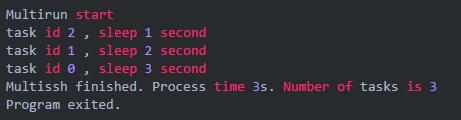
三个 goroutine `分别 sleep 了 3,2,1秒。但总耗时只有 3 秒。所以并发生效了,go 的并发就是这么简单。
按序返回
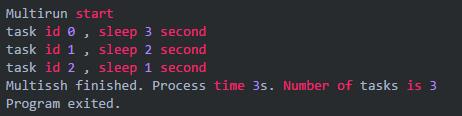
刚才的示例中,我执行任务的顺序是 0,1,2。但是从 channel 中返回的顺序却是 2,1,0。这很好理解,因为 task 2 执行的最快嘛,所以先返回了进入了 channel,task 1 次之,task 0 最慢。
如果我们希望按照任务执行的顺序依次返回数据呢?可以通过一个 channel 数组(好吧,应该叫切片)来做,比如这样
package main
import (
 "fmt"
 "time"
)
func run(task_id, sleeptime int, ch chan string) {
 time.sleep(time.duration(sleeptime) * time.second)
 ch <- fmt.sprintf("task id %d , sleep %d second", task_id, sleeptime)
 return
}
func main() {
 input := []int{3, 2, 1}
 chs := make([]chan string, len(input))
 starttime := time.now()
 fmt.println("multirun start")
 for i, sleeptime := range input {
  chs[i] = make(chan string)
  go run(i, sleeptime, chs[i])
 }
 for _, ch := range chs {
  fmt.println(<-ch)
 }
 endtime := time.now()
 fmt.printf("multissh finished. process time %s. number of tasks is %d", endtime.sub(starttime), len(input))
}
超时控制
刚才的例子里我们没有考虑超时。然而如果某个 goroutine 运行时间太长了,那很肯定会拖累主 goroutine 被阻塞住,整个程序就挂起在那儿了。因此我们需要有超时的控制。
通常我们可以通过select + time.after 来进行超时检查,例如这样,我们增加一个函数 run() ,在 run() 中执行 go run() 。并通过 select + time.after 进行超时判断。
package main
import (
 "fmt"
 "time"
)
func run(task_id, sleeptime, timeout int, ch chan string) {
 ch_run := make(chan string)
 go run(task_id, sleeptime, ch_run)
 select {
 case re := <-ch_run:
  ch <- re
 case <-time.after(time.duration(timeout) * time.second):
  re := fmt.sprintf("task id %d , timeout", task_id)
  ch <- re
 }
}
func run(task_id, sleeptime int, ch chan string) {
 time.sleep(time.duration(sleeptime) * time.second)
 ch <- fmt.sprintf("task id %d , sleep %d second", task_id, sleeptime)
 return
}
func main() {
 input := []int{3, 2, 1}
 timeout := 2
 chs := make([]chan string, len(input))
 starttime := time.now()
 fmt.println("multirun start")
 for i, sleeptime := range input {
  chs[i] = make(chan string)
  go run(i, sleeptime, timeout, chs[i])
 }
 for _, ch := range chs {
  fmt.println(<-ch)
 }
 endtime := time.now()
 fmt.printf("multissh finished. process time %s. number of task is %d", endtime.sub(starttime), len(input))
}
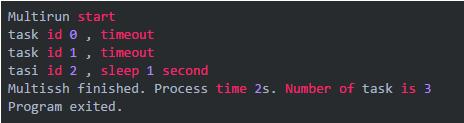
运行结果,task 0 和 task 1 已然超时
并发限制
如果任务数量太多,不加以限制的并发开启 goroutine 的话,可能会过多的占用资源,服务器可能会爆炸。所以实际环境中并发限制也是一定要做的。
一种常见的做法就是利用 channel 的缓冲机制。我们分别创建一个带缓冲和不带缓冲的 channel 看看
ch := make(chan string) // 这是一个无缓冲的 channel,或者说缓冲区长度是 0
ch := make(chan string, 1) // 这是一个带缓冲的 channel, 缓冲区长度是 1
这两者的区别在于,如果 channel 没有缓冲,或者缓冲区满了。goroutine 会自动阻塞,直到 channel 里的数据被读走为止。举个例子
package main
import (
 "fmt"
)
func main() {
 ch := make(chan string)
 ch <- "123"
 fmt.println(<-ch)
}
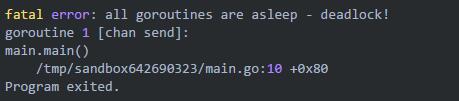
这段代码执行将报错
fatal error: all goroutines are asleep - deadlock!
goroutine 1 [chan send]:
main.main()
 /tmp/sandbox531498664/main.go:9 +0x60
program exited.
这是因为我们创建的 ch 是一个无缓冲的 channel。因此在执行到 ch<-"123",这个 goroutine 就阻塞了,后面的 fmt.println(<-ch) 没有办法得到执行。所以将会报 deadlock 错误。
如果我们改成这样,程序就可执行
package main
import (
 "fmt"
)
func main() {
 ch := make(chan string, 1)
 ch <- "123"
 fmt.println(<-ch)
}
执行
123
program exited.
如果我们改成这样
package main
import (
 "fmt"
)
func main() {
 ch := make(chan string, 1)
 ch <- "123"
 ch <- "123"
 fmt.println(<-ch)
 fmt.println(<-ch)
}
尽管读取了两次 channel,但是程序还是会死锁,因为缓冲区满了,goroutine 阻塞挂起。第二个 ch<- "123" 是没有办法写入的。
因此,利用 channel 的缓冲设定,我们就可以来实现并发的限制。我们只要在执行并发的同时,往一个带有缓冲的 channel 里写入点东西(随便写啥,内容不重要)。让并发的 goroutine 在执行完成后把这个 channel 里的东西给读走。这样整个并发的数量就讲控制在这个 channel 的缓冲区大小上。
比如我们可以用一个 bool 类型的带缓冲 channel 作为并发限制的计数器。

然后在并发执行的地方,每创建一个新的 goroutine,都往 chlimit 里塞个东西。
for i, sleeptime := range input {
 chs[i] = make(chan string, 1)
 chlimit <- true
 go limitfunc(chlimit, chs[i], i, sleeptime, timeout)
}
这里通过 go 关键字并发执行的是新构造的函数。他在执行完原来的 run() 后,会把 chlimit 的缓冲区里给消费掉一个。
limitfunc := func(chlimit chan bool, ch chan string, task_id, sleeptime, timeout int) {
 run(task_id, sleeptime, timeout, ch)
 <-chlimit
}
这样一来,当创建的 goroutine 数量到达 chlimit 的缓冲区上限后。主 goroutine 就挂起阻塞了,直到这些 goroutine 执行完毕,消费掉了 chlimit 缓冲区中的数据,程序才会继续创建新的 goroutine。我们并发数量限制的目的也就达到了。
完整示例代码
package main
import (
 "fmt"
 "time"
)
func run(task_id, sleeptime, timeout int, ch chan string) {
 ch_run := make(chan string)
 go run(task_id, sleeptime, ch_run)
 select {
 case re := <-ch_run:
  ch <- re
 case <-time.after(time.duration(timeout) * time.second):
  re := fmt.sprintf("task id %d , timeout", task_id)
  ch <- re
 }
}
func run(task_id, sleeptime int, ch chan string) {
 time.sleep(time.duration(sleeptime) * time.second)
 ch <- fmt.sprintf("task id %d , sleep %d second", task_id, sleeptime)
 return
}
func main() {
 input := []int{3, 2, 1}
 timeout := 2
 chlimit := make(chan bool, 1)
 chs := make([]chan string, len(input))
 limitfunc := func(chlimit chan bool, ch chan string, task_id, sleeptime, timeout int) {
  run(task_id, sleeptime, timeout, ch)
  <-chlimit
 }
 starttime := time.now()
 fmt.println("multirun start")
 for i, sleeptime := range input {
  chs[i] = make(chan string, 1)
  chlimit <- true
  go limitfunc(chlimit, chs[i], i, sleeptime, timeout)
 }
 for _, ch := range chs {
  fmt.println(<-ch)
 }
 endtime := time.now()
 fmt.printf("multissh finished. process time %s. number of task is %d", endtime.sub(starttime), len(input))
}
运行结果
multirun start
task id 0 , timeout
task id 1 , timeout
task id 2 , sleep 1 second
multissh finished. process time 5s. number of task is 3
program exited.
chlimit 的缓冲是 1。task 0 和 task 1 耗时 2 秒超时。task 2 耗时 1 秒。总耗时 5 秒。并发限制生效了。
如果我们修改并发限制为 2
chlimit := make(chan bool, 2)
运行结果
multirun start
task id 0 , timeout
task id 1 , timeout
task id 2 , sleep 1 second
multissh finished. process time 3s. number of task is 3
program exited.
task 0 , task 1 并发执行,耗时 2秒。task 2 耗时 1秒。总耗时 3 秒。符合预期。
有没有注意到代码里有个地方和之前不同。这里,用了一个带缓冲的 channel
chs[i] = make(chan string, 1)
还记得上面的例子么。如果 channel 不带缓冲,那么直到他被消费掉之前,这个 goroutine 都会被阻塞挂起。
然而如果这里的并发限制,也就是 chlimit 生效阻塞了主 goroutine,那么后面消费这些数据的代码并不会执行到。。。于是就 deadlock 拉!
for _, ch := range chs {
 fmt.println(<-ch)
}
所以给他一个缓冲就好了。
以上为个人经验,希望能给大家一个参考,也希望大家多多支持。如有错误或未考虑完全的地方,望不吝赐教。

