
maven的插件
- 作者: LOVE语诺
- 来源: 51数据库
- 2020-09-29
一、eclipse安装maven插件
安装maven插件前要安装一系列的插件,Integration with other Eclipse tools, such as WTP, AJDT, Mylyn, Subclipse and others
1.安装Mylyn插件,插件地址为http://download.eclipse.org/mylyn/releases/indigo
2.安装svn插件即subclipse,插件地址为http://subclipse.tigris.org/update_1.0.x
3.安装ajdt,插件地址为ajdt - http://download.eclipse.org/tools/ajdt/37/update
4.安装wtp,插件地址为http://download.eclipse.org/webtools/repository/indigo
5.可能还需要安装gef,插件地址为http://download.eclipse.org/tools/gef/updates/releases
然后安装maven插件m2e插件地址为http://download.eclipse.org/technology/m2e/releases
二、eclipse关键本机maven
点击eclipse菜单window>preferences点开左侧菜单的maven选择installations,点击add按钮选择第一步安装的maven路径即可
一种是在线安装,打开eclipse点击help-->install new software,然后输入要下载插件的链接地址如下图
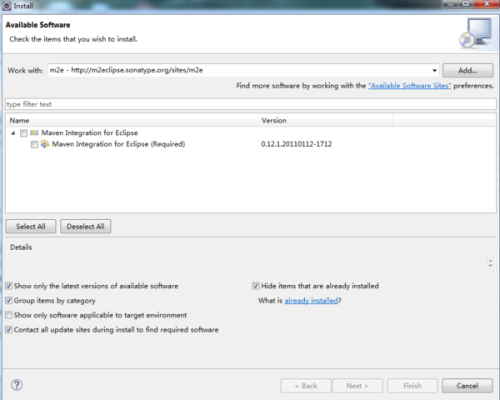
勾选择要下载的项,点击下一步进行下载。下载完成会自动安装。安装速度跟你自身网速和服务器有关。
另一种方式就是离线下载:
你要现在网上找到相关maven版本的离线安装包,在你的eclipse安装根目录下创建两个文件夹:links,myplugins(文件夹名字可以自定义),所在路径d:\eclipse。将下载下来的maven插件放到myplugins下。载links目录下创建一个maven.txt(名字可以自定义)。在文件中添加:path=d:\eclipse\myplugins\maven,保存并关闭maven.txt,并将后缀改为maven.link,重启eclipse,打开windows-->preferences,查看死否安装成功。
安装完成后,配置maven:
如图
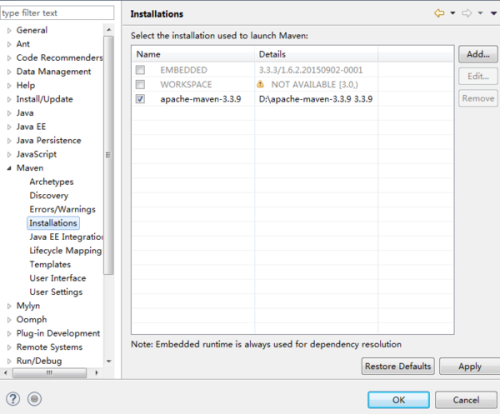
点击add按钮,选择你本机安装maven的路径
配置settings.xml文件如图
点击browse按钮,选到你maven的settings.xml配置文件,然后点击ok,这样就完成了eclipse maven的插件配置。
安装maven插件前要安装一系列的插件,Integration with other Eclipse tools, such as WTP, AJDT, Mylyn, Subclipse and others
1.安装Mylyn插件,插件地址为http://download.eclipse.org/mylyn/releases/indigo
2.安装svn插件即subclipse,插件地址为http://subclipse.tigris.org/update_1.0.x
3.安装ajdt,插件地址为ajdt - http://download.eclipse.org/tools/ajdt/37/update
4.安装wtp,插件地址为http://download.eclipse.org/webtools/repository/indigo
5.可能还需要安装gef,插件地址为http://download.eclipse.org/tools/gef/updates/releases
然后安装maven插件m2e插件地址为http://download.eclipse.org/technology/m2e/releases
二、eclipse关键本机maven
点击eclipse菜单window>preferences点开左侧菜单的maven选择installations,点击add按钮选择第一步安装的maven路径即可
一种是在线安装,打开eclipse点击help-->install new software,然后输入要下载插件的链接地址如下图
勾选择要下载的项,点击下一步进行下载。下载完成会自动安装。安装速度跟你自身网速和服务器有关。
另一种方式就是离线下载:
你要现在网上找到相关maven版本的离线安装包,在你的eclipse安装根目录下创建两个文件夹:links,myplugins(文件夹名字可以自定义),所在路径d:\eclipse。将下载下来的maven插件放到myplugins下。载links目录下创建一个maven.txt(名字可以自定义)。在文件中添加:path=d:\eclipse\myplugins\maven,保存并关闭maven.txt,并将后缀改为maven.link,重启eclipse,打开windows-->preferences,查看死否安装成功。
安装完成后,配置maven:
如图
点击add按钮,选择你本机安装maven的路径
配置settings.xml文件如图
点击browse按钮,选到你maven的settings.xml配置文件,然后点击ok,这样就完成了eclipse maven的插件配置。
推荐阅读

