
分析Cache 在 Ruby China 里面的应用情况
- 作者: 和女朋友分手后重回段子圈
- 来源: 51数据库
- 2021-08-08
首先给大家看一下 newrelic 的报表
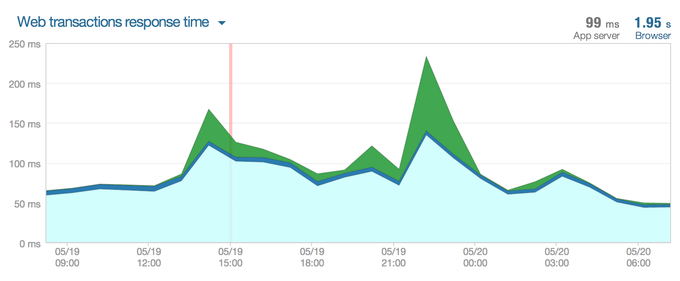
最近 24h 的平均响应时间
流量高的那些页面 (action)
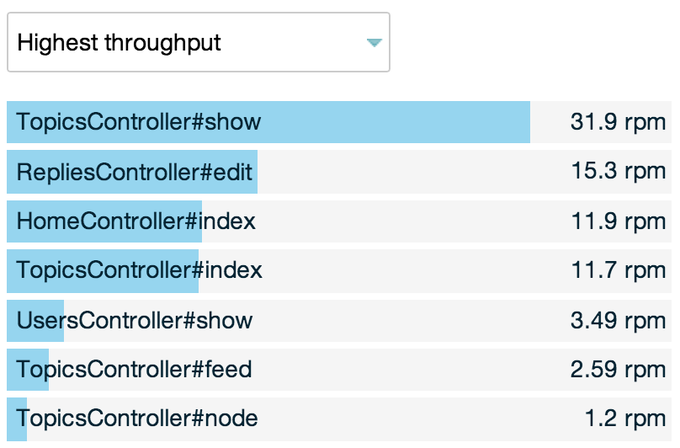
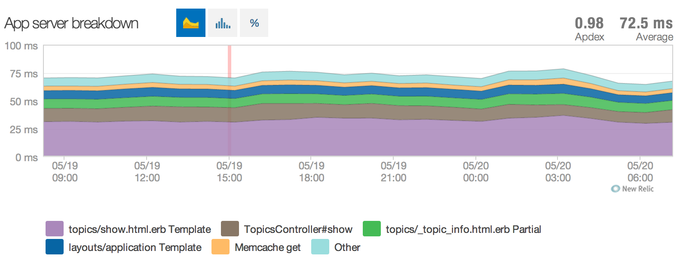
访问量搞的几个 action 的情况:
topicscontroller#show
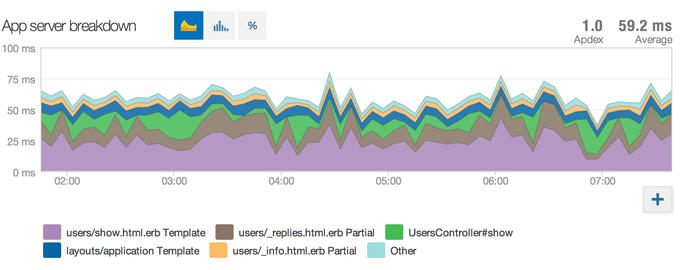
userscontroller#show (比较惨,主要是 github api 请求拖慢)
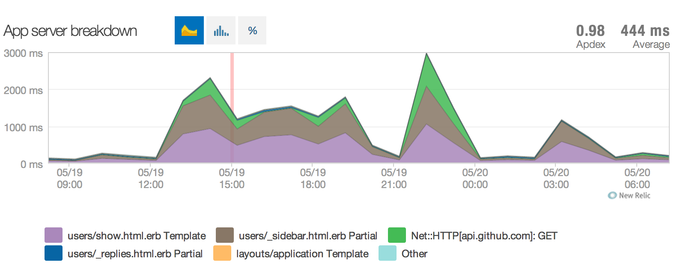
ps: 在发布这篇文章之前我有稍加修改了一下,github 请求放到后台队列处理,新的结果是这样:
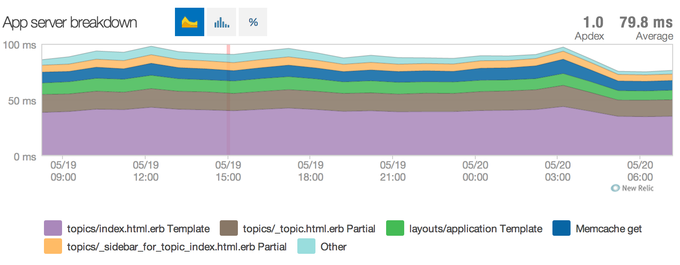
topicscontroller#index
homecontroller#index
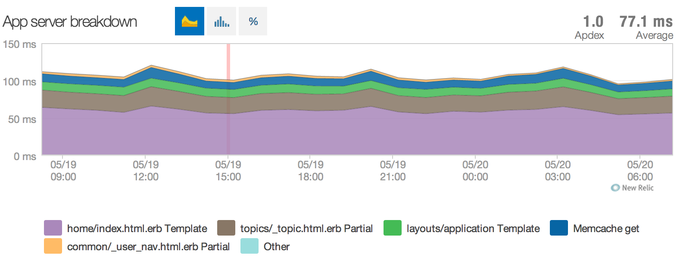
从上面的报表来看,目前 ruby china 后端的请求,排除用户主页之外,响应时间都在 100ms 以内,甚至更低。
我们是如何做到的?
markdown 缓存
fragment cache
数据缓存
etag
静态资源缓存 (js,css,图片)
markdown 缓存
在内容修改的时候就算好 markdown 的结果,存到数据库,避免浏览的时候反复计算。
此外这个东西也特意不放到 cache,而是放到数据库里面:
为了持久化,避免 memcached 停掉的时候,大量丢失;
避免过多占用缓存内存;
class topic
 field :body # 存放原始内容,用于修改
 field :body_html # 存放计算好的结果,用于显示

 before_save :markdown_body
 def markdown_body
  self.body_html = markdowntopicconverter.format(self.body) if self.body_changed?
 end
end
fragment cache
这个是 ruby china 里面用得最多的缓存方案,也是速度提升的原因所在。
app/views/topics/_topic.html.erb

<% cache([topic, suggest]) do %>
<div class="topic topic_line topic_<%= topic.id %>">
  <%= link_to(topic.replies_count,"#{topic_path(topic)}#reply#{topic.replies_count}",
     :class => "count state_false") %>
 ... 省略内容部分

</div>
<% end %>
用 topic 的 cache_key 作为缓存 cache views/topics/{编号}-#{更新时间}/{suggest 参数}/{文件内容 md5} -> views/topics/19105-20140508153844/false/bc178d556ecaee49971b0e80b3566f12
某些涉及到根据用户帐号,有不同状态显示的地方,直接把完整 html 准备好,通过 js 控制状态,比如目前的“喜欢“功能。
<script type="text/javascript">
 var readed_topic_ids = <%= current_user.filter_readed_topics(@topics) %>;
 for (var i = 0; i < readed_topic_ids.length; i++) {
  topic_id = readed_topic_ids[i];
  $(".topic_"+ topic_id + " .right_info .count").addclass("state_true");
 }
</script>
再比如
app/views/topics/_reply.html.erb

 <% cache([reply,"raw:#{@show_raw}"]) do %>
<div class="reply">
 <div class="pull-left face"><%= user_avatar_tag(reply.user, :normal) %></div>
 <div class="infos">
  <div class="info">
   <span class="name">
    <%= user_name_tag(reply.user) %>
   </span>
   <span class="opts">
    <%= likeable_tag(reply, :cache => true) %>
    <%= link_to("", edit_topic_reply_path(@topic,reply), :class => "edit icon small_edit", 'data-uid' => reply.user_id, :title => "修改回帖")%>
    <%= link_to("", "#", 'data-floor' => floor, 'data-login' => reply.user_login,
      :title => t("topics.reply_this_floor"), :class => "icon small_reply" )
    %>
   </span>
  </div>
  <div class="body">
   <%= sanitize_reply reply.body_html %>
  </div>
 </div>
</div>
<% end %>
同样也是通过 reply 的 cache_key 来缓存 views/replies/202695-20140508081517/raw:false/d91dddbcb269f3e0172bf5d0d27e9088
同时这里还有复杂的用户权限控制,用 js 实现;
<script type="text/javascript">
 $(document).ready(function(){
  <% if admin? %>
   $("#replies .reply a.edit").css('display','inline-block');
  <% elsif current_user %>
   $("#replies .reply a.edit[data-uid='<%= current_user.id %>']").css('display','inline-block');
  <% end %>
  <% if current_user && !@user_liked_reply_ids.blank? %>
   topics.checkreplieslikestatus([<%= @user_liked_reply_ids.join(",") %>]);
  <% end %>
 })
</script>
数据缓存
其实 ruby china 的大多数 model 查询都没有上 cache 的,因为据实际状况来看, mongodb 的查询响应时间都是很快的,大部分场景都是在 5ms 以内,甚至更低。
我们会做一些比价负责的数据查询缓存,比如:github repos 获取
def github_repos(user_id)
 cache_key = "user:#{user_id}:github_repos"
 items = rails.cache.read(cache_key)
 if items.blank?
  items = real_fetch_from_github()
  rails.cache.write(cache_key, items, expires_in: 15.days)
 end
 return items
end
etag
etag 是在 http request, response 可以带上的一个参数,用于检测内容是否有更新过,以减少网络开销。
过程大概是这样
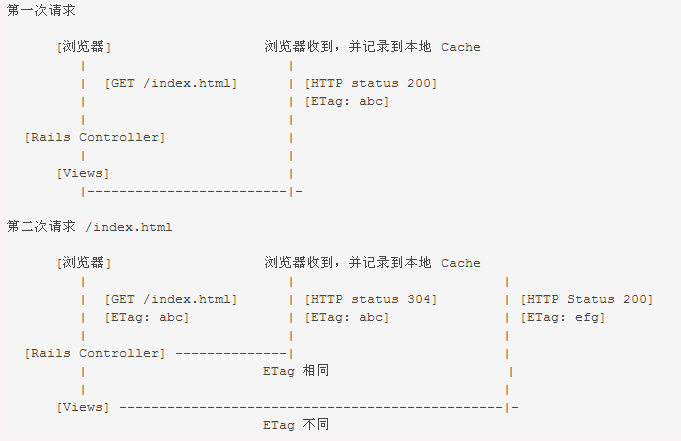
rails 的 fresh_when 方法可以帮助将你的查询内容生成 etag 信息
def show
 @topic = topic.find(params[:id])

 fresh_when(etag: [@topic])
end
静态资源缓存
请不要小看这个东西,后端写得再快,也有可能被这些拖慢(浏览器上面的表现)!
1、合理利用 rails assets pipeline,一定要开启!
# config/environments/production.rb
config.assets.digest = true
2、在 nginx 里面将 css, js, image 的缓存有效期设成 max;
location ~ (/assets|/favicon.ico|/*.txt) {
 access_log    off;
 expires      max;
 gzip_static on;
}
3、尽可能的减少一个页面 js, css, image 的数量,简单的方法是合并它们,减少 http 请求开销;
<head>
 ...
 只有两个
 <link  rel="stylesheet" />
 <script src="//ruby-china-files.b0.upaiyun.com/assets/app-24d4280cc6fda926e73419c126c71206.js"></script>
 ...
</head>
一些 tips
看统计日志,优先处理流量高的页面;
updated_at 是一个非常有利于帮助你清理缓存的东西,善用它!修改数据的时候别忽略它!
多关注你的 rails log 里面的查询时间,100ms 一下的页面响应时间是一个比较好的状态,超过 200ms 用户就会感觉到迟钝了。

