
c# WPF中System.Windows.Interactivity的使用
- 作者: 老板加份肉可否
- 来源: 51数据库
- 2021-08-24
背景
在我们进行wpf开发应用程序的时候不可避免的要使用到事件,很多时候没有严格按照mvvm模式进行开发的时候习惯直接在xaml中定义事件,然后再在对应的.cs文件中直接写事件的处理过程,这种处理方式写起来非常简单而且不用过多地处理考虑代码之间是否符合规范,但是我们在写代码的时候如果完全按照wpf规范的mvvm模式进行开发的时候就应该将相应的事件处理写在viewmodel层,这样整个代码才更加符合规范而且层次也更加清楚,更加符合mvvm规范。
常规用法
1 引入命名空间
通过在代码中引入system.windows.interactivity.dll,引入了这个dll后我们就能够使用这个里面的方法来将事件映射到viewmodel层了,我们来看看具体的使用步骤,第一步就是引入命名控件
xmlns:i="clr-namespace:system.windows.interactivity;assembly=system.windows.interactivity"
另外还可以通过另外一种方式来引入命名空间,其实这两者间都是对等的。
xmlns:i=http://schemas.microsoft.com/expression/2010/interactivity
2 添加事件对应的command
这里以textbox的getfocus和lostfocus为例来进行说明
<textbox text="commandbinding">
    <i:interaction.triggers>
        <i:eventtrigger eventname="lostfocus">
            <i:invokecommandaction command="{binding ontextlostfocus}"
                                   commandparameter="{binding relativesource={relativesource mode=findancestor, ancestorlevel=1, ancestortype={x:type textbox}}}"/>
        </i:eventtrigger>
        <i:eventtrigger eventname="gotfocus">
            <i:invokecommandaction command="{binding ontextgotfocus}"
                                   commandparameter="{binding relativesource={relativesource mode=findancestor, ancestorlevel=1, ancestortype={x:type textbox}}}"/>
        </i:eventtrigger>
    </i:interaction.triggers>
</textbox>
这个里面我们重点来看看这个invokecommandaction的代码结构
namespace system.windows.interactivity
{
    public sealed class invokecommandaction : triggeraction<dependencyobject>
    {
        public static readonly dependencyproperty commandproperty;
        public static readonly dependencyproperty commandparameterproperty;

        public invokecommandaction();

        public string commandname { get; set; }
        public icommand command { get; set; }
        public object commandparameter { get; set; }

        protected override void invoke(object parameter);
    }
}
这里我们发现这里我们如果我们定义一个command的话我们只能够在command中获取到我们绑定的commandparameter这个参数,但是有时候我们需要获取到触发这个事件的routedeventargs的时候,通过这种方式就很难获取到了,这个时候我们就需要自己去扩展一个invokecommandaction了,这个时候我们应该怎么做呢?整个过程分成三步:
2.1 定义自己的commandparameter
public class excommandparameter
{
    /// <summary>
    /// 事件触发源
    /// </summary>
    public dependencyobject sender { get; set; }
    /// <summary>
    /// 事件参数
    /// </summary>
    public eventargs eventargs { get; set; }
    /// <summary>
    /// 额外参数
    /// </summary>
    public object parameter { get; set; }
}
这个对象除了封装我们常规的参数外还封装了我们需要的eventargs属性,有了这个我们就能将当前的事件的eventargs传递进来了。
2.2 重写自己的invokecommandaction
public class exinvokecommandaction : triggeraction<dependencyobject>
    {

        private string commandname;
        public static readonly dependencyproperty commandproperty = dependencyproperty.register("command", typeof(icommand), typeof(exinvokecommandaction), null);
        public static readonly dependencyproperty commandparameterproperty = dependencyproperty.register("commandparameter", typeof(object), typeof(exinvokecommandaction), null);
        /// <summary>
        /// 获得或设置此操作应调用的命令的名称。
        /// </summary>
        /// <value>此操作应调用的命令的名称。</value>
        /// <remarks>如果设置了此属性和 command 属性,则此属性将被后者所取代。</remarks>
        public string commandname
        {
            get
            {
                base.readpreamble();
                return this.commandname;
            }
            set
            {
                if (this.commandname != value)
                {
                    base.writepreamble();
                    this.commandname = value;
                    base.writepostscript();
                }
            }
        }
        /// <summary>
        /// 获取或设置此操作应调用的命令。这是依赖属性。
        /// </summary>
        /// <value>要执行的命令。</value>
        /// <remarks>如果设置了此属性和 commandname 属性,则此属性将优先于后者。</remarks>
        public icommand command
        {
            get
            {
                return (icommand)base.getvalue(exinvokecommandaction.commandproperty);
            }
            set
            {
                base.setvalue(exinvokecommandaction.commandproperty, value);
            }
        }
        /// <summary>
        /// 获得或设置命令参数。这是依赖属性。
        /// </summary>
        /// <value>命令参数。</value>
        /// <remarks>这是传递给 icommand.canexecute 和 icommand.execute 的值。</remarks>
        public object commandparameter
        {
            get
            {
                return base.getvalue(exinvokecommandaction.commandparameterproperty);
            }
            set
            {
                base.setvalue(exinvokecommandaction.commandparameterproperty, value);
            }
        }
        /// <summary>
        /// 调用操作。
        /// </summary>
        /// <param name="parameter">操作的参数。如果操作不需要参数,则可以将参数设置为空引用。</param>
        protected override void invoke(object parameter)
        {
            if (base.associatedobject != null)
            {
                icommand command = this.resolvecommand();
                /*
                 * ★★★★★★★★★★★★★★★★★★★★★★★★
                 * 注意这里添加了事件触发源和事件参数
                 * ★★★★★★★★★★★★★★★★★★★★★★★★
                 */
                excommandparameter exparameter = new excommandparameter
                {
                    sender = base.associatedobject,
                    parameter = getvalue(commandparameterproperty),
                    eventargs = parameter as eventargs
                };
                if (command != null && command.canexecute(exparameter))
                {
                    /*
                     * ★★★★★★★★★★★★★★★★★★★★★★★★
                     * 注意将扩展的参数传递到execute方法中
                     * ★★★★★★★★★★★★★★★★★★★★★★★★
                     */
                    command.execute(exparameter);
                }
            }
        }
        private icommand resolvecommand()
        {
            icommand result = null;
            if (this.command != null)
            {
                result = this.command;
            }
            else
            {
                if (base.associatedobject != null)
                {
                    type type = base.associatedobject.gettype();
                    propertyinfo[] properties = type.getproperties(bindingflags.instance | bindingflags.public);
                    propertyinfo[] array = properties;
                    for (int i = 0; i < array.length; i++)
                    {
                        propertyinfo propertyinfo = array[i];
                        if (typeof(icommand).isassignablefrom(propertyinfo.propertytype) && string.equals(propertyinfo.name, this.commandname, stringcomparison.ordinal))
                        {
                            result = (icommand)propertyinfo.getvalue(base.associatedobject, null);
                        }
                    }
                }
            }
            return result;
        }

    }
这个里面的重点是要重写基类中的invoke方法,将当前命令通过反射的方式来获取到,然后在执行command.execute方法的时候将我们自定义的excommandparameter传递进去,这样我们就能够在最终绑定的命令中获取到特定的eventargs对象了。
2.3 在代码中应用自定义invokecommandaction
  <listbox x:name="lb_selecthistorymembers"
           snapstodevicepixels="true"
           itemssource="{binding datacontext.specifichistorymembers,relativesource={relativesource mode=findancestor,ancestortype=my:announcementapp},mode=twoway}"
           horizontalalignment="stretch"
           scrollviewer.horizontalscrollbarvisibility="disabled"
           background="#fff"
           borderthickness="1">
           <i:interaction.triggers>
              <i:eventtrigger eventname="selectionchanged">
                 <interactive:exinvokecommandaction command="{binding datacontext.onselecthistorymemberslistboxselected,relativesource={relativesource mode=findancestor,ancestortype=my:announcementapp},mode=twoway}"
                              commandparameter="{binding relativesource={relativesource mode=findancestor, ancestortype=listbox}}">
                 </interactive:exinvokecommandaction>
              </i:eventtrigger>
          </i:interaction.triggers>
</listbox>
注意这里需要首先引入自定义的interactive的命名空间,这个在使用的时候需要注意,另外在最终的command订阅中eventargs根据不同的事件有不同的表现形式,比如loaded事件,那么最终获取到的eventargs就是routedeventargs对象,如果是tablecontrol的selectionchanged事件,那么最终获取到的就是selectionchangedeventargs对象,这个在使用的时候需要加以区分。
3 使用当前程序集增加behavior扩展
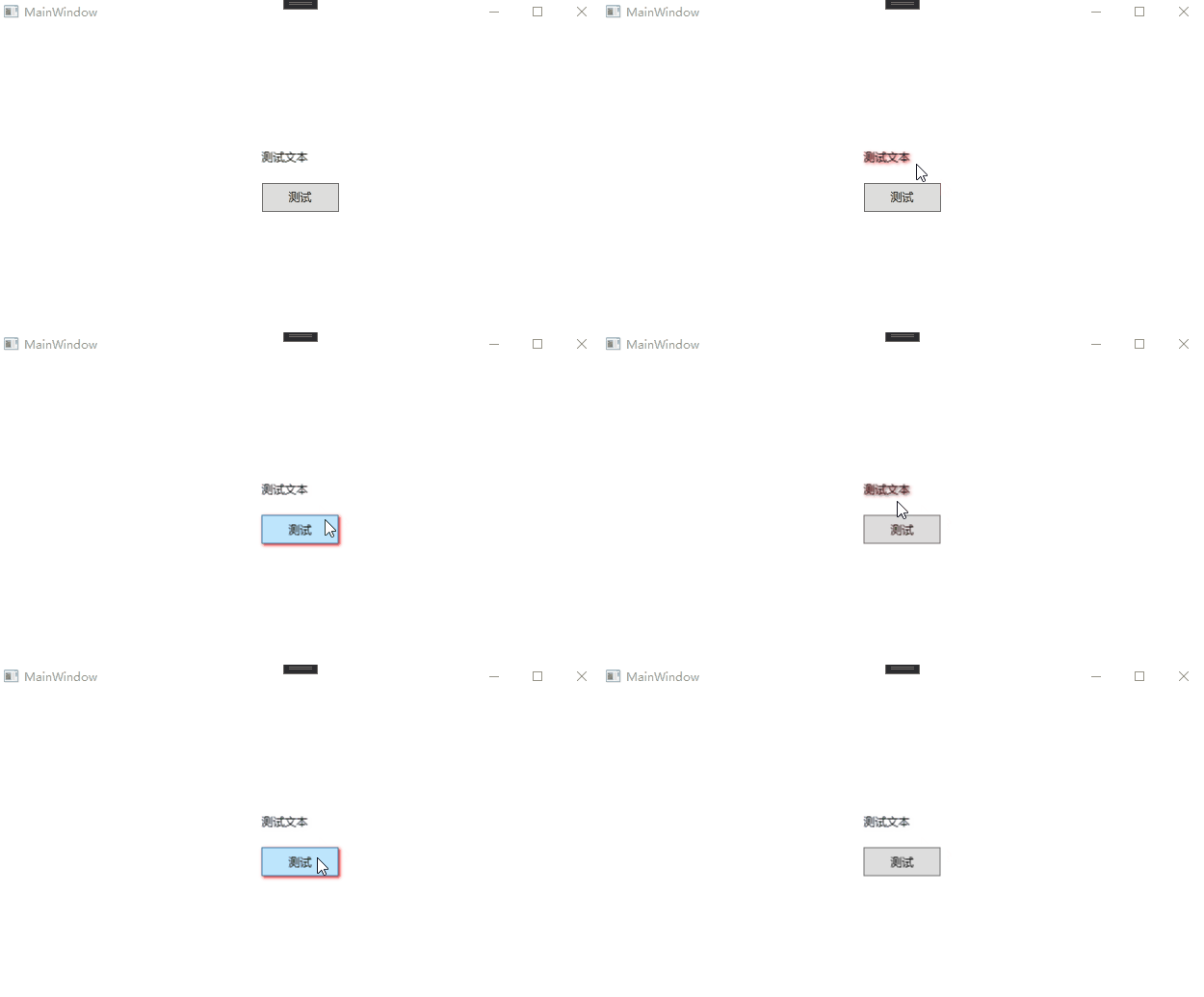
system.windows.interactivity.dll中一个重要的扩展就是对behavior的扩展,这个behavior到底该怎么用呢?我们来看下面的一个例子,我们需要给一个textblock和button增加一个统一的dropshadoweffect,我们先来看看最终的效果,然后再就具体的代码进行分析。
代码分析
1 增加一个effectbehavior
public class effectbehavior : behavior<frameworkelement>
 {
 protected override void onattached()
 {
 base.onattached();

 associatedobject.mouseenter += associatedobject_mouseenter;
 associatedobject.mouseleave += associatedobject_mouseleave;
 }

 private void associatedobject_mouseleave(object sender, system.windows.input.mouseeventargs e)
 {
 var element = sender as frameworkelement;
 element.effect = new dropshadoweffect() { color = colors.transparent, shadowdepth = 2 }; ;
 }

 private void associatedobject_mouseenter(object sender, system.windows.input.mouseeventargs e)
 {
 var element = sender as frameworkelement;
 element.effect = new dropshadoweffect() { color = colors.red, shadowdepth = 2 };
 }

 protected override void ondetaching()
 {
 base.ondetaching();
 associatedobject.mouseenter -= associatedobject_mouseenter;
 associatedobject.mouseleave -= associatedobject_mouseleave;

 }
 }
这里我们继承自system.windows.interactivity中的behavior<t>这个泛型类,这里我们的泛型参数使用frameworkelement,因为大部分的控件都是继承自这个对象,我们方便为其统一添加效果,在集成这个基类后我们需要重写基类的onattached和ondetaching方法,这个里面associatedobject就是我们具体添加effect的元素,在我们的示例中这个分别是textblock和button对象。
2 在具体的控件中添加此效果
<window x:class="wpfbehavior.mainwindow"
 xmlns="http://schemas.microsoft.com/winfx/2006/xaml/presentation"
 xmlns:x="http://schemas.microsoft.com/winfx/2006/xaml"
 xmlns:d="http://schemas.microsoft.com/expression/blend/2008"
 xmlns:mc="http://schemas.openxmlformats.org/markup-compatibility/2006"
 xmlns:local="clr-namespace:wpfbehavior"
 xmlns:i="http://schemas.microsoft.com/expression/2010/interactivity"
 mc:ignorable="d"
 title="mainwindow" height="450" width="800">
 <grid>
 <stackpanel orientation="vertical" horizontalalignment="center" verticalalignment="center">
 <textblock text="测试文本" margin="2" height="30">
 <i:interaction.behaviors>
 <local:effectbehavior></local:effectbehavior>
 </i:interaction.behaviors>
 </textblock>
 <button content="测试" width="80" height="30" margin="2">
 <i:interaction.behaviors>
 <local:effectbehavior></local:effectbehavior>
 </i:interaction.behaviors>
 </button>
 </stackpanel>
 </grid>
</window>
以上就是c# wpf中system.windows.interactivity的使用的详细内容,更多关于wpf中system.windows.interactivity的资料请关注其它相关文章!

