
c# winform主题实现的方法
- 作者: 网络没名
- 来源: 51数据库
- 2021-08-27
winform的主题实现没有bs里面那么舒服,下面做了一个简单实现,记录一下。
1、一个接口,需要做主题的控件、窗体都要实现这个接口
/// <summary>
 /// 使用主题的控件、窗体需要实现此接口
 /// </summary>
 public interface ithemecontrol
 {
  itheme thistheme { get; set; }
  /// <summary>
  /// 重置主题
  /// </summary>
  void resettheme();
 }
2、一个主题接口
/// <summary>
 /// 主题
 /// </summary>
 public interface itheme
 {
  int code { get; }
  /// <summary>
  /// 初始化
  /// </summary>
  void init();

 }
3、一个主题控制类
/// <summary>
 /// 主题设置
 /// </summary>
 public class theme
 {
  internal delegate void checkedthemeeventhandle(itheme theme);
  /// <summary>
  /// 改变主题事件
  /// </summary>
  static internal event checkedthemeeventhandle checkedthemeevent;
  static itheme currenttheme;
  /// <summary>
  /// 当前主题
  /// </summary>
  internal static itheme currenttheme
  {
   get { return currenttheme; }
   set
   {
    if (value == null)
     return;
    currenttheme = value;
    currenttheme.init();
    if (checkedthemeevent != null)
    {
     checkedthemeevent(value);
    }
   }
  }
  /// <summary>
  /// 加载控件的主题
  /// </summary>
  /// <param name="control"></param>
  internal static void loadtheme(ithemecontrol control)
  {
   control.resettheme();
  }
 }
4、添加一个窗体通用的主题接口
public interface ithemebaseform
 {
  /// <summary>
  /// 基本窗体背景色
  /// </summary>
  color baseformbackgroundcolor { get; }
  /// <summary>
  /// 基本窗体文字颜色
  /// </summary>
  color baseformforecolor { get; }
  /// <summary>
  /// 标题栏颜色
  /// </summary>
  color baseformtitlecolor { get; }
 }
5、添加对应的窗体或控件的主题接口
窗体的样式接口(例子)
public interface ithemefrmlock : ithemebaseform
 {
  color frmlock_txtfillcolor { get; }
  color frmlock_txtrectcolor { get; }
  color frmlock_txtforecolor { get; }
  color frmlock_btnfillcolor { get; }
  color frmlock_btnforecolor { get; }
  color frmlock_btnrectcolor { get; }

 }
控件的样式接口(例子)
public interface ithemeucfileitem : itheme
 {
  color ucfileitem_backgroundcolor { get; }
  color ucfileitem_forecolor { get; }
  color ucfileitem_boxcolor { get; }
  image ucfileitem_img1 { get; }
  image ucfileitem_img2 { get; }
  image ucfileitem_img3 { get; }
  image ucfileitem_img4 { get; }
  image ucfileitem_img5 { get; }
 }
我这里做一个深色一个浅色主题
深色的
/// <summary>
 /// 深色
 /// </summary>
 public partial class dark :
  itheme,
  ithemebaseform,
  ithemefrmlock,
  ithemeucfileitem
 {

  public int code { get { return 1; } }
  /// <summary>
  /// 基本窗体背景色
  /// </summary>
  public color baseformbackgroundcolor { get { return color.fromargb(37, 41, 59); } }
  /// <summary>
  /// 基本窗体文字颜色
  /// </summary>
  public color baseformforecolor { get { return color.white; } }
  public color baseformtitlecolor { get { return color.fromargb(38, 45, 67); } }

  /// <summary>
  /// 初始化操作
  /// </summary>
  public void init()
  {
   //这里做一些修改主题时候的业务
  }
  #region 重写运算符
  /// <summary>
  /// 重写==
  /// </summary>
  /// <param name="lhs"></param>
  /// <param name="rhs"></param>
  /// <returns></returns>
  public static bool operator ==(dark lhs, itheme rhs)
  {

   if (lhs == null && rhs == null)
    return true;
   else
   {
    if (lhs != null && rhs != null)
    {
     if (lhs.code == rhs.code)
      return true;
     else
      return false;
    }
    else
     return false;
   }
  }

  /// <summary>
  /// 重写!=
  /// </summary>
  /// <param name="lhs"></param>
  /// <param name="rhs"></param>
  /// <returns></returns>
  public static bool operator !=(dark lhs, itheme rhs)
  {

   if (lhs == null && rhs == null)
    return false;
   else
   {
    if (lhs != null && rhs != null)
    {
     if (lhs.code == rhs.code)
      return false;
     else
      return true;
    }
    else
     return true;
   }
  }


  public override bool equals(object obj)
  {
   if (obj == null || gettype() != obj.gettype())
   {
    return false;
   }
   if (obj is itheme)
   {
    if (code == ((itheme)obj).code)
     return true;
    else
     return false;
   }
   else
   {
    return false;
   }
  }


  public override int gethashcode()
  {
   return base.gethashcode();
  }
  #endregion
 }
浅色的也一样 只需要实现
- itheme,
- ithemebaseform,
- ithemefrmlock,
- ithemeucfileitem
这些接口就行(定义的控件接口,这里都要进行实现)
然后添加具体的控件主题实现类
/// <summary>
 /// frmlock
 /// </summary>
 public partial class dark
 {
  public color frmlock_txtfillcolor { get { return color.fromargb(34, 40, 60); } }
  public color frmlock_txtrectcolor { get { return color.fromargb(65, 75, 101); } }
  public color frmlock_txtforecolor { get { return color.white; } }
  public color frmlock_btnfillcolor { get { return color.fromargb(46, 54, 76); } }
  public color frmlock_btnforecolor { get { return color.fromargb(175, 193, 225); } }
  public color frmlock_btnrectcolor { get { return color.fromargb(65, 75, 101); } }
 }
然后就是去控件或窗体里面做事情了,实现接口theme.ithemecontrol,构造函数里面添加checkedthemeevent事件
public partial class frmlock : frmwithtitle,theme.ithemecontrol
 {

  public frmlock()
  {
   try
   {
    initializecomponent();
    theme.theme.checkedthemeevent += theme_checkedthemeevent;
   }
   catch (exception ex)
   {

   }
  }
  void theme_checkedthemeevent(theme.itheme theme)
  {
   if (this.visible)
   {
    thistheme = theme;
   }
  }
visiblechanged事件添加内容
private void frmlock_visiblechanged(object sender, eventargs e)
  {
   if (visible)
   {
    thistheme = theme.theme.currenttheme;
   }
  }
实现的接口
theme.itheme thistheme = null;
  /// <summary>
  /// 当前页面正在使用的主题
  /// </summary>
  public theme.itheme thistheme
  {
   get
   {
    if (thistheme == null)
    {
     thistheme = theme.theme.currenttheme;
    }
    return thistheme;
   }
   set
   {
    if (thistheme != value)
    {
     thistheme = value;
     theme.theme.loadtheme(this);
    }
   }
  }

  public void resettheme()
  {
   var t = (theme.ithemefrmlock)thistheme;
   this.backcolor = t.baseformbackgroundcolor;
   this.lbltitle.backcolor = t.baseformtitlecolor;
   this.lbltitle.forecolor = t.baseformforecolor;

   uccontrolbase1.fillcolor = t.frmlock_txtfillcolor;
   uccontrolbase1.rectcolor = t.frmlock_txtrectcolor;
   txtpw.backcolor = t.frmlock_txtfillcolor;
   txtpw.forecolor = t.frmlock_txtforecolor;
   tongyong_btnpaizhaopath.fillcolor = t.frmlock_btnfillcolor;
   tongyong_btnpaizhaopath.rectcolor = t.frmlock_btnrectcolor;
   tongyong_btnpaizhaopath.forecolor = t.frmlock_btnforecolor;
  }
以上就是修改代码,下面看调用
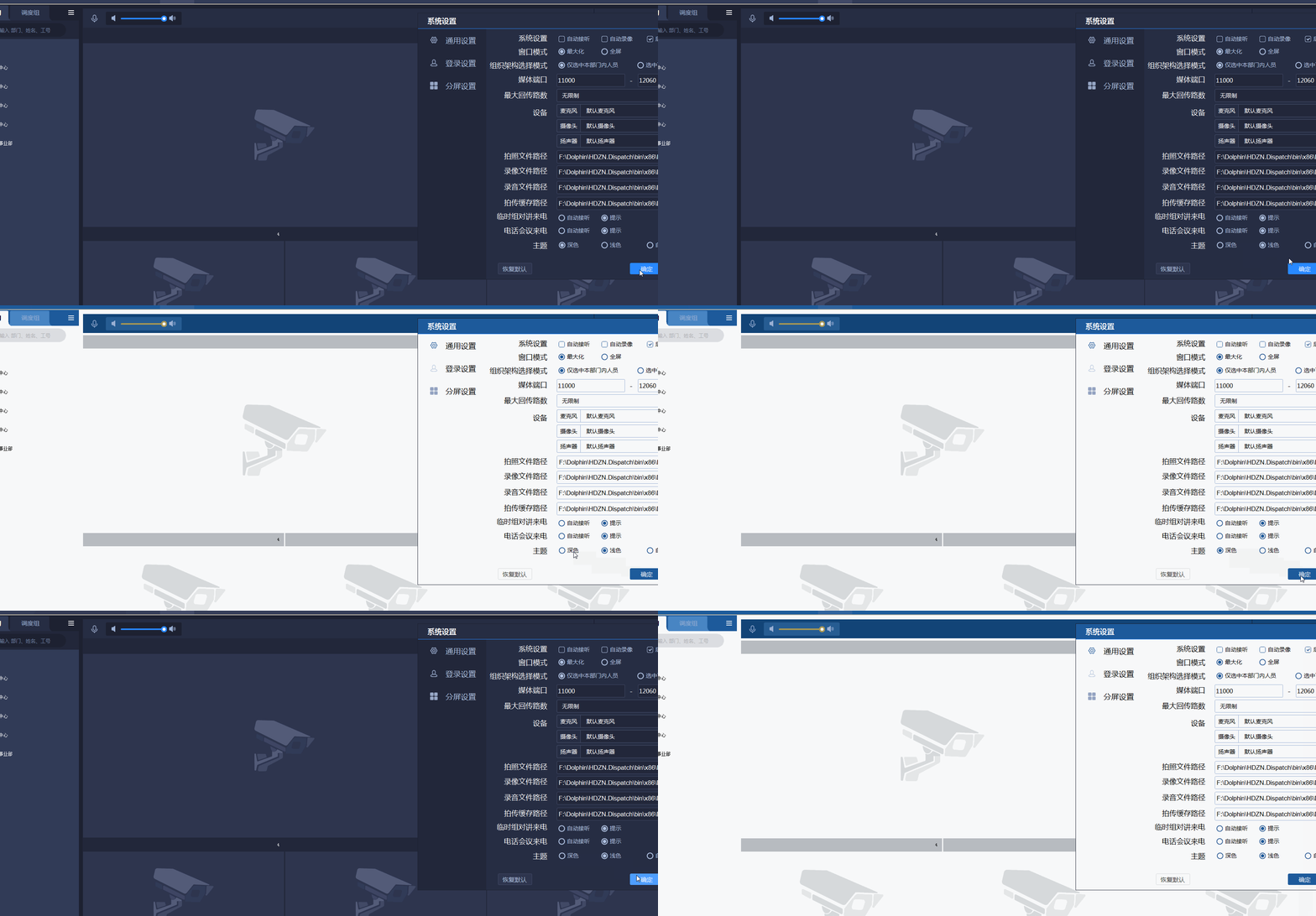
theme.theme.currenttheme = new theme.dark();
效果
作者:冰封一夏
出处:
hzhcontrols官网:
以上就是c# winform主题实现的方法的详细内容,更多关于c# winform主题实现的资料请关注其它相关文章!
推荐阅读

