
如何在C#中使用注册表
- 作者: 无毛刺的不锈钢管
- 来源: 51数据库
- 2021-09-05
一、什么是注册表
注册表是microsoft windows操作系统和其应用程序中的一个重要的层次型数据库,用于存储系统和应用程序的设置信息。由键(key,或称“项”)、子键(subkey,子项)和值项(value)构成。一个键就是树状数据结构中的一个节点,而子键就是这个节点的子节点,子键也是键。一个值项则是一个键的一条属性,由名称(name)、数据类型(datatype)以及数据(data)组成。一个键可以有一个或多个值,每个值的名称各不相同,如果一个值的名称为空,则该值为该键的默认值。
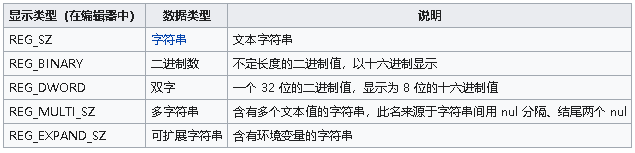
(1)、注册表的数据类型主要有以下五种:
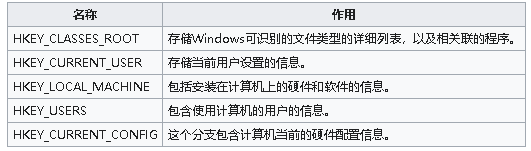
(2)、注册表有以下5个一级分支:
(3)、注册表的存储方式:
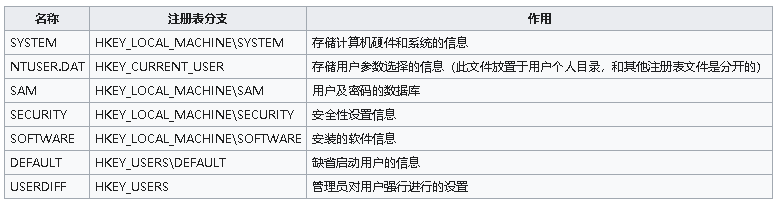
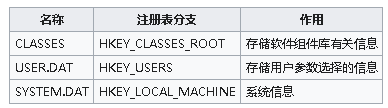
windows nt系列操作系统和windows 9x系列的存储方式有很大区别。注册表被分成多个文件存储,称为registry hives,每一个文件被称为一个配置单元。在早期的windows 3.x系列中,注册表仅包含一个reg.dat文件,所存放的内容后来演变为hkey_classes_root分支。
windows nt家族的配置单元文件:
windows 9x家族的配置单元文件:
二、c#操作注册表
我们可以使用外部加载windows操作系统自带的 advapi32.dll 文件,实现注册表的操作。下面实例中,我们使用 .net 平台自带的 microsoft.win32.registry 类库,使用的时候添加如下引用:
using microsoft.win32;
具体操作如下:
public static class registryutil
  {
    #region 创建注册表
    /// <summary>
    /// 创建注册表项
    /// </summary>
    /// <param name="keypath"></param>
    /// <param name="parentkey"></param>
    /// <returns></returns>
    public static registrykey createregistrykey(string keypath, registrykey parentkey)
    {
      return parentkey?.createsubkey(keypath);
    }


    /// <summary>
    /// 创建<see cref="registry.localmachine">注册表项目
    /// </summary>
    /// <param name="keypath"></param>
    /// <returns></returns>
    public static registrykey createregistrylocalmachine64key(string keypath)
    {
      return registry.localmachine.createsubkey(keypath);
    }

    /// <summary>
    /// 创建<see cref="registry.classesroot">注册表项目
    /// </summary>
    /// <param name="keypath"></param>
    /// <returns></returns>
    public static registrykey createregistryclassesrootkey(string keypath)
    {
      return registry.classesroot.createsubkey(keypath);
    }

    /// <summary>
    /// 创建<see cref="registry.currentconfig">注册表项目
    /// </summary>
    /// <param name="keypath"></param>
    /// <returns></returns>
    public static registrykey createregistrycurrentconfigkey(string keypath)
    {
      return registry.currentconfig.createsubkey(keypath);
    }

    /// <summary>
    /// 创建<see cref="registry.currentuser">注册表项目
    /// </summary>
    /// <param name="keypath"></param>
    /// <returns></returns>
    public static registrykey createregistrycurrentuserkey(string keypath)
    {
      return registry.currentuser.createsubkey(keypath);
    }

    /// <summary>
    /// 创建<see cref="registry.performancedata">注册表项目
    /// </summary>
    /// <param name="keypath"></param>
    /// <returns></returns>
    public static registrykey createregistryperformancedatakey(string keypath)
    {
      return registry.performancedata.createsubkey(keypath);
    }

    /// <summary>
    /// 创建<see cref="registry.users">注册表项目
    /// </summary>
    /// <param name="keypath"></param>
    /// <returns></returns>
    public static registrykey createregistryuserskey(string keypath)
    {
      return registry.users.createsubkey(keypath);
    }
    #endregion


    #region 打开注册表
    /// <summary>
    /// 打开 <see cref="registryview.registry64"/> 的 <see cref="registryhive.localmachine"/>
    /// </summary>
    /// <returns></returns>
    public static registrykey openlocalmachine64key()
    {
      return registrykey.openbasekey(microsoft.win32.registryhive.localmachine, registryview.registry64);
    }

    /// <summary>
    /// 打开 <see cref="registryview.registry32"/> 的 <see cref="registryhive.localmachine"/>
    /// </summary>
    /// <returns></returns>
    public static registrykey openlocalmachine32key()
    {
      return registrykey.openbasekey(microsoft.win32.registryhive.localmachine, registryview.registry32);
    }

    /// <summary>
    /// 打开 <see cref="registryview.registry64"/> 的 <see cref="registryhive.currentuser"/>
    /// </summary>
    /// <returns></returns>
    public static registrykey opencurrentuser64key()
    {
      return registrykey.openbasekey(microsoft.win32.registryhive.currentuser, registryview.registry64);
    }

    /// <summary>
    /// 打开 <see cref="registryview.registry32"/> 的 <see cref="registryhive.localmachine"/>
    /// </summary>
    /// <returns></returns>
    public static registrykey opencurrentuser32key()
    {
      return registrykey.openbasekey(microsoft.win32.registryhive.currentuser, registryview.registry32);
    }

    /// <summary>
    /// 打开注册表键
    /// </summary>
    /// <param name="rootkey"></param>
    /// <param name="keypath"></param>
    /// <returns></returns>
    public static registrykey openkey(this registrykey rootkey, string keypath)
    {
      return rootkey.opensubkey(keypath, true);
    }
    #endregion


    /// <summary>
    /// 读取注册表值
    /// </summary>
    /// <param name="key"></param>
    /// <param name="name"></param>
    /// <returns></returns>
    public static string readregistryvalue(this registrykey key, string name)
    {
      return key?.getvalue(name)?.tostring();
    }

    /// <summary>
    /// 写入注册表值
    /// </summary>
    /// <param name="key"></param>
    /// <param name="name"></param>
    /// <param name="value"></param>
    public static void writeregistryvalue(this registrykey key, string name, string value)
    {
      key.setvalue(name, value);
    }

    /// <summary>
    /// 删除注册值
    /// </summary>
    /// <param name="key"></param>
    /// <param name="name"></param>
    public static void deleteregistryvalue(this registrykey key, string name)
    {
      key.deletevalue(name);
    }
  }
调试代码如下:
static void main(string[] args)
    {
      // 写入注册表
      string path = @"software\test\char";
      var key = registryutil.createregistrylocalmachine64key(path);
      key.writeregistryvalue("name", "dwayne");
      key.writeregistryvalue("age", "18");

      // 读取注册表
      var regkey = registryutil.openlocalmachine64key().openkey(path);
      var name  = regkey.readregistryvalue("name");
      var age  = regkey.readregistryvalue("age");
      console.writeline($"name={name},age={age}");

      console.writeline("hello world!");
    }
以上就是如何在c# 中使用注册表的详细内容,更多关于c# 使用注册表的资料请关注其它相关文章!
推荐阅读

