
c# 用ELMAH日志组件处理异常
- 作者: 歇斯底里22771160
- 来源: 51数据库
- 2021-07-31
背景
elmah就是一个日志的拦截和处理组件,说到.net的日志组件,大家的第一反应该是log4net、nlog等这些东西,关于log4net和nlog,可以说是.net日志组件里面使用最为广泛的组件了,它们功能强大、使用方便。
优点
相比它们:
1、elmah的使用更加简单,它甚至不用写一句代码;
2、elmah是一种“可拔插式”的组件,即在一个运行的项目里面我们可以随意轻松加入日志功能,或者移除日志功能;
3、elmah组件自带界面,不用写任何代码,即可查看异常日志的界面;
4、组件提供了一个用于集中记录和通知错误日志的机制,通过邮件的机制通知错误信息给相关人员。
代码实现
1、nuget安装 using elmah;
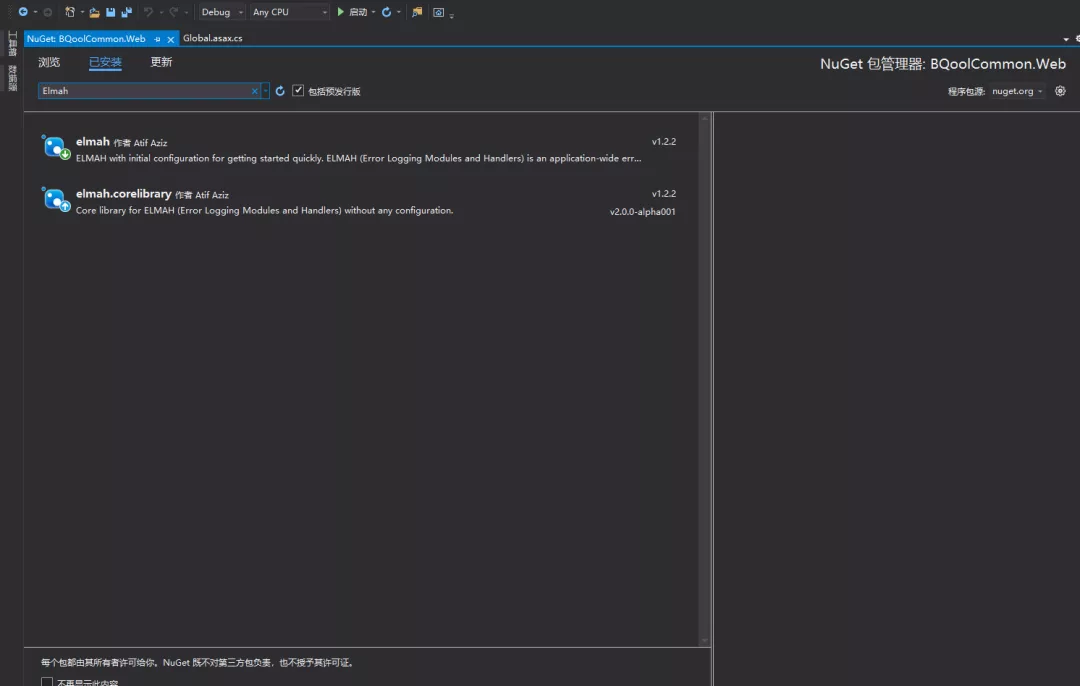
2、application_error 异常404处理
protected void application_error(object sender, eventargs e)
    {
      if (bqoolcommon.helpers.setting.commonsetting.isprod())
      {
        if (e is exceptionfiltereventargs exceptionfilter)
        {
          if (exceptionfilter.exception is httpexception httpexception && httpexception.message.startswith(_exceptionmsg))
          {
            response.redirect("/");
          }
        }
        response.clear();
        server.clearerror();
        response.statuscode = 404;
      }
    }
3、排除 elmah 404 寄信通知
public void errormail_filtering(object sender, exceptionfiltereventargs e)
    {
      if (e.exception is httpexception httpexception && (httpexception.gethttpcode() == 404 || httpexception.message.startswith(_exceptionmsg)))
      {
        e.dismiss();
      }
    }
4、自定 elmah 发信主旨
void errormail_mailing(object sender, elmah.errormaileventargs e)
    {
      string machinename = "none server";
      try
      {
        if (request != null)
        {
          machinename = request.servervariables["http_host"];
        }
      }
      catch
      {
      }

      // 取得 elamh errormail 的主旨
      // "$machinename$ at $errortime$ : {0}"
      string elmahsubject = e.mail.subject;
      //替換 errormail 的主旨內容
      string emailsubject = string.format("bigcrm.web error => {0}",
        elmahsubject
          .replace("$machinename$", machinename)
      );

      e.mail.subject = emailsubject;
    }
5、web.config配置
<elmah>
  <!--
    see http://www.51sjk.com/Upload/Articles/1/0/262/262393_20210702002646297.jpg for
    more information on remote access and securing elmah.
  -->
  <security allowremoteaccess="false"/>
 </elmah>
 <location path="elmah.axd" inheritinchildapplications="false">
  <system.web>
   <httphandlers>
    <add verb="post,get,head" path="elmah.axd" type="elmah.errorlogpagefactory, elmah"/>
   </httphandlers>
   <!--
    see http://www.51sjk.com/Upload/Articles/1/0/262/262393_20210702002646297.jpg for
    more information on using asp.net authorization securing elmah.

   <authorization>
    <allow roles="admin" />
    <deny users="*" />
   </authorization>
   -->
  </system.web>
  <system.webserver>
   <handlers>
    <add name="elmah" verb="post,get,head" path="elmah.axd" type="elmah.errorlogpagefactory, elmah" precondition="integratedmode"/>
   </handlers>
  </system.webserver>
 </location>
运行效果
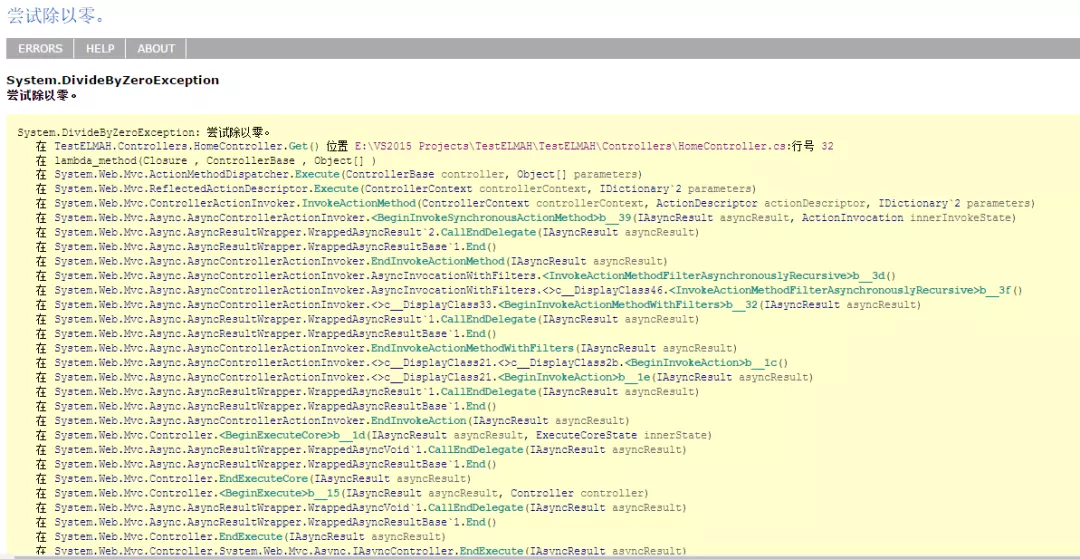
总结
elmah对于中小项目来说不失为一种不错的选择;
以上就是c# 用elmah日志组件处理异常的详细内容,更多关于c# elmah日志组件的资料请关注其它相关文章!
推荐阅读

