
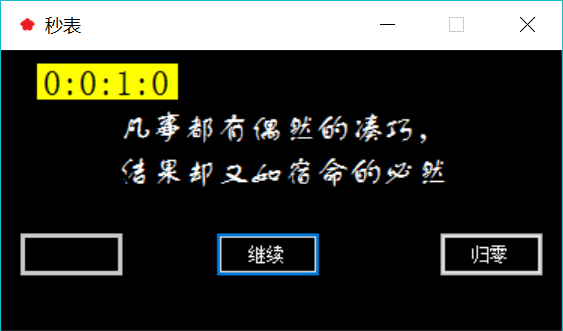
C#窗体应用程序实现时钟秒表
- 作者: 初见10462170
- 来源: 51数据库
- 2021-08-15

using System;
using System.Collections.Generic;
using System.ComponentModel;
using System.Data;
using System.Drawing;
using System.Linq;
using System.Text;
using System.Threading.Tasks;
using System.Windows.Forms;
using System.Diagnostics;

namespace Clock
{
    public partial class Form1 : Form
    {
        public Form1()
        {
            InitializeComponent();
        }
        Timer time = new Timer();
        Stopwatch sw; //秒表对象
        TimeSpan ts;
        static int count = 1;
        private void Form1_Load(object sender, EventArgs e)
        {
            button2.Enabled = false;
            button3.Enabled = false;
        }


        private void button1_Click(object sender, EventArgs e)
        {
            //开始按钮
            button2.Enabled = true;
            button3.Enabled = false;
            if (button2.Text == "继续")
                button2.Text = "暂停";
            sw = new Stopwatch();
            time.Tick += new EventHandler(timer1_Tick);  //触发
            time.Interval = 1;
            sw.Start();
            time.Start();
            button1.Enabled = false;
        }

        private void button2_Click(object sender, EventArgs e)
        {

            if (button2.Text == "暂停")
            {
                //暂停
                button2.Text = "继续";
                sw.Stop();
                time.Stop();
                button3.Enabled = true;
            }
            else if (button2.Text == "继续")
            {
                //继续
                button2.Text = "暂停";
                sw.Start();
                time.Start();

            }
        }

        private void timer1_Tick(object sender, EventArgs e)
        {
            ts = sw.Elapsed;
            label1.Text = string.Format("{0}:{1}:{2}:{3}", ts.Hours, ts.Minutes, ts.Seconds, ts.Milliseconds / 10);
        }

        private void button3_Click(object sender, EventArgs e)
        {
            //归零
            sw.Stop();
            time.Stop();
            label1.Text = string.Format("{0}:{1}:{2}:{3}", 0, 0, 0, 0);
            button2.Enabled = false;
            button1.Enabled = true;
        }

    }
    }
推荐阅读

