
C# DataGridView实现分页显示功能
- 作者: via72376176
- 来源: 51数据库
- 2021-07-28
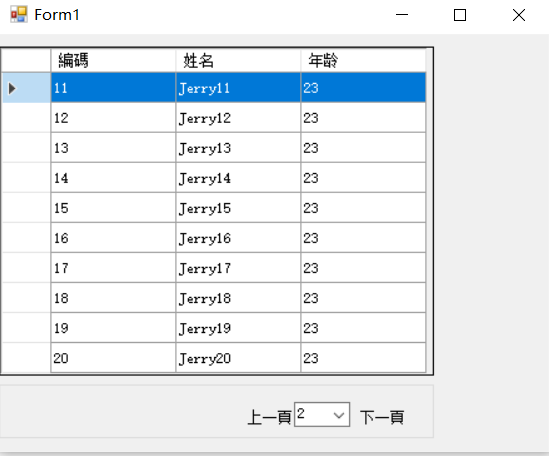
以上是效果图
最近项目需要实现分页显示功能,自己写了一个用户控件进行记录一下,demo功能比较简单,数据来源主要以test手动添加为主
思路:
1.分页显示——将要显示的内容按照一次显示的大小建立DataTable?
?DataTable dt = new DataTable(tableName);
对于Table中如果有很多列需要建立,单独一个个手动添加会比较麻烦,可以选择建立一个string[]里面放所有需要建立的列名,
通过遍历的方式进行添加
?
2.将建立好的DataTable放入DataSet
?ds.Tables.Add(dt);
3.将该DataSet绑定为需要显示这些数据对应的DataGridView的数据源
?this.dataGridView1.DataSource = ds.Tables[currentPageNum].DefaultView;
?
4.对于显示过程中会出现每页显示都多一行空行的问题,显示如下
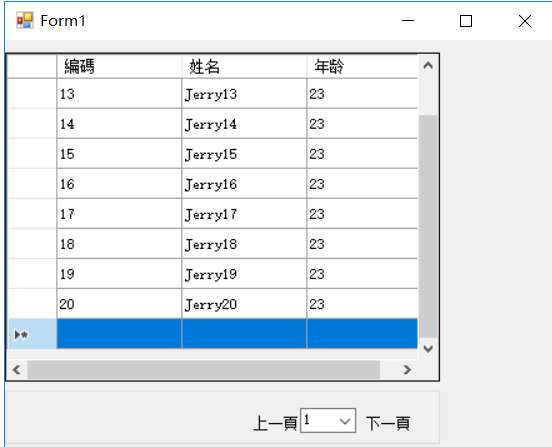
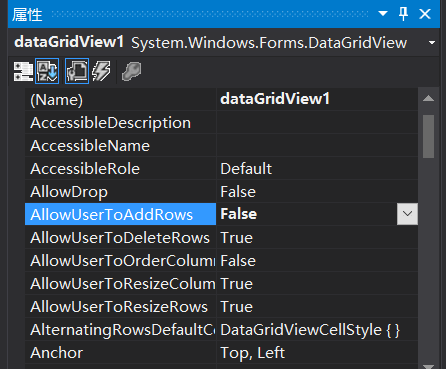
可以通过设置DataGridView的以下属性为false即可
代码
namespace PageDataUI
{
? ? public partial class PageUI : UserControl
? ? {
? ? ? ? #region 屬性字段定義
? ? ? ? private int maxPageNum=0; ? ? //最大頁數
? ? ? ? private int currentPageNum; //當前頁數
? ? ? ? private int prePageNum; ? ? //上一頁
? ? ? ? private int nextPageNum; ? ?//下一頁
? ? ? ? private int MaxNum = 10; //每頁最大條數
? ? ? ? private int TotalNum = 0; //所有頁總條數
? ? ? ? DataSet ds = new DataSet();
? ? ? ? #endregion
? ? ? ? public PageUI()
? ? ? ? {
? ? ? ? ? ? InitializeComponent();
? ? ? ? ? ? LoadDataInit();
? ? ? ? }
? ? ? ? #region 屬性字段賦值
? ? ? ? public virtual int MaxPageNum
? ? ? ? {
? ? ? ? ? ? get
? ? ? ? ? ? {
? ? ? ? ? ? ? ? return maxPageNum;
? ? ? ? ? ? }
? ? ? ? ? ? set
? ? ? ? ? ? {
? ? ? ? ? ? ? ? maxPageNum = value;
? ? ? ? ? ? }
? ? ? ? }
? ? ? ? public virtual int CurrentPageNum
? ? ? ? {
? ? ? ? ? ? get
? ? ? ? ? ? {
? ? ? ? ? ? ? ? return currentPageNum;
? ? ? ? ? ? }
? ? ? ? ? ? set
? ? ? ? ? ? {
? ? ? ? ? ? ? ? currentPageNum = value;
? ? ? ? ? ? }
? ? ? ? }
? ? ? ? public virtual int PrePageNum
? ? ? ? {
? ? ? ? ? ? get
? ? ? ? ? ? {
? ? ? ? ? ? ? ? return prePageNum;
? ? ? ? ? ? }
? ? ? ? ? ? set
? ? ? ? ? ? {
? ? ? ? ? ? ? ? prePageNum = value;
? ? ? ? ? ? }
? ? ? ? }
? ? ? ? public virtual int NextPageNum
? ? ? ? {
? ? ? ? ? ? get
? ? ? ? ? ? {
? ? ? ? ? ? ? ? return nextPageNum;
? ? ? ? ? ? }
? ? ? ? ? ? set
? ? ? ? ? ? {
? ? ? ? ? ? ? ? nextPageNum = value;
? ? ? ? ? ? }
? ? ? ? }
? ? ? ? #endregion
? ? ? ? private void LoadDataInit()
? ? ? ? {
? ? ? ? ? ? for (int j = 1; j <= 3; j++) ? ?//建立三個table
? ? ? ? ? ? {
? ? ? ? ? ? ? ? CurrentPagecomboBox.Text = currentPageNum.ToString();
? ? ? ? ? ? ? ? currentPageNum = 1;
? ? ? ? ? ? ? ? int tableNum = maxPageNum + 1; ? ? ? ? ?//有多少個Table建立
? ? ? ? ? ? ? ? string tableName = "table" + tableNum.ToString(); //table名稱從table1開始計數
? ? ? ? ? ? ? ? DataTable dt = new DataTable(tableName);
? ? ? ? ? ? ? ? AddColumeHeader(dt); ?//動態添加表頭
? ? ? ? ? ? ? ? int JudgeRangeMax = TotalNum + MaxNum;
? ? ? ? ? ? ? ? for (int i = TotalNum+1; i <= JudgeRangeMax; i++)
? ? ? ? ? ? ? ? {
? ? ? ? ? ? ? ? ? ? TotalNum = i;
? ? ? ? ? ? ? ? ? ? DataRow row = dt.NewRow();
? ? ? ? ? ? ? ? ? ? row["編碼"] = TotalNum;
? ? ? ? ? ? ? ? ? ? row["姓名"] = "Jerry"+i.ToString();
? ? ? ? ? ? ? ? ? ? row["年龄"] = 23;
? ? ? ? ? ? ? ? ? ? dt.Rows.Add(row);
? ? ? ? ? ? ? ? ? ??
? ? ? ? ? ? ? ? }
? ? ? ? ? ? ? ? maxPageNum +=1;
? ? ? ? ? ? ? ? ds.Tables.Add(dt);
? ? ? ? ? ? ? ? //this.dataGridView1.DataSource = ds.Tables[j-1];
? ? ? ? ? ? }
? ? ? ? ? ? ShowData();
? ? ? ? ? ? this.dataGridView1.SelectionMode = DataGridViewSelectionMode.FullRowSelect; ? ? //设置DataGridView全行显示
? ? ? ? ? ? //this.dataGridView1.AutoSizeColumnsMode = DataGridViewAutoSizeColumnsMode.AllCells; ?//設置DataGridView列寬自適應顯示
? ? ? ? }
? ? ? ? private void ShowData()
? ? ? ? {
? ? ? ? ? ? this.dataGridView1.DataSource = ds.Tables[currentPageNum].DefaultView;
? ? ? ? ? ? //foreach (DataTable table in ds.Tables)
? ? ? ? ? ? //{
? ? ? ? ? ? // ? ?foreach (DataRow row in table.Rows)
? ? ? ? ? ? // ? ?{
? ? ? ? ? ? // ? ? ? ?foreach (DataColumn column in table.Columns)
? ? ? ? ? ? // ? ? ? ?{
? ? ? ? ? ? // ? ? ? ? ? ?Console.WriteLine(row[column]);
? ? ? ? ? ? // ? ? ? ?}
? ? ? ? ? ? // ? ?}
? ? ? ? ? ? //}
? ? ? ? }
? ? ? ? private void AddColumeHeader(DataTable dt)
? ? ? ? {
? ? ? ? ? ? dt.Columns.Add("編碼");
? ? ? ? ? ? dt.Columns.Add("姓名");
? ? ? ? ? ? dt.Columns.Add("年龄");
? ? ? ? ?
? ? ? ? }
? ? ? ? private void PrePagelabel_Click(object sender, EventArgs e)
? ? ? ? {
? ? ? ? ? ? if (currentPageNum != 1)
? ? ? ? ? ? {
? ? ? ? ? ? ? ? currentPageNum = currentPageNum - 1;
? ? ? ? ? ? ? ? CurrentPagecomboBox.Text = currentPageNum.ToString();
? ? ? ? ? ? ? ? this.dataGridView1.DataSource = ds.Tables[currentPageNum - 1];
? ? ? ? ? ? }
? ? ? ? ? ? else
? ? ? ? ? ? {
? ? ? ? ? ? ? ? //PrePagelabel.Enabled = false;
? ? ? ? ? ? }
? ? ? ? }
? ? ? ? private void NextPagelabel_Click(object sender, EventArgs e)
? ? ? ? {
? ? ? ? ? ? if(currentPageNum+1<=maxPageNum)
? ? ? ? ? ? {
? ? ? ? ? ? ? ? currentPageNum = currentPageNum + 1;
? ? ? ? ? ? ? ? CurrentPagecomboBox.Text = currentPageNum.ToString();
? ? ? ? ? ? ? ? this.dataGridView1.DataSource = ds.Tables[currentPageNum -1];
? ? ? ? ? ? }
? ? ? ? ? ? else
? ? ? ? ? ? {
? ? ? ? ? ? ? ? //NextPagelabel.Enabled = false;
? ? ? ? ? ? }
? ? ? ? }
? ? }
}
?
注:
该Demo只是实现基本的分页显示功能,对于过程出现的一些特殊情况
1.每页填充数据如果非满table的处理
2.如果读取是数据为0个table
等等,就需要对相应的内容进行调整和控制
仅以此来记录学习日常
?
?
?
?
?

