
让 .NET 轻松构建中间件模式代码(二)
- 作者: 首席鉴黄师--唐马儒
- 来源: 51数据库
- 2021-08-11
让 .net 轻松构建中间件模式代码(二)--- 支持管道的中断和分支
intro
上次实现了一个基本的构建中间件模式的中间件构建器,现在来丰富一下功能,让它支持中断和分支,分别对应 asp.net core 中的 applicationbuilder.run 和 applicationbuilder.mapwhen
实现管道中断
实现中间件的中断其实很简单,通过上一次的分析我们已经知道,中间件每一个部分其实是一个上下文和 next 的委托,只需要忽略 next,不执行 next 就可以了,就可以中断后面中间件的执行。
定义一个 run 扩展方法来实现方便的实现中间件中断:
public static ipipelinebuilder<tcontext> run<tcontext>(this ipipelinebuilder<tcontext> builder, action<tcontext> handler)
{
    return builder.use(_ => handler);
}

public static iasyncpipelinebuilder<tcontext> run<tcontext>(this iasyncpipelinebuilder<tcontext> builder, func<tcontext, task> handler)
{
    return builder.use(_ => handler);
}
实现分支
分支的实现主要是参考 asp.net core 里 applicationbuilder.map/applicationbuilder.mapwhen 实现分支路由的做法,在 asp.net core 里,mapwhen 是一个扩展方法,其实现是一个 mapwhenmiddleware,有兴趣可以看 asp.net core 的源码。
实现原理也挺简单的,其实就是满足分支的条件时创建一个全新的中间件管道,当满足条件的时候就就执行这个分支中间件管道,否则就跳过这个分支进入下一个中间件。
首先在 pipelinebuilder 的接口定义中增加了一个 new 方法用来创建一个全新的中间件管道,定义如下:
public interface ipipelinebuilder<tcontext>
{
    ipipelinebuilder<tcontext> use(func<action<tcontext>, action<tcontext>> middleware);

    action<tcontext> build();

    ipipelinebuilder<tcontext> new();
}

//
public interface iasyncpipelinebuilder<tcontext>
{
    iasyncpipelinebuilder<tcontext> use(func<func<tcontext, task>, func<tcontext, task>> middleware);

    func<tcontext, task> build();

    iasyncpipelinebuilder<tcontext> new();
}
实现就是直接创建了一个新的 pipelinebuilder<tcontext> 对象,示例如下:
internal class pipelinebuilder<tcontext> : ipipelinebuilder<tcontext>
{
    private readonly action<tcontext> _completefunc;
    private readonly list<func<action<tcontext>, action<tcontext>>> _pipelines = new list<func<action<tcontext>, action<tcontext>>>();

    public pipelinebuilder(action<tcontext> completefunc)
    {
        _completefunc = completefunc;
    }

    public ipipelinebuilder<tcontext> use(func<action<tcontext>, action<tcontext>> middleware)
    {
        _pipelines.add(middleware);
        return this;
    }

    public action<tcontext> build()
    {
        var request = _completefunc;

        for (var i = _pipelines.count - 1; i >= 0; i--)
        {
            var pipeline = _pipelines[i];
            request = pipeline(request);
        }

        return request;
    }

    public ipipelinebuilder<tcontext> new() => new pipelinebuilder<tcontext>(_completefunc);
}
异步的和同步类似,这里就不再赘述,有疑问可以直接看文末的源码链接
接着就可以定义我们的分支扩展了
public static ipipelinebuilder<tcontext> when<tcontext>(this ipipelinebuilder<tcontext> builder, func<tcontext, bool> predict, action<ipipelinebuilder<tcontext>> configureaction)
{
    return builder.use((context, next) =>
    {
        if (predict.invoke(context))
        {
            var branchpipelinebuilder = builder.new();
            configureaction(branchpipelinebuilder);
            var branchpipeline = branchpipelinebuilder.build();
            branchpipeline.invoke(context);
        }
        else
        {
            next();
        }
    });
}
使用示例
我们可以使用分支和中断来改造一下昨天的示例,改造完的示例如下:
var requestcontext = new requestcontext()
{
    requestername = "kangkang",
    hour = 12,
};

var builder = pipelinebuilder.create<requestcontext>(context =>
        {
            console.writeline($"{context.requestername} {context.hour}h apply failed");
        })
        .when(context => context.hour <= 2, pipeline =>
                {
                    pipeline.use((context, next) =>
                    {
                        console.writeline("this should be invoked");
                        next();
                    });
                    pipeline.run(context => console.writeline("pass 1"));
                    pipeline.use((context, next) =>
                    {
                        console.writeline("this should not be invoked");
                        next();
                        console.writeline("will this invoke?");
                    });
                })
        .when(context => context.hour <= 4, pipeline =>
            {
                pipeline.run(context => console.writeline("pass 2"));
            })
        .when(context => context.hour <= 6, pipeline =>
            {
                pipeline.run(context => console.writeline("pass 3"));
            })

    ;
var requestpipeline = builder.build();
console.writeline();
foreach (var i in enumerable.range(1, 8))
{
    console.writeline($"--------- h:{i} apply pipeline------------------");
    requestcontext.hour = i;
    requestpipeline.invoke(requestcontext);
    console.writeline("----------------------------");
}
输出结果如下:
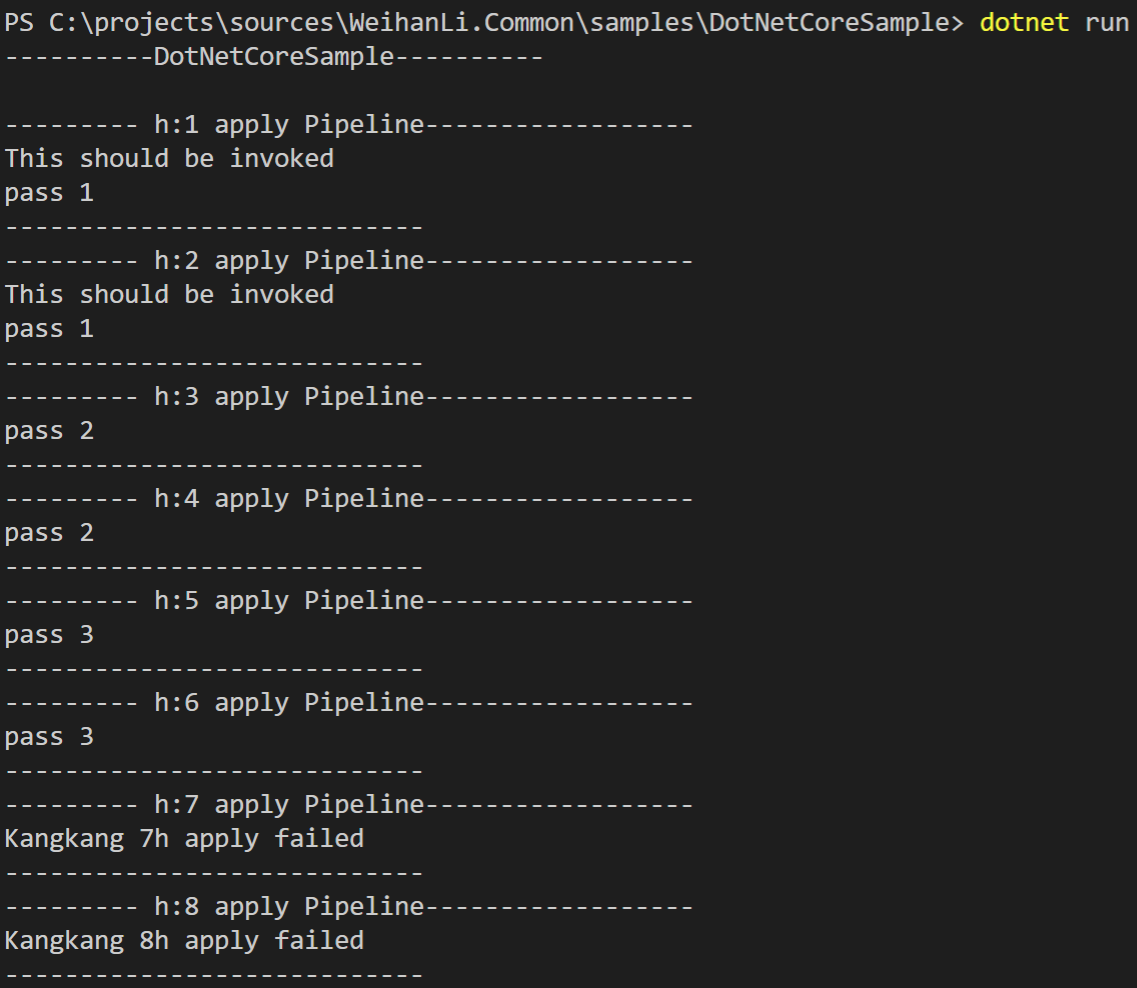
看输出结果我们可以看到 run 后面注册的中间件是不会执行的,run 前面注册的中间件正常执行
然后定义的 when 分支也是正确执行的~~
reference
- https://github.com/weihanli/weihanli.common/blob/dev/samples/dotnetcoresample/pipelinetest.cs
- https://github.com/weihanli/weihanli.common/blob/dev/src/weihanli.common/helpers/pipelines/pipelinebuilder.cs
- https://github.com/dotnet/aspnetcore/blob/master/src/http/http/src/builder/applicationbuilder.cs
- https://github.com/dotnet/aspnetcore/blob/master/src/http/http.abstractions/src/extensions/mapwhenextensions.cs
- https://github.com/dotnet/aspnetcore/blob/master/src/http/http.abstractions/src/extensions/mapwhenmiddleware.cs
推荐阅读

