
使用OWIN自托管开发ASP.NET Web API的系列
- 作者: 歆颢美菱格
- 来源: 51数据库
- 2021-08-18
本教程说明如何使用owin自托管web api框架,在控制台应用程序中托管asp.net web api。
.net开放web界面(owin)定义了.net web服务器和web应用程序之间的抽象。owin将web应用程序与服务器分离,这使owin成为在iis之外以自己的进程自托管web应用程序的理想选择。
本教程中使用的软件版本
- visual studio 2017
- web api 5.2.7
注意
您可以在github.com/aspnet/samples中找到本教程的完整源代码。
创建一个控制台应用程序
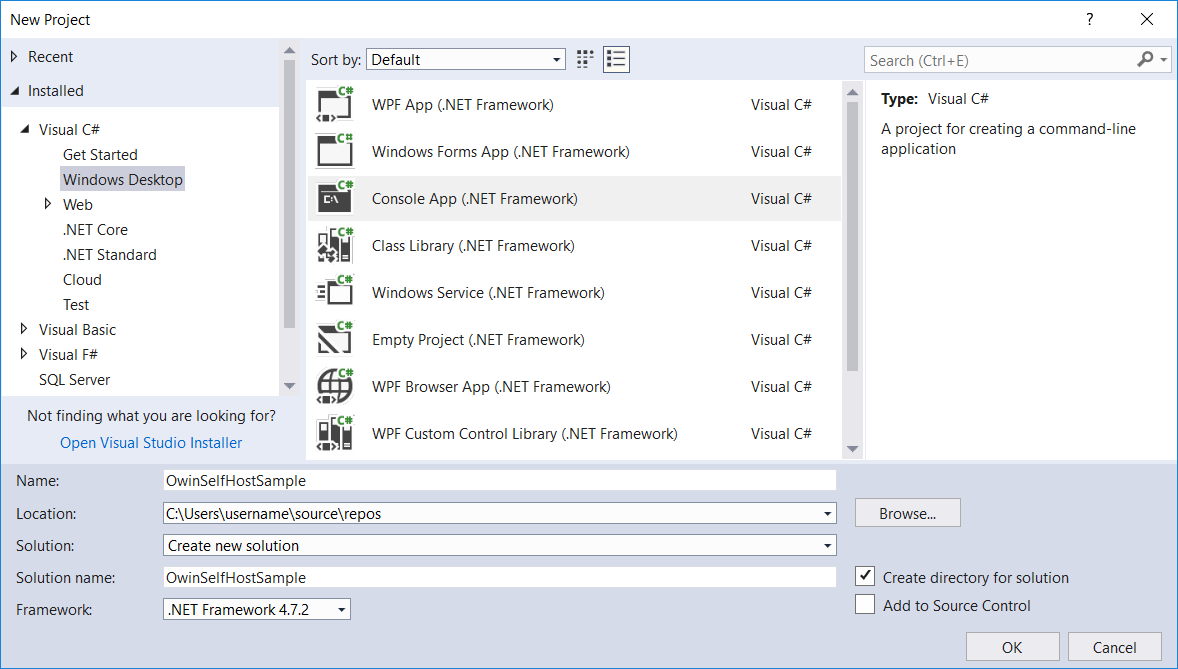
在文件菜单上, 新建,然后选择项目。在“ 已安装 ”的visual c#下,选择“ windows桌面”,然后选择“ 控制台应用程序(.net framework)”。将项目命名为“ owinselfhostsample”,然后选择“ 确定”。
添加web api和owin包
从“ 工具”菜单中,选择“ nuget软件包管理器”,然后选择“ 软件包管理器控制台”。在“程序包管理器控制台”窗口中,输入以下命令:
install-package microsoft.aspnet.webapi.owinselfhost
这将安装webapi owin自托管软件包和所有必需的owin软件包。
配置web api以进行自我托管
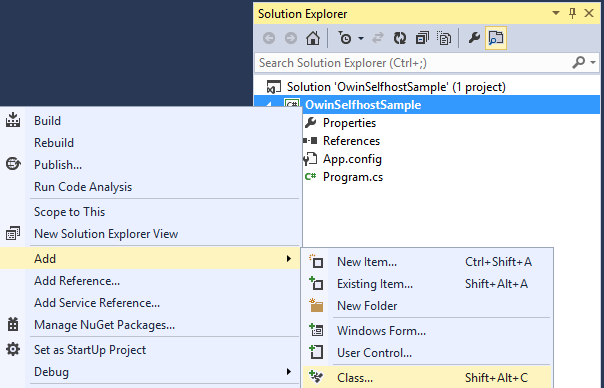
在解决方案资源管理器中,右键单击该项目,然后选择“ 添加 / 类”以添加新的类。给班级命名startup。
用以下内容替换此文件中的所有样板代码:
using owin;
using system.web.http;

namespace owinselfhostsample
{
    public class startup
    {
        // this code configures web api. the startup class is specified as a type
        // parameter in the webapp.start method.
        public void configuration(iappbuilder appbuilder)
        {
            // configure web api for self-host.
            httpconfiguration config = new httpconfiguration();
            config.routes.maphttproute(
                name: "defaultapi",
                routetemplate: "api/{controller}/{id}",
                defaults: new { id = routeparameter.optional }
            );

            appbuilder.usewebapi(config);
        }
    }
}
添加web api控制器
接下来,添加一个web api控制器类。在解决方案资源管理器中,右键单击该项目,然后选择“ 添加 / 类”以添加新的类。给班级命名valuescontroller。
用以下内容替换此文件中的所有样板代码:
using system.collections.generic;
using system.web.http;

namespace owinselfhostsample
{
    public class valuescontroller : apicontroller
    {
        // get api/values
        public ienumerable<string> get()
        {
            return new string[] { "value1", "value2" };
        }

        // get api/values/5
        public string get(int id)
        {
            return "value";
        }

        // post api/values
        public void post([frombody]string value)
        {
        }

        // put api/values/5
        public void put(int id, [frombody]string value)
        {
        }

        // delete api/values/5
        public void delete(int id)
        {
        }
    }
}
启动owin主机并向httpclient发出请求
用以下内容替换program.cs文件中的所有样板代码:
using microsoft.owin.hosting;
using system;
using system.net.http;

namespace owinselfhostsample
{
    public class program
    {
        static void main()
        {
            string baseaddress = "http://localhost:9000/";

            // start owin host
            using (webapp.start<startup>(url: baseaddress))
            {
                // create httpclient and make a request to api/values
                httpclient client = new httpclient();

                var response = client.getasync(baseaddress + "api/values").result;

                console.writeline(response);
                console.writeline(response.content.readasstringasync().result);
                console.readline();
            }
        }
    }
 }
运行应用程序
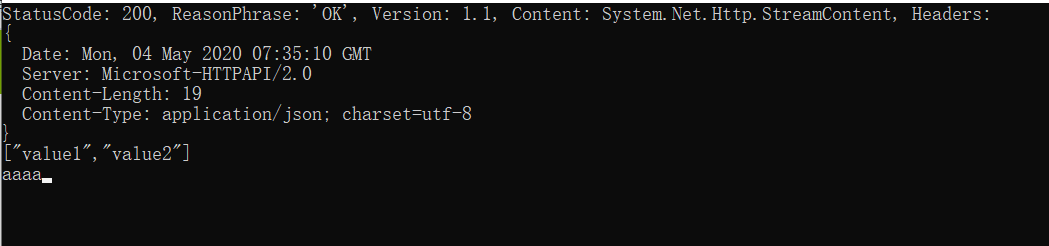
若要运行该应用程序,请在visual studio中按f5。输出应如下所示:
statuscode: 200, reasonphrase: 'ok', version: 1.1, content: system.net.http.streamcontent, headers:
{
date: mon, 04 may 2020 07:35:10 gmt
server: microsoft-httpapi/2.0
content-length: 19
content-type: application/json; charset=utf-8
}
["value1","value2"]
参考资料
描述
4月中旬开发一个小项目,app和客户端进行数据交互,为了脱离iis(因为iis安装太麻烦,有的客户电脑配置太低),因此我们定初步目标是采用stock通信进行数据交互,进行一两天发现stock开发太慢;最后网上找到使用owin自托管web api框架,在控制台应用程序中托管asp.net web api。

