
Asp.Net Core用NLog记录日志操作方法
- 作者: 成管
- 来源: 51数据库
- 2021-09-03
需求
1.日志自动写入到数据库、写入到文件
2.appsettings.json数据库连接更改后,不需要去改nlog中的连接地址,启动网站或项目时自动检测变动然后去更改,以appsettings.json为准,保持同步。
3.写入日志时,除了nlog自带的字段,新增logtype自定义字段记录日志类型,例如网站日志、中间件日志等
4.统一的写日志方法,不用每次get一个logger对象(或依赖注入)来记日志
安装包
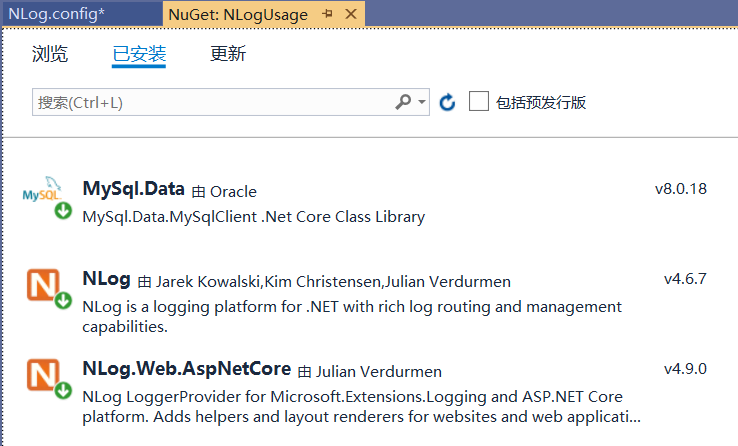
在nuget中安装nlog和nlog.web.aspnetcore ,这两个是nlog相关的包。
还需要安装nlog写入数据库的数据库适配器,我这里写入到mysql数据库,所以安装mysql.data
如果是写入到sql server数据库,需要安装microsoft.data.sqlclient
nlog.config 配置文件内容
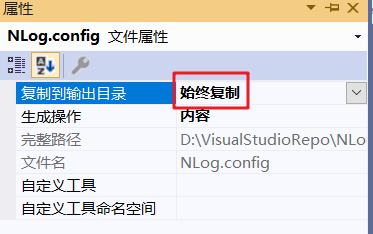
网站根目录下新建nlog.config配置文件,记得右击该文件“属性”,复制到输出目录:“始终复制”
nlog.config文件内容:
<?xml version="1.0" encoding="utf-8"?>
<nlog xmlns="http://www.nlog-project.org/schemas/nlog.xsd"
 xmlns:xsi="http://www.w3.org/2001/xmlschema-instance"
 autoreload="true"
 throwexceptions="false"
 internalloglevel="off"
 internallogfile="nlogrecords.log">
 <!--nlog内部日志记录为off关闭。除非纠错,不可以设为trace否则速度很慢,起码debug以上-->
 <extensions>
 <add assembly="nlog.web.aspnetcore" />
 </extensions>
 <targets>
 <!--通过数据库记录日志 配置
 dbprovider请选择mysql或是sqlserver,同时注意连接字符串,需要安装对应的sql数据提供程序
 mysql:
 dbprovider="mysql.data.mysqlclient.mysqlconnection, mysql.data"
 connectionstring="server=localhost;database=basemis;user=root;password=123456"
 mssql:
 dbprovider="microsoft.data.sqlclient"
 connectionstring="server=127.0.0.1;database=basemis;user id=sa;password=123456"
 -->
 <target name="log_database" xsi:type="database" dbprovider="mysql.data.mysqlclient.mysqlconnection, mysql.data"
  connectionstring="server=192.168.137.10;database=testnlog;user=root;password=mysql@local">
 <commandtext>
 insert into tbllogrecords
 (logdate,loglevel,logtype,logger,message,machinename,machineip,netrequestmethod
 ,netrequesturl,netuserisauthenticated,netuserauthtype,netuseridentity,exception)
 values
 (@logdate,@loglevel,@logtype,@logger,@message,@machinename,@machineip,@netrequestmethod
 ,@netrequesturl,@netuserisauthenticated,@netuserauthtype,@netuseridentity,@exception);
 </commandtext>
 <parameter name="@logdate" layout="${date}" />
 <parameter name="@loglevel" layout="${level}" />
 <parameter name="@logtype" layout="${event-properties:item=logtype}" />
 <parameter name="@logger" layout="${logger}" />
 <parameter name="@message" layout="${message}" />
 <parameter name="@machinename" layout="${machinename}" />
 <parameter name="@machineip" layout="${aspnet-request-ip}" />
 <parameter name="@netrequestmethod" layout="${aspnet-request-method}" />
 <parameter name="@netrequesturl" layout="${aspnet-request-url}" />
 <parameter name="@netuserisauthenticated" layout="${aspnet-user-isauthenticated}" />
 <parameter name="@netuserauthtype" layout="${aspnet-user-authtype}" />
 <parameter name="@netuseridentity" layout="${aspnet-user-identity}" />
 <parameter name="@exception" layout="${exception:tostring}" />
 </target>
 <target name="log_file" xsi:type="file" filename="${basedir}/logs/${shortdate}.log"
  layout="${longdate} | ${level:uppercase=false} | ${message} ${onexception:${exception:format=tostring} ${newline} ${stacktrace} ${newline}" />
 </targets>
 <rules>
 <!--跳过所有级别的microsoft组件的日志记录-->
 <logger name="microsoft.*" final="true" />
 <!-- blackhole without writeto -->
 <!--只通过数据库记录日志,如果给了name名字,cs里用日志记录的时候,取logger需要把name当做参数-->
 <logger name="logdb" writeto="log_database" />
 <logger name="logfile" writeto="log_file" />
 </rules>
</nlog>
配置文件解读 nlog根节点: autoreload属性,true时,如果nlog.config文件有变动,会自动应用新配置(但是会有延迟,过几秒才会应用起来) internalloglevel属性,设定后,输出的是nlog内部自己的日志记录,如果遇到nlog异常/配置文件没配好,可以把off改为trace或debug来查看nlogrecords.log里的内容 internallogfile属性,可以设定路径,例如默认的c:\temp\nlog-internal.log 新增了extensions节点,因为引用了nlog.web.aspnetcore包 targets节点中是各种记录方式的配置第一个target节点,可以看到name是log_database,这里的name和下方logger中writeto属性对应 xsi:type="database",就是写入数据库了 dbprovider属性是数据库适配器,mysql是mysql.data.mysqlclient.mysqlconnection, mysql.data,sql server是microsoft.data.sqlclient,其他数据库适配器可在官方文档内查看 connectionstring即连接字符串了 commandtext子节点是插入数据库时insert语句,可以看到我这里是写入到tbllogrecords表,表结构下文会展示出来 parameter子节点是insert语句的各个参数: 有个name="@logtype"参数,layout="${event-properties:item=logtype}",表示@logtype参数的值从event-properties中的logtype中取,这个后文会写到用法其余参数均是nlog自带的内容,aspnet-开头的是nlog.web.aspnetcore包中提供的方法 第二个target节点,可以看到name是log_file,这里的name和下方logger中writeto属性对应 xsi:type="file",即写入到文件 filename属性是文件名,这里是写入到当前目录下的logs文件夹,并且按日期归档 layout属性是写入日志的格式 rules节点是各个日志记录器logger的配置 第一个logger配置跳过所有microsoft组件的日志记录,final 标记当前规则为最后一个规则。其后的规则即时匹配也不会被运行。第二个logger name="logdb",该日志记录器名为logdb,是适配log_database规则,即写入数据库,如果要适配多条规则,用逗号隔开其余规则可以参考 数据库配置数据表结构
这里数据库为testnlog:
create database if not exists `testnlog`;
use `testnlog`;

-- dumping structure for table testnlog.tbllogrecords
create table if not exists `tbllogrecords` (
 `id` int(11) not null auto_increment,
 `logdate` datetime(6) not null,
 `loglevel` varchar(50) not null,
 `logtype` varchar(50) default null,
 `logger` varchar(256) not null,
 `message` longtext,
 `machinename` varchar(50) default null,
 `machineip` varchar(50) default null,
 `netrequestmethod` varchar(10) default null,
 `netrequesturl` varchar(500) default null,
 `netuserisauthenticated` varchar(10) default null,
 `netuserauthtype` varchar(50) default null,
 `netuseridentity` varchar(50) default null,
 `exception` longtext,
 primary key (`id`)
) engine=innodb auto_increment=96 default charset=utf-8 collate=utf8mb4_0900_ai_ci;
网站配置连接
appsettings.json中增加conectionstrings节点:
"conectionstrings": {
 "mysqlconnection": "server=192.168.137.10;database=testnlog;user=root;password=mysql@local"
 }
统一日志记录方法
网站下新建commonutils文件夹,添加nlogutil.cs文件(包含logtype定义):
using nlog;
using nlog.config;
using system;
using system.componentmodel;
using system.linq;
using system.xml.linq;

namespace nlogusage.commonutils
{
 public enum logtype
 {
 [description("网站")]
 web,
 [description("数据库")]
 database,
 [description("api接口")]
 apirequest,
 [description("中间件")]
 middleware
 }
 public static class nlogutil
 {
 public static logger dblogger = logmanager.getlogger("logdb");
 public static logger filelogger = logmanager.getlogger("logfile");
 /// <summary>
 /// 写日志到数据库
 /// </summary>
 /// <param name="loglevel">日志等级</param>
 /// <param name="logtype">日志类型</param>
 /// <param name="message">信息</param>
 /// <param name="exception">异常</param>
 public static void writedblog(loglevel loglevel, logtype logtype, string message, exception exception = null)
 {
  logeventinfo theevent = new logeventinfo(loglevel, dblogger.name, message);
  theevent.properties["logtype"] = logtype.tostring();
  theevent.exception = exception;
  dblogger.log(theevent);
 }
 /// <summary>
 /// 写日志到文件
 /// </summary>
 /// <param name="loglevel">日志等级</param>
 /// <param name="logtype">日志类型</param>
 /// <param name="message">信息</param>
 /// <param name="exception">异常</param>
 public static void writefilelog(loglevel loglevel, logtype logtype, string message, exception exception = null)
 {
  logeventinfo theevent = new logeventinfo(loglevel, filelogger.name, message);
  theevent.properties["logtype"] = logtype.tostring();
  theevent.exception = exception;
  filelogger.log(theevent);
 }

 /// <summary>
 /// 确保nlog配置文件sql连接字符串正确
 /// </summary>
 /// <param name="nlogpath"></param>
 /// <param name="sqlconnectionstr"></param>
 public static void ensurenlogconfig(string nlogpath, string sqlconnectionstr)
 {
  xdocument xd = xdocument.load(nlogpath);
  if (xd.root.elements().firstordefault(a => a.name.localname == "targets")
  is xelement targetsnode && targetsnode != null &&
  targetsnode.elements().firstordefault(a => a.name.localname == "target" && a.attribute("name").value == "log_database")
  is xelement targetnode && targetnode != null)
  {
  if (!targetnode.attribute("connectionstring").value.equals(sqlconnectionstr))//不一致则修改
  {
   //这里暂时没有考虑dbprovider的变动
   targetnode.attribute("connectionstring").value = sqlconnectionstr;
   xd.save(nlogpath);
   //编辑后重新载入配置文件(不依靠nlog自己的autoreload,有延迟)
   logmanager.configuration = new xmlloggingconfiguration(nlogpath);
  }
  }
 }
 }
}
配置nlog依赖注入
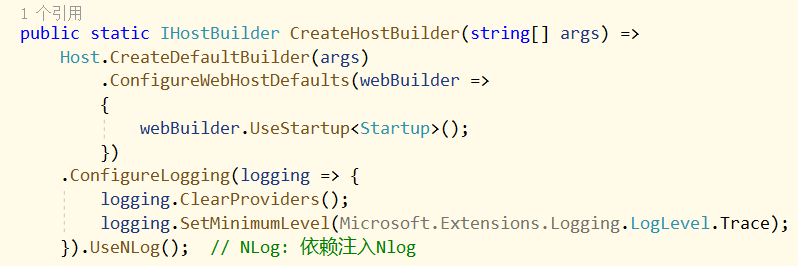
网站program.cs文件中,在createhostbuilder方法中添加以下内容:
//using nlog.web;
.configurelogging(logging => {
  logging.clearproviders();
  logging.setminimumlevel(microsoft.extensions.logging.loglevel.trace);
  }).usenlog(); // nlog: 依赖注入nlog
完成后如下图所示:
启动项目同步连接字符串
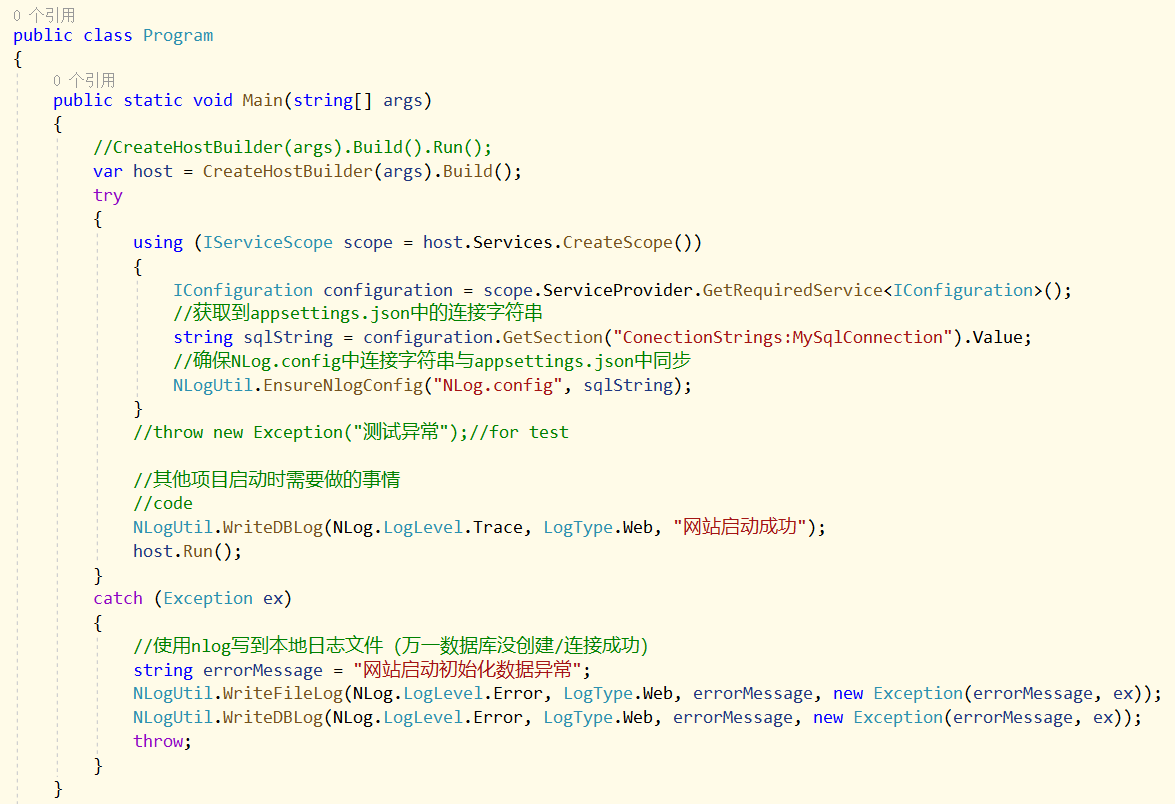
修改网站启动program.cs中的逻辑:
//using nlogusage.commonutils;
//using microsoft.extensions.dependencyinjection;
public static void main(string[] args)
{
 //createhostbuilder(args).build().run();
 var host = createhostbuilder(args).build();
 try
 {
 using (iservicescope scope = host.services.createscope())
 {
  iconfiguration configuration = scope.serviceprovider.getrequiredservice<iconfiguration>();
  //获取到appsettings.json中的连接字符串
  string sqlstring = configuration.getsection("conectionstrings:mysqlconnection").value;
  //确保nlog.config中连接字符串与appsettings.json中同步
  nlogutil.ensurenlogconfig("nlog.config", sqlstring);
 }
 //throw new exception("测试异常");//for test

 //其他项目启动时需要做的事情
 //code
 nlogutil.writedblog(nlog.loglevel.trace, logtype.web, "网站启动成功");
 host.run();
 }
 catch (exception ex)
 {
 //使用nlog写到本地日志文件(万一数据库没创建/连接成功)
 string errormessage = "网站启动初始化数据异常";
 nlogutil.writefilelog(nlog.loglevel.error, logtype.web, errormessage, new exception(errormessage, ex));
 nlogutil.writedblog(nlog.loglevel.error, logtype.web, errormessage, new exception(errormessage, ex));
 throw;
 }
}
修改完成后,如下图所示:
启动验证
启动项目,可以正常记录日志到数据库和文件:
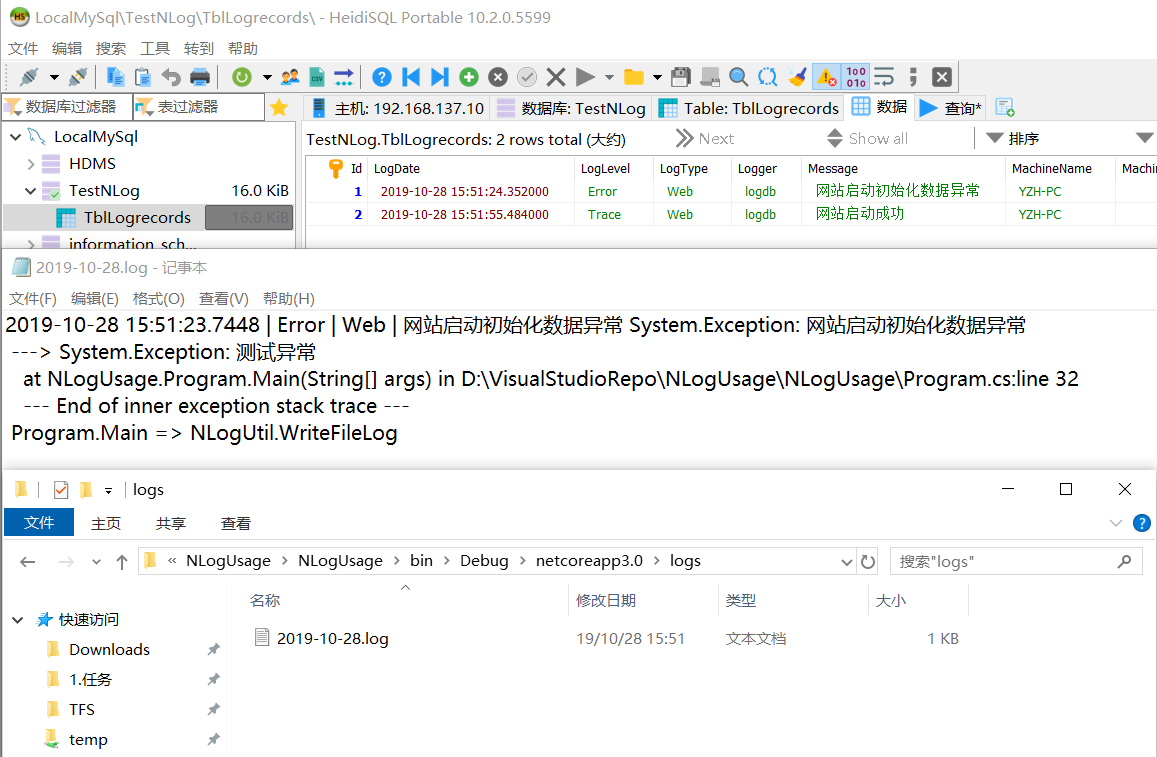
以上就是本次介绍的全部相关知识点,感谢大家的学习和对的支持。

