
Vue如何实现组件间通信
- 作者: 油炸土包子
- 来源: 51数据库
- 2021-07-01
1. 父子间通信
最常见的就是父子之间的通信,通信是双向的数据传递。
1.1 父组件 --> 儿子组件
父组件向儿子组件传递数据的方式就是 通过 prop 向子组件传递数据。
//child.vue
<template>
    <div>
        我是儿子,我收到来自父亲的数据为 {{value}}
    </div>
</template>

<script>
export default {
    props:{
        value: string
    }
}
//app.vue
<template>
  <div id="app">
    <child :value="x" />
  </div>
</template>

<script>
import child from './components/child'
export default {
  data(){
    return {
      x: 'hi,child'
    }
  },
  components:{
    child
  }
}
</script>
1.2 儿子组件 --> 父组件
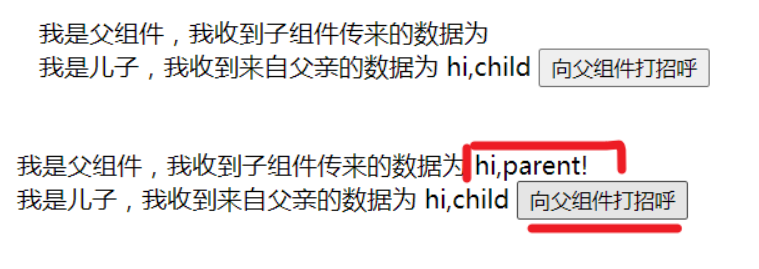
儿子组件向父组件传递数据的方式就是通过子组件内 $emit 触发自定义事件,子组件使用时 v-on 绑定监听自定义事件。
这里的 v-on 事件通信是在子组件使用时作为子组件的事件属性自动进行监听的。
因此儿子组件向父组件传递数据,依赖于子组件使用时的自定义事件属性。
//child.vue
<template>
    <div>
        我是儿子,我收到来自父亲的数据为 {{value}}
        <button @click="sayhi">
            向父组件打招呼
        </button>
    </div>
</template>

<script>
export default {
    props:{
        value: string
    },
    methods:{
        sayhi(){
            this.$emit('sayhi','hi,parent!');
        }
    }
}
</script>
//app.vue
<template>
  <div id="app">
    我是父组件,我收到子组件传来的数据为 {{y}}
    <child :value="x" @sayhi="y = $event"/>
  </div>
</template>

<script>
import child from './components/child'
export default {
  data(){
    return {
      x: 'hi,child',
      y: ''
    }
  },
  components:{
    child
  }
}
</script>
2. 爷孙间通信
爷孙间通信,可以使用两次 v-on 通信,爷爷爸爸通信,然后爸爸儿子通信。
也可使用下方的任意组件间通信的方式。
3. 任意组件间通信
任意组件间通信就不再区分是 a 向 b 通信,还是 b 向 a 通信,而是通用的方式,谁想发送数据就使用对应的 api 发送数据,谁想要接收什么数据,就使用对应的 api 接收。
任意组件间通信有两种方式,一种是使用 eventbus 发布订阅模式通信,一种是使用 vuex 通信。
3.1 eventbus
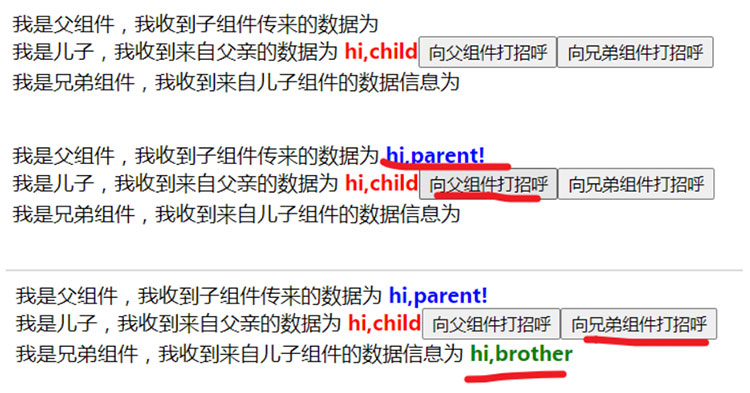
eventbus ,从字面意思理解就是事件公交车,所有触发的事件传递的数据都从前门上车保存到公交车上,然后通过监听对应事件提供的出口让对应的事件数据下车。
eventbus,实际意思是发布和订阅模式,就是谁想把数据传递出去,就要通过触发自定义事件的 api 进行数据的发布;谁需要接收该数据信息的,就通过事件监听的 api 进行数据的监听,一旦检测到监听的数据发布出来,就会接收,这就是数据的订阅。
eventbus 通信方式最重要是搞明白发布和订阅的接口 api,在 vue 中,vue 实例有提供两个接口,即 $emit 和 $on ,因此可以新创建一个空的 vue 实例,来获得这两个接口。
const eventbus = new vue();
eventbus.$emit(eventname, […args]) //发布事件
eventbus.$on(event, callback)      //订阅事件
实例如下:
// eventbus.js
import vue from 'vue'
export const eventbus = new vue();
//child
<template>
    <div>
        我是儿子,我收到来自父亲的数据为 <strong>{{value}}</strong>
        <button @click="sayhi">
            向父组件打招呼
        </button>
        <button @click="sibling">
            向兄弟组件打招呼
        </button>
    </div>
</template>

<script>
import {eventbus} from '../eventbus.js'
export default {
    props:{
        value: string
    },
    methods:{
        sayhi(){
            this.$emit('sayhi','hi,parent!');
        },
        sibling(){
            eventbus.$emit('sibling','hi,brother');
        }
    }
}
</script>

<style scoped>
    strong{
        color: red;
    }
</style>
//sibling
<template>
    <div>
        我是兄弟组件,我收到来自儿子组件的数据信息为 <strong>{{x}}</strong>
    </div>
</template>

<script>
import {eventbus} from '../eventbus.js'
export default {
    data(){
        return {
            x: ''
        }
    },
    mounted(){
        eventbus.$on('sibling', (msg)=>{
            this.x = msg;
        })
    }
}
</script>

<style scoped>
    strong{
            color: green;
    }
</style>
//parent
<template>
  <div id="app">
    我是父组件,我收到子组件传来的数据为 <strong>{{y}}</strong>
    <child :value="x" @sayhi="y = $event"/>
    <sibling></sibling>
  </div>
</template>

<script>
import child from './components/child'
import sibling from './components/sibling'
export default {
  data(){
    return {
      x: 'hi,child',
      y: ''
    }
  },
  components:{
    child,
    sibling
  }
}
</script>

<style scoped>
    strong{
            color: blue;
    }
</style>
关于 eventbus 这部分,可能存在这样一个疑问,既然 vue 实例中都有 $emit 和 $on,为什么不直接用 this.$emit 触发事件, this.$on 接收事件呢?还非得要额外一个空实例 eventbus = new vue() 。那是因为,vue 中每个组件都是一个单独的 vue 实例,你在这个 vue 实例中触发该实例的 emit 事件,另外一个实例的 on 事件是接收不到的,不在一辆公交车上,怎么能进行事件通信呢?因此就必须要一个公共的公交车,也就是事件总线。
上述实例中的 eventbus 的使用方法是局部的 eventbus,谁要用到 eventbus 要自己手动引入。也可以将 eventbus 做成全局的,比如挂在 vue 的原型上。
//main.js
import vue from 'vue'
import app from './app.vue'

vue.config.productiontip = false

vue.prototype.$eventbus = new vue();//添加这句,一定要在下方的 new vue 前。

new vue({
  render: h => h(app),
}).$mount('#app')
//child
sibling(){
    this.$eventbus.$emit('sibling','hi,brother');
}
//sibling
mounted(){
    this.$eventbus.$on('sibling', (msg)=>{
        this.x = msg;
    })
}
除了上述的添加属性到 vue 原型的方式外,还可以使用 object.defineproperty() 为 vue 原型添加属性。
import vue from 'vue'
import app from './app.vue'

vue.config.productiontip = false

let eventbus = new vue()
object.defineproperty(vue.prototype,'$eventbus',{
  get(){
    return eventbus
  }
})

new vue({
  render: h => h(app),
}).$mount('#app')
3.2 vuex
vue 组件间的通信也可使用专门为 vue.js 应用程序开发的状态管理模式:vuex。vuex 的使用比较复杂,详细可见 vuex 博客。vuex 适用于大型的复杂的 vue 项目的状态管理。对于一些中小型的应用程序,可以根据 vuex 的原理自定义 store 模式进行状态管理,vue 自定义状态管理,可详见 vue 简单状态管理—store模式 博客。
无论是 vuex 还是 自定义 store模式 ,其实现组件间通信的原理都是通过共享数据的方式实现的。组件间使用相同的数据源,当一个组件改变数据时,另一个组件依赖的数据源也就改变了。
以上就是vue如何实现组件间通信的详细内容,更多关于vue组件间通信的资料请关注其它相关文章!

