
使用Vue3+Vant组件实现App搜索历史记录功能(示例代码)
- 作者: 我的名字叫秘密
- 来源: 51数据库
- 2021-07-28
最近在开发一款新的app项目,我自己也是第一次接触app开发,经过团队的一段时间研究调查,决定使用vue3+vant前端组件的模式进行开发,vue2开发我们已经用过几个项目了,所以决定这一次尝试使用vue3来进行前段开发。
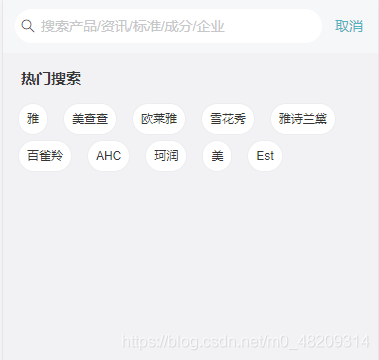
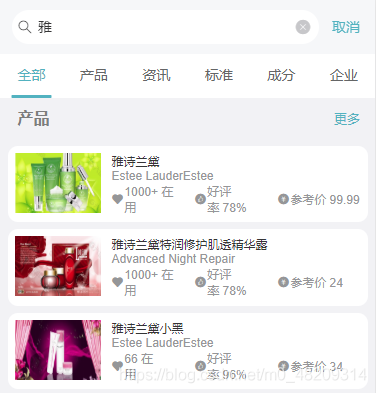
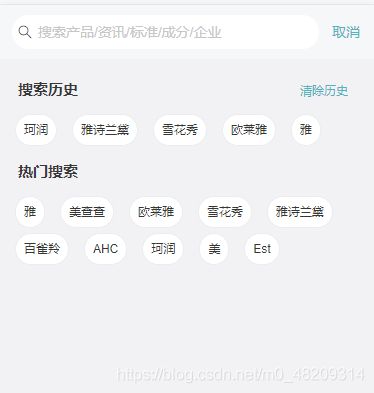
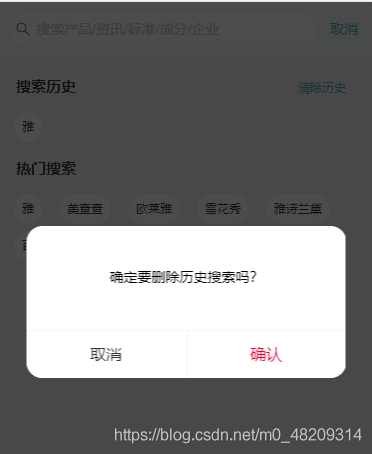
我刚开始负责搜索功能的开发,有历史搜索记录的需求,一开始我认为这是记录的存储信息也会放在一个数据库表里面,但经过一番调查,发现并不是这样,而是要存储在本地。但是网上的方法也并没有完全解决问题,经过一番尝试,终于给搞好了,话不多说,直接上效果图。
初始化不显示历史搜索记录
回车搜索进入详情页面
历史记录页面
清除历史记录
首先创建一个js文件
这个js文件主要包括了增加历史记录信息,删除所有历史记录信息的功能
export default {

  // 添加搜索首页历史查询记录
  addsearchhistory(state, payload) {
    // list中包含该记录的时,删除
    const index = state.searchhistorylist.indexof(payload);
    if (index > -1) {
      state.searchhistorylist.splice(index, 1);
    }
    state.searchhistorylist.unshift(payload);
    // 历史记录中最大记20个记录
    const count = state.searchhistorylist.length;
    state.searchhistorylist.splice(20, count);
  },

  // 清除搜索首页历史查询记录
  clearsearchhistory(state) {
    state.searchhistorylist = [];
  },
};
vue代码块
<template>
  <!-- 搜索框 -->
  <search-bar
    @searchclick="searchclick"
    :placeholdervalue="state.placeholdervalue"
    :searchval="state.searchval">
  </search-bar>
  <div class="search">

    <!-- 搜索历史 -->
    <div class="history" v-if="state.isshowhistory">
      <span class="prohot">搜索历史</span>
      <span class="delhotsearch" @click="delhostclick">清除历史</span>

      <!-- 存放历史记录信息 -->
      <div class="searchbtn-div">
        <span v-for="(item, index) in state.historylist" :key="index" class="searchvalbtn" >
        <van-button
          round
          size="small"
          @click="searchvalclick(item)"
          >{{ item }}
        </van-button>
      </span>
      </div>
    </div>
  </div>
</template>

<script>
import {
  onmounted,
  reactive,
  getcurrentinstance,
} from 'vue';
import { toast, dialog } from 'vant';
import searchbar from '@/components/searchbar.vue';
import { userouter } from 'vue-router';
import { usestore } from 'vuex';

export default {

  components: {
    searchbar,
  },

  setup() {
    const router = userouter();
    const store = usestore();
    const { proxy } = getcurrentinstance();
    const state = reactive({
      isshowhistory: '', // 是否显示历史记录
      searchval: '', // 搜索关键字
      placeholdervalue: '搜索产品/资讯/标准/成分/企业',
      historylist: [], // 历史搜索数据
    });


    // 回车搜索
    const searchclick = (val) => {
      store.commit('addsearchhistory', val);
      // router.push({ path: '/search-detail', query: { searchval: val } });
    };

    // 清除历史记录
    const delhostclick = async () => {
      dialog.confirm({
        message: '确定要删除历史搜索吗?',
      }).then(() => {
        store.commit('clearsearchhistory', store);
        state.isshowhistory = false;
        toast({
          message: '删除成功',
          position: 'bottom',
        });
      });
    };

	// 初始化获取历史搜索记录信息
    onmounted(async () => {
      // 获取历史搜索信息
      state.historylist = store.state.searchhistorylist;
      // 判断初始化是否显示历史搜索
      if (state.historylist.length > 0) {
        state.isshowhistory = true;
      } else {
        state.isshowhistory = false;
      }
    });

    return {
      state,
      searchclick,
      delhostclick,
    };
  },
};
</script>

<style lang="less" scoped>
</style>
vue代码直接粘贴复制的话可能没法直接用,因为这里面有好多业务代码已经删除,留下的主要是历史搜索记录的代码。主要有三个重点:
引入usestore
import { usestore } from 'vuex';

const store = usestore();
初始化检索历史搜索记录
// 初始化获取历史搜索记录信息
	// 每次加载这和页面都会首先调用这个方法,来取最新的信息
    onmounted(async () => {
      // 获取历史搜索信息
      state.historylist = store.state.searchhistorylist;
      // 判断初始化是否显示历史搜索
      if (state.historylist.length > 0) {
        state.isshowhistory = true;
      } else {
        state.isshowhistory = false;
      }
    })
搜索框触发搜索事件将搜索信息存放在store中
// 子组件发射一个事件,父组件调用
    const searchclick = (val) => {
    	// 将搜索值放入历史记录中
      store.commit('addsearchhistory', val);
      // 路由跳转可以忽略
      // router.push({ path: '/search-detail', query: { searchval: val } });
    };
清空历史记录
// 清除历史记录
    const delhostclick = async () => {
      dialog.confirm({
        message: '确定要删除历史搜索吗?',
      }).then(() => {
      	// 清空历史记录信息
        store.commit('clearsearchhistory', store);
        state.isshowhistory = false;
        toast({
          message: '删除成功',
          position: 'bottom',
        });
      });
    };
以上就是使用vue3+vant组件实现app搜索历史记录功能的详细内容,更多关于vue 搜索历史记录的资料请关注其它相关文章!
推荐阅读

