
详解如何在Vue项目中导出Excel
- 作者: 爱青柠没道理
- 来源: 51数据库
- 2021-08-12
excel 导出
excel 的导入导出都是依赖于js-xlsx来实现的。
在 js-xlsx的基础上又封装了export2excel.js来方便导出数据。
使用
由于 export2excel不仅依赖js-xlsx还依赖file-saver和script-loader。
所以你先需要安装如下命令:
npm install xlsx file-saver -s
npm install script-loader -s -d
由于js-xlsx体积还是很大的,导出功能也不是一个非常常用的功能,所以使用的时候建议使用懒加载。使用方法如下:
import('@/vendor/export2excel').then(excel => {
 excel.export_json_to_excel({
  header: theader, //表头 必填
  data, //具体数据 必填
  filename: 'excel-list', //非必填, 导出文件的名字
  autowidth: true, //非必填, 导出文件的排列方式
  booktype: 'xlsx' //非必填, 导出文件的格式
 })
})
注意
在v3.9.1+以后的版本中移除了对 bolb 的兼容性代码,如果你还需要兼容很低版本的浏览器可以手动引入blob-polyfill进行兼容。
参数
| 参数 | 说明 | 类型 | 可选值 | 默认值 |
| header | 导出数据的表头 | array | / | [] |
| data | 导出的具体数据 | array | / | [] |
| filename | 导出文件名 | string | / | excel-list |
| autowidth | 单元格是否要自适应宽度 | boolean | true / false | true |
| booktype | 导出文件类型 | string | xlsx, csv, txt, more | xlsx |
项目实战
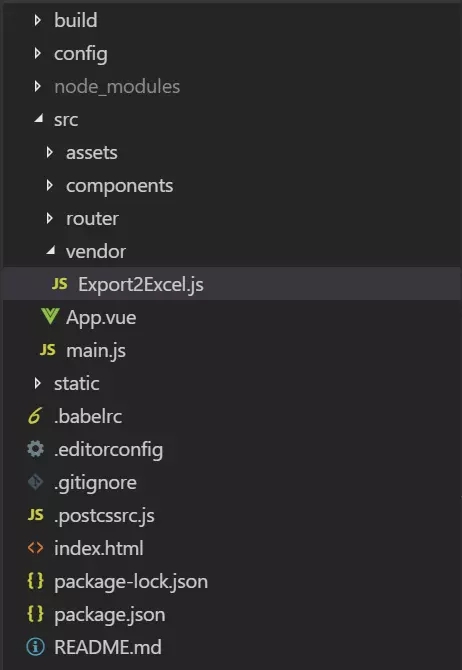
使用脚手架搭建出基本项目雏形,这时候在src目录下新建一个vendor(文件名自己定义)文件夹,新建一个export2excel.js文件,这个文件里面在js-xlsx的基础上又封装了export2excel.js来方便导出数据。
目录如下
export2excel.js代码如下
require('script-loader!file-saver');
import xlsx from 'xlsx'

function generatearray(table) {
 var out = [];
 var rows = table.queryselectorall('tr');
 var ranges = [];
 for (var r = 0; r < rows.length; ++r) {
  var outrow = [];
  var row = rows[r];
  var columns = row.queryselectorall('td');
  for (var c = 0; c < columns.length; ++c) {
   var cell = columns[c];
   var colspan = cell.getattribute('colspan');
   var rowspan = cell.getattribute('rowspan');
   var cellvalue = cell.innertext;
   if (cellvalue !== "" && cellvalue == +cellvalue) cellvalue = +cellvalue;

   //skip ranges
   ranges.foreach(function (range) {
    if (r >= range.s.r && r <= range.e.r && outrow.length >= range.s.c && outrow.length <= range.e.c) {
     for (var i = 0; i <= range.e.c - range.s.c; ++i) outrow.push(null);
    }
   });

   //handle row span
   if (rowspan || colspan) {
    rowspan = rowspan || 1;
    colspan = colspan || 1;
    ranges.push({
     s: {
      r: r,
      c: outrow.length
     },
     e: {
      r: r + rowspan - 1,
      c: outrow.length + colspan - 1
     }
    });
   };

   //handle value
   outrow.push(cellvalue !== "" ? cellvalue : null);

   //handle colspan
   if (colspan)
    for (var k = 0; k < colspan - 1; ++k) outrow.push(null);
  }
  out.push(outrow);
 }
 return [out, ranges];
};

function datenum(v, date1904) {
 if (date1904) v += 1462;
 var epoch = date.parse(v);
 return (epoch - new date(date.utc(1899, 11, 30))) / (24 * 60 * 60 * 1000);
}

function sheet_from_array_of_arrays(data, opts) {
 var ws = {};
 var range = {
  s: {
   c: 10000000,
   r: 10000000
  },
  e: {
   c: 0,
   r: 0
  }
 };
 for (var r = 0; r != data.length; ++r) {
  for (var c = 0; c != data[r].length; ++c) {
   if (range.s.r > r) range.s.r = r;
   if (range.s.c > c) range.s.c = c;
   if (range.e.r < r) range.e.r = r;
   if (range.e.c < c) range.e.c = c;
   var cell = {
    v: data[r][c]
   };
   if (cell.v == null) continue;
   var cell_ref = xlsx.utils.encode_cell({
    c: c,
    r: r
   });

   if (typeof cell.v === 'number') cell.t = 'n';
   else if (typeof cell.v === 'boolean') cell.t = 'b';
   else if (cell.v instanceof date) {
    cell.t = 'n';
    cell.z = xlsx.ssf._table[14];
    cell.v = datenum(cell.v);
   } else cell.t = 's';

   ws[cell_ref] = cell;
  }
 }
 if (range.s.c < 10000000) ws['!ref'] = xlsx.utils.encode_range(range);
 return ws;
}

function workbook() {
 if (!(this instanceof workbook)) return new workbook();
 this.sheetnames = [];
 this.sheets = {};
}

function s2ab(s) {
 var buf = new arraybuffer(s.length);
 var view = new uint8array(buf);
 for (var i = 0; i != s.length; ++i) view[i] = s.charcodeat(i) & 0xff;
 return buf;
}

export function export_table_to_excel(id) {
 var thetable = document.getelementbyid(id);
 var oo = generatearray(thetable);
 var ranges = oo[1];

 /* original data */
 var data = oo[0];
 var ws_name = "sheetjs";

 var wb = new workbook(),
  ws = sheet_from_array_of_arrays(data);

 /* add ranges to worksheet */
 // ws['!cols'] = ['apple', 'banan'];
 ws['!merges'] = ranges;

 /* add worksheet to workbook */
 wb.sheetnames.push(ws_name);
 wb.sheets[ws_name] = ws;

 var wbout = xlsx.write(wb, {
  booktype: 'xlsx',
  booksst: false,
  type: 'binary'
 });

 saveas(new blob([s2ab(wbout)], {
  type: "application/octet-stream"
 }), "test.xlsx")
}

export function export_json_to_excel({
 multiheader = [],
 header,
 data,
 filename,
 merges = [],
 autowidth = true,
 booktype = 'xlsx'
} = {}) {
 /* original data */
 filename = filename || 'excel-list'
 data = [...data]
 data.unshift(header);

 for (let i = multiheader.length - 1; i > -1; i--) {
  data.unshift(multiheader[i])
 }

 var ws_name = "sheetjs";
 var wb = new workbook(),
  ws = sheet_from_array_of_arrays(data);

 if (merges.length > 0) {
  if (!ws['!merges']) ws['!merges'] = [];
  merges.foreach(item => {
   ws['!merges'].push(xlsx.utils.decode_range(item))
  })
 }

 if (autowidth) {
  /*设置worksheet每列的最大宽度*/
  const colwidth = data.map(row => row.map(val => {
   /*先判断是否为null/undefined*/
   if (val == null) {
    return {
     'wch': 10
    };
   }
   /*再判断是否为中文*/
   else if (val.tostring().charcodeat(0) > 255) {
    return {
     'wch': val.tostring().length * 2
    };
   } else {
    return {
     'wch': val.tostring().length
    };
   }
  }))
  /*以第一行为初始值*/
  let result = colwidth[0];
  for (let i = 1; i < colwidth.length; i++) {
   for (let j = 0; j < colwidth[i].length; j++) {
    if (result[j]['wch'] < colwidth[i][j]['wch']) {
     result[j]['wch'] = colwidth[i][j]['wch'];
    }
   }
  }
  ws['!cols'] = result;
 }

 /* add worksheet to workbook */
 wb.sheetnames.push(ws_name);
 wb.sheets[ws_name] = ws;

 var wbout = xlsx.write(wb, {
  booktype: booktype,
  booksst: false,
  type: 'binary'
 });
 saveas(new blob([s2ab(wbout)], {
  type: "application/octet-stream"
 }), `${filename}.${booktype}`);
}
新建一个exportexcel.vue模板用于导出excel表格,使用代码如下
<template>
 <div class="exportexcel">
  <div class="excel-header">
   <!--导出文件名称-->
   <div class="filename">
    <label class="radio-label" style="padding-left:0;">filename:</label>
    <el-input
     v-model="filename"
     placeholder="请输入导出文件名"
     style="width:340px;"
    prefix-icon="el-icon-document" />
   </div>
   <!--设置表格导出的宽度是否自动-->
   <div class="autowidth">
    <label class="radio-label">cell auto-width:</label>
    <el-radio-group v-model="autowidth">
     <el-radio :label="true" border>true</el-radio>
     <el-radio :label="false" border>false</el-radio>
    </el-radio-group>
   </div>
   <!--导出文件后缀类型-->
   <div class="booktype">
    <label class="radio-label">book type:</label>
    <el-select v-model="booktype" style="width:120px;">
     <el-option v-for="item in options" :key="item" :label="item" :value="item"/>
    </el-select>
   </div>
   <!--导出文件-->
   <div class="download">
    <el-button
     :loading="downloadloading"
     type="primary"
     icon="document"
    @click="handledownload">export excel</el-button>
   </div>
  </div>

  <el-table
   v-loading="listloading"
   :data="list"
   element-loading-text="拼命加载中"
   border
   fit
   highlight-current-row
   height="390px"
  >
   <el-table-column align="center" label="序号" width="95">
    <template slot-scope="scope">{{ scope.$index }}</template>
   </el-table-column>
   <el-table-column label="订单号" width="230">
    <template slot-scope="scope">{{ scope.row.title }}</template>
   </el-table-column>
   <el-table-column label="菜品" align="center">
    <template slot-scope="scope">{{ scope.row.foods }}</template>
   </el-table-column>
   <el-table-column label="收银员" width="110" align="center">
    <template slot-scope="scope">
     <el-tag>{{ scope.row.author }}</el-tag>
    </template>
   </el-table-column>
   <el-table-column label="金额" width="115" align="center">
    <template slot-scope="scope">{{ scope.row.pageviews }}</template>
   </el-table-column>
   <el-table-column align="center" label="时间" width="220">
    <template slot-scope="scope">
     <i class="el-icon-time"/>
     <span>{{ scope.row.timestamp | parsetime('{y}-{m}-{d} {h}:{i}') }}</span>
    </template>
   </el-table-column>
  </el-table>
 </div>
</template>

export default {
 name: "exportexceldialog",
 data() {
  return {
   // 列表内容
   list: null,
   // loding窗口状态
   listloading: true,
   // 下载loding窗口状态
   downloadloading: false,
   // 导出文件名称
   filename: "",
   // 导出表格宽度是否auto
   autowidth: true,
   // 导出文件格式
   booktype: "xlsx",
   // 默认导出文件后缀类型
   options: ["xlsx", "csv", "txt"]
  };
 },
 methods: {
  // 导出excel表格
  handledownload() {
   this.downloadloading = true;
   // 懒加载该用法
   import("@/vendor/export2excel").then(excel => {
    // 设置导出表格的头部
    const theader = ["序号", "订单号", "菜品", "收银员", "金额", "时间"];
    // 设置要导出的属性
    const filterval = [
     "id",
     "title",
     "foods",
     "author",
     "pageviews",
     "display_time"
    ];
    // 获取当前展示的表格数据
    const list = this.list;
    // 将要导出的数据进行一个过滤
    const data = this.formatjson(filterval, list);
    // 调用我们封装好的方法进行导出excel
    excel.export_json_to_excel({
     // 导出的头部
     header: theader,
     // 导出的内容
     data,
     // 导出的文件名称
     filename: this.filename,
     // 导出的表格宽度是否自动
     autowidth: this.autowidth,
     // 导出文件的后缀类型
     booktype: this.booktype
    });
    this.downloadloading = false;
   });
  },
  // 对要导出的内容进行过滤
  formatjson(filterval, jsondata) {
   return jsondata.map(v =>
    filterval.map(j => {
     if (j === "timestamp") {
      return this.parsetime(v[j]);
     } else {
      return v[j];
     }
    })
   );
  },
  // 过滤时间
  parsetime(time, cformat) {
   if (arguments.length === 0) {
    return null;
   }
   const format = cformat || "{y}-{m}-{d} {h}:{i}:{s}";
   let date;
   if (typeof time === "object") {
    date = time;
   } else {
    if (typeof time === "string" && /^[0-9]+$/.test(time)) {
     time = parseint(time);
    }
    if (typeof time === "number" && time.tostring().length === 10) {
     time = time * 1000;
    }
    date = new date(time);
   }
   const formatobj = {
    y: date.getfullyear(),
    m: date.getmonth() + 1,
    d: date.getdate(),
    h: date.gethours(),
    i: date.getminutes(),
    s: date.getseconds(),
    a: date.getday()
   };
   const timestr = format.replace(/{(y|m|d|h|i|s|a)+}/g, (result, key) => {
    let value = formatobj[key];
    // note: getday() returns 0 on sunday
    if (key === "a") {
     return ["日", "一", "二", "三", "四", "五", "六"][value];
    }
    if (result.length > 0 && value < 10) {
     value = "0" + value;
    }
    return value || 0;
   });
   return timestr;
  }
 },
 mounted() {
  // 模拟获取数据
  settimeout(() => {
   this.list = [
    {
     timestamp: 1432179778664,
     author: "charles",
     comment_disabled: true,
     content_short: "mock data",
     display_time: "1994-05-25 23:37:25",
     foods: "鸡翅、萝卜、牛肉、红烧大闸蟹、红烧鸡翅",
     id: 1,
     image_uri:
      "http://www.51sjk.com/Upload/Articles/1/0/284/284803_20210711000708029.jpg",
     importance: 3,
     pageviews: 2864,
     platforms: ["a-platform"],
     reviewer: "sandra",
     status: "published",
     title: "o20190407135010000000001",
     type: "cn"
    },
    {
     timestamp: 1432179778664,
     author: "charles",
     comment_disabled: true,
     content_short: "mock data",
     display_time: "1994-05-25 23:37:25",
     foods: "鸡翅、萝卜、牛肉、红烧大闸蟹、红烧鸡翅",
     id: 1,
     image_uri:
      "http://www.51sjk.com/Upload/Articles/1/0/284/284803_20210711000708029.jpg",
     importance: 3,
     pageviews: 2864,
     platforms: ["a-platform"],
     reviewer: "sandra",
     status: "published",
     title: "o20190407135010000000001",
     type: "cn"
    },
    {
     timestamp: 1432179778664,
     author: "charles",
     comment_disabled: true,
     content_short: "mock data",
     display_time: "1994-05-25 23:37:25",
     foods: "鸡翅、萝卜、牛肉、红烧大闸蟹、红烧鸡翅",
     id: 1,
     image_uri:
      "http://www.51sjk.com/Upload/Articles/1/0/284/284803_20210711000708029.jpg",
     importance: 3,
     pageviews: 2864,
     platforms: ["a-platform"],
     reviewer: "sandra",
     status: "published",
     title: "o20190407135010000000001",
     type: "cn"
    },
    {
     timestamp: 1432179778664,
     author: "charles",
     comment_disabled: true,
     content_short: "mock data",
     display_time: "1994-05-25 23:37:25",
     foods: "鸡翅、萝卜、牛肉、红烧大闸蟹、红烧鸡翅",
     id: 1,
     image_uri:
      "http://www.51sjk.com/Upload/Articles/1/0/284/284803_20210711000708029.jpg",
     importance: 3,
     pageviews: 2864,
     platforms: ["a-platform"],
     reviewer: "sandra",
     status: "published",
     title: "o20190407135010000000001",
     type: "cn"
    },
    {
     timestamp: 1432179778664,
     author: "charles",
     comment_disabled: true,
     content_short: "mock data",
     display_time: "1994-05-25 23:37:25",
     foods: "鸡翅、萝卜、牛肉、红烧大闸蟹、红烧鸡翅",
     id: 1,
     image_uri:
      "http://www.51sjk.com/Upload/Articles/1/0/284/284803_20210711000708029.jpg",
     importance: 3,
     pageviews: 2864,
     platforms: ["a-platform"],
     reviewer: "sandra",
     status: "published",
     title: "o20190407135010000000001",
     type: "cn"
    },
    {
     timestamp: 1432179778664,
     author: "charles",
     comment_disabled: true,
     content_short: "mock data",
     display_time: "1994-05-25 23:37:25",
     foods: "鸡翅、萝卜、牛肉、红烧大闸蟹、红烧鸡翅",
     id: 1,
     image_uri:
      "http://www.51sjk.com/Upload/Articles/1/0/284/284803_20210711000708029.jpg",
     importance: 3,
     pageviews: 2864,
     platforms: ["a-platform"],
     reviewer: "sandra",
     status: "published",
     title: "o20190407135010000000001",
     type: "cn"
    },
    {
     timestamp: 1432179778664,
     author: "charles",
     comment_disabled: true,
     content_short: "mock data",
     display_time: "1994-05-25 23:37:25",
     foods: "鸡翅、萝卜、牛肉、红烧大闸蟹、红烧鸡翅",
     id: 1,
     image_uri:
      "http://www.51sjk.com/Upload/Articles/1/0/284/284803_20210711000708029.jpg",
     importance: 3,
     pageviews: 2864,
     platforms: ["a-platform"],
     reviewer: "sandra",
     status: "published",
     title: "o20190407135010000000001",
     type: "cn"
    },
    {
     timestamp: 1432179778664,
     author: "charles",
     comment_disabled: true,
     content_short: "mock data",
     display_time: "1994-05-25 23:37:25",
     foods: "鸡翅、萝卜、牛肉、红烧大闸蟹、红烧鸡翅",
     id: 1,
     image_uri:
      "http://www.51sjk.com/Upload/Articles/1/0/284/284803_20210711000708029.jpg",
     importance: 3,
     pageviews: 2864,
     platforms: ["a-platform"],
     reviewer: "sandra",
     status: "published",
     title: "o20190407135010000000001",
     type: "cn"
    },
    {
     timestamp: 1432179778664,
     author: "charles",
     comment_disabled: true,
     content_short: "mock data",
     display_time: "1994-05-25 23:37:25",
     foods: "鸡翅、萝卜、牛肉、红烧大闸蟹、红烧鸡翅",
     id: 1,
     image_uri:
      "http://www.51sjk.com/Upload/Articles/1/0/284/284803_20210711000708029.jpg",
     importance: 3,
     pageviews: 2864,
     platforms: ["a-platform"],
     reviewer: "sandra",
     status: "published",
     title: "o20190407135010000000001",
     type: "cn"
    }
   ];
   this.listloading = false;
  }, 2000);
 },
 filters: {
  // 过滤时间
  parsetime(time, cformat) {
   if (arguments.length === 0) {
    return null;
   }
   const format = cformat || "{y}-{m}-{d} {h}:{i}:{s}";
   let date;
   if (typeof time === "object") {
    date = time;
   } else {
    if (typeof time === "string" && /^[0-9]+$/.test(time)) {
     time = parseint(time);
    }
    if (typeof time === "number" && time.tostring().length === 10) {
     time = time * 1000;
    }
    date = new date(time);
   }
   const formatobj = {
    y: date.getfullyear(),
    m: date.getmonth() + 1,
    d: date.getdate(),
    h: date.gethours(),
    i: date.getminutes(),
    s: date.getseconds(),
    a: date.getday()
   };
   const timestr = format.replace(/{(y|m|d|h|i|s|a)+}/g, (result, key) => {
    let value = formatobj[key];
    // note: getday() returns 0 on sunday
    if (key === "a") {
     return ["日", "一", "二", "三", "四", "五", "六"][value];
    }
    if (result.length > 0 && value < 10) {
     value = "0" + value;
    }
    return value || 0;
   });
   return timestr;
  }
 }
}
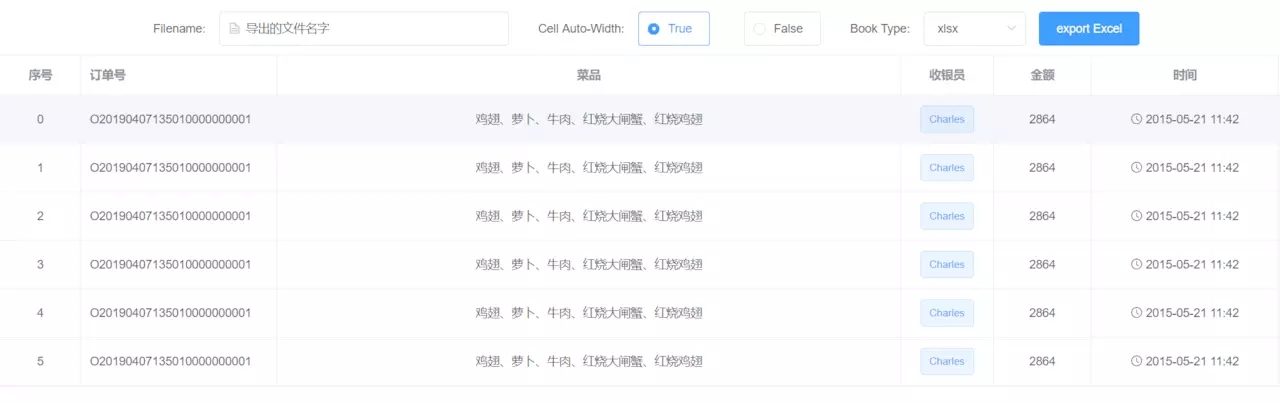
效果图如下
用法都是看github开源项目的和博客的,自己本身还没有二次封装这样内容的实力,欢迎大佬提出宝贵的意见。
以上所述是小编给大家介绍的如何在vue项目中导出excel详解整合,希望对大家有所帮助
推荐阅读

