
vue 项目 iOS WKWebView 加载
- 作者: N年卜洗澡
- 来源: 51数据库
- 2021-08-08
1、首先让前端的同事打一个包(index.html,static文件包含css、资源文件、js等)导入项目;
:warning: 注意:
把index.html放入项目根目录下,command+n创建一个资源文件.bundle,资源文件里也的包含一份 index.html
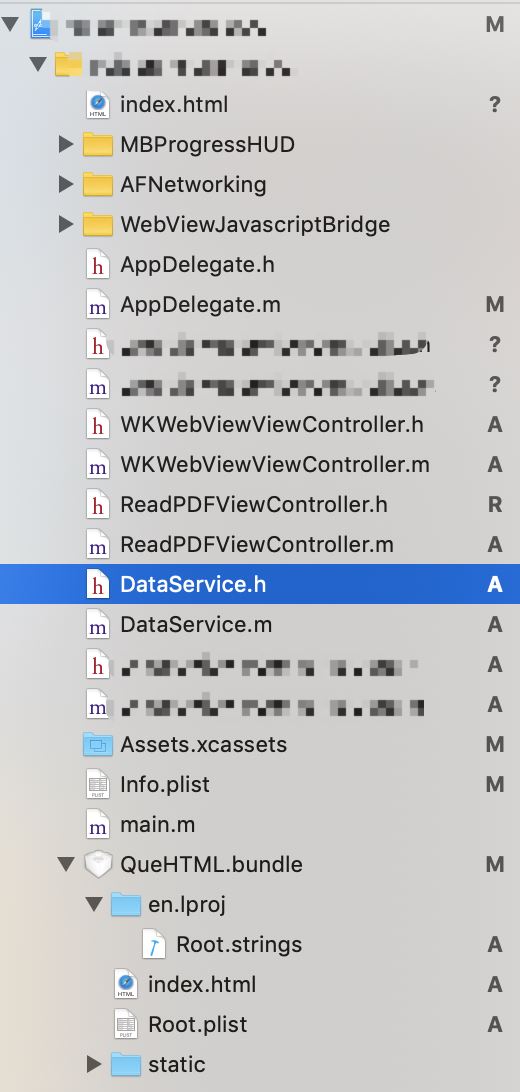
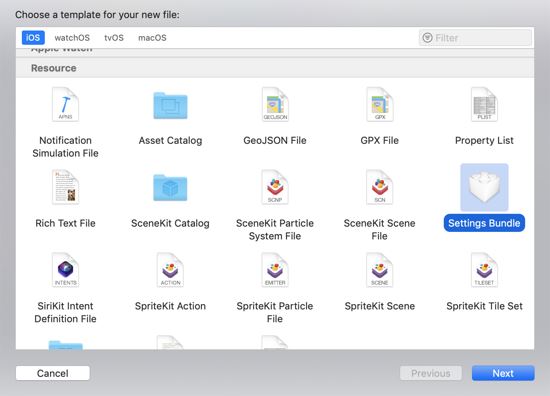
下面开始代码:
懒加载wkwebview
引入#import <webkit/webkit.h> #import <webkit/wkwebview.h>
继承 wknavigationdelegate,wkuidelegate,
- (wkwebview *)wkwebview{
  if (!_wkwebview) {
    //设置网页的配置文件
    wkwebviewconfiguration * configuration = [[wkwebviewconfiguration alloc]init];
    //允许视频播放
    if (@available(ios 9.0, *)) {
      configuration.allowsairplayformediaplayback = yes;
    } else {
      // fallback on earlier versions
    }
    // 允许在线播放
    configuration.allowsinlinemediaplayback = yes;
    // 允许可以与网页交互,选择视图
    configuration.selectiongranularity = yes;
    // 关于 wkwebview 无法跳转新页面 设置
    configuration.preferences.javascriptcanopenwindowsautomatically = yes;
    // web内容处理池
    configuration.processpool = [[wkprocesspool alloc] init];
    //自定义配置,一般用于 js调用oc方法(oc拦截url中的数据做自定义操作)
    wkusercontentcontroller * usercontentcontroller = [[wkusercontentcontroller alloc]init];
    // 添加消息处理,注意:self指代的对象需要遵守wkscriptmessagehandler协议,结束时需要移除
    [usercontentcontroller addscriptmessagehandler:self name:@"download"];//downloadpolicy
    // 是否支持记忆读取
    configuration.suppressesincrementalrendering = yes;
    // 允许用户更改网页的设置
    configuration.usercontentcontroller = usercontentcontroller;

    _wkwebview = [[wkwebview alloc] initwithframe:cgrectmake(0, 0, self.view.frame.size.width, kis_iphonex? self.view.frame.size.height-34:self.view.frame.size.height) configuration:configuration];
    _wkwebview.backgroundcolor = [uicolor colorwithred:240.0/255 green:240.0/255 blue:240.0/255 alpha:1.0];
    // 设置代理
    _wkwebview.navigationdelegate = self;
    _wkwebview.uidelegate = self;
    // 垂直滚动
    [_wkwebview.scrollview setshowsverticalscrollindicator:no];
    _wkwebview.scrollview.contentsize = cgsizemake(self.view.frame.size.width, kis_iphonex? self.view.frame.size.height-34:self.view.frame.size.height);
    //开启手势触摸
    _wkwebview.allowsbackforwardnavigationgestures = yes;
    // 设置 可以前进 和 后退
    //适应你设定的尺寸
    [_wkwebview sizetofit];
    [self.view addsubview:_wkwebview];
  }
  return _wkwebview;
}
ios 9 以后和 ios 8 之前 加载方法不一样,做区分
- (void)viewdidload {
  [super viewdidload];
  nsfilemanager *filemanager = [nsfilemanager defaultmanager];
  nsarray *array1 = nssearchpathfordirectoriesindomains(nsdocumentdirectory, nsuserdomainmask, yes);
  nsstring *matpath1 = [[array1 objectatindex:0] stringbyappendingpathcomponent:@"quehtml"];;
  if (![filemanager fileexistsatpath:matpath1]) {
    nsstring *matstring = [[nsbundle mainbundle] pathforresource:@"quehtml" oftype:@"bundle"];
    dispatch_async(dispatch_get_global_queue(0, 0), ^{
      [filemanager removeitematpath:matpath1 error:nil];
      [filemanager copyitematpath:matstring topath:matpath1 error:nil];
      dispatch_async(dispatch_get_main_queue(), ^{
        nslog(@"创建完了");
        if ([[[uidevice currentdevice] systemversion] floatvalue] < 9.0) {
          [self ios8load];
        }
        else{
          [self ios9load];
        }
      });
    });
  }
  else{
    if ([[[uidevice currentdevice] systemversion] floatvalue] <9.0) {
      [self ios8load];
    }
    else{
      [self ios9load];
    }
  }
}
- (void)ios8load {
  nsarray *paths = nssearchpathfordirectoriesindomains(nsdocumentdirectory, nsuserdomainmask, yes);
  nsstring *path = [paths objectatindex:0];
  nsstring *basepath = [nsstring stringwithformat:@"%@/%@",path,@"quehtml/"];
  [self.wkwebview loadrequest:[nsurlrequest requestwithurl:[nsurl fileurlwithpath:[nstemporarydirectory() stringbyappendingpathcomponent:[nsstring stringwithformat:@"www/quehtml/index.html"]]]]];
}
- (void)ios9load {
  nsarray *paths = nssearchpathfordirectoriesindomains(nsdocumentdirectory, nsuserdomainmask, yes);
  nsstring *path = [paths objectatindex:0];
  nsstring *basepath = [nsstring stringwithformat:@"%@/%@",path,@"quehtml/"];
  nsstring *htmlpath = [nsstring stringwithformat:@"%@/%@",path,@"quehtml/index.html"];
  nsurl *fileurl = [nsurl fileurlwithpath:htmlpath];
  if (@available(ios 9.0, *)) {
    [self.wkwebview loadfileurl:fileurl allowingreadaccesstourl:[nsurl fileurlwithpath:basepath isdirectory:yes]];
  }
}
实现代理方法
// 接收到服务器跳转请求之后调用
- (void)webview:(wkwebview *)webview didreceiveserverredirectforprovisionalnavigation:(wknavigation *)navigation{
  nslog(@"接收到服务器跳转请求----%@",navigation);
}
// 在收到响应后,决定是否跳转
- (void)webview:(wkwebview *)webview decidepolicyfornavigationresponse:(wknavigationresponse *)navigationresponse decisionhandler:(void (^)(wknavigationresponsepolicy))decisionhandler{
  nslog(@"在收到响应后,决定是否跳转---%@",navigationresponse.response.url.absolutestring);
  //允许跳转
  decisionhandler(wknavigationresponsepolicyallow);
  //不允许跳转
  //decisionhandler(wknavigationresponsepolicycancel);
}
// 在发送请求之前,决定是否跳转
- (void)webview:(wkwebview *)webview decidepolicyfornavigationaction:(wknavigationaction *)navigationaction decisionhandler:(void (^)(wknavigationactionpolicy))decisionhandler{
  nslog(@"在发送请求之前,决定是否跳转---%@",navigationaction.request.url.absolutestring);
  //允许跳转
  decisionhandler(wknavigationactionpolicyallow);
  //不允许跳转
  //decisionhandler(wknavigationactionpolicycancel);
}
#pragma mark - wknavigationdelegate
// 页面开始加载时调用
- (void)webview:(wkwebview *)webview didstartprovisionalnavigation:(wknavigation *)navigation{
  nslog(@"页面开始加载");
}
// 当内容开始返回时调用
- (void)webview:(wkwebview *)webview didcommitnavigation:(wknavigation *)navigation{
  nslog(@"内容开始返回");
}
// 页面加载完成之后调用
- (void)webview:(wkwebview *)webview didfinishnavigation:(wknavigation *)navigation{
  nslog(@"页面加载完成");
}
// 页面加载失败时调用
- (void)webview:(wkwebview *)webview didfailprovisionalnavigation:(wknavigation *)navigation{
  nslog(@"页面加载失败");
}
如果是https访问需加上一下代码
- (void)webview:(wkwebview *)webview didreceiveauthenticationchallenge:(nsurlauthenticationchallenge *)challenge completionhandler:(void (^)(nsurlsessionauthchallengedisposition disposition, nsurlcredential *credential))completionhandler {
  if ([challenge.protectionspace.authenticationmethod isequaltostring:nsurlauthenticationmethodservertrust]) {
    if ([challenge previousfailurecount] == 0) {
      nsurlcredential *credential = [nsurlcredential credentialfortrust:challenge.protectionspace.servertrust];
      completionhandler(nsurlsessionauthchallengeusecredential, credential);
    } else {
      completionhandler(nsurlsessionauthchallengecancelauthenticationchallenge, nil);
    }
  } else {
   completionhandler(nsurlsessionauthchallengecancelauthenticationchallenge, nil);
  }
}
总结
以上所述是小编给大家介绍的vue 项目 ios wkwebview 加载,希望对大家有所帮助
推荐阅读

