
java如何在word中画图 JAVA实现简单的画图板
- 作者: 大湿胸的初恋
- 来源: 51数据库
- 2020-04-18
楼主写一个html,很容易把下面代码嵌入到applet,可以google一下实现,
还有copy自己不知道算不算复制。。。-_-!
--------------------------------------------------------------------
楼主给你一个我的,直接保存成pb.java编译运行,就是你要的画图功能 ,可以参考一下
____________________________________________________________________
import java.applet.*;
import java.awt.*;
import java.awt.event.*;
import java.util.*;
import javax.swing.*;
import java.awt.geom.*;
import java.io.*;
class Point implements Serializable
{
int x,y;
Color col;
int tool;
int boarder;
Point(int x, int y, Color col, int tool, int boarder)
{
this.x = x;
this.y = y;
this.col = col;
this.tool = tool;
this.boarder = boarder;
}
}
class paintboard extends Frame implements ActionListener,MouseMotionListener,MouseListener,ItemListener
{
int x = -1, y = -1;
int con = 1;//画笔大小
int Econ = 5;//橡皮大小
int toolFlag = 0;//toolFlag:工具标记
//toolFlag工具对应表:
//(0--画笔);(1--橡皮);(2--清除);
//(3--直线);(4--圆);(5--矩形);
Color c = new Color(0,0,0); //画笔颜色
BasicStroke size = new BasicStroke(con,BasicStroke.CAP_BUTT,BasicStroke.JOIN_BEVEL);//画笔粗细
Point cutflag = new Point(-1, -1, c, 6, con);//截断标志
Vector paintInfo = null;//点信息向量组
int n = 1;
FileInputStream picIn = null;
FileOutputStream picOut = null;
ObjectInputStream VIn = null;
ObjectOutputStream VOut = null;
// *工具面板--画笔,直线,圆,矩形,多边形,橡皮,清除*/
Panel toolPanel;
Button eraser, drLine,drCircle,drRect;
Button clear ,pen;
Choice ColChoice,SizeChoice,EraserChoice;
Button colchooser;
Label 颜色,大小B,大小E;
//保存功能
Button openPic,savePic;
FileDialog openPicture,savePicture;
paintboard(String s)
{
super(s);
addMouseMotionListener(this);
addMouseListener(this);
paintInfo = new Vector();
/*各工具按钮及选择项*/
//颜色选择
ColChoice = new Choice();
ColChoice.add("black");
ColChoice.add("red");
ColChoice.add("blue");
ColChoice.add("green");
ColChoice.addItemListener(this);
//画笔大小选择
SizeChoice = new Choice();
SizeChoice.add("1");
SizeChoice.add("3");
SizeChoice.add("5");
SizeChoice.add("7");
SizeChoice.add("9");
SizeChoice.addItemListener(this);
//橡皮大小选择
EraserChoice = new Choice();
EraserChoice.add("5");
EraserChoice.add("9");
EraserChoice.add("13");
EraserChoice.add("17");
EraserChoice.addItemListener(this);
////////////////////////////////////////////////////
toolPanel = new Panel();
clear = new Button("清除");
eraser = new Button("橡皮");
pen = new Button("画笔");
drLine = new Button("画直线");
drCircle = new Button("画圆形");
drRect = new Button("画矩形");
openPic = new Button("打开图画");
savePic = new Button("保存图画");
colchooser = new Button("显示调色板");
//各组件事件监听
clear.addActionListener(this);
eraser.addActionListener(this);
pen.addActionListener(this);
drLine.addActionListener(this);
drCircle.addActionListener(this);
drRect.addActionListener(this);
openPic.addActionListener(this);
savePic.addActionListener(this);
colchooser.addActionListener(this);
颜色 = new Label("画笔颜色",Label.CENTER);
大小B = new Label("画笔大小",Label.CENTER);
大小E = new Label("橡皮大小",Label.CENTER);
//面板添加组件
toolPanel.add(openPic);
toolPanel.add(savePic);
toolPanel.add(pen);
toolPanel.add(drLine);
toolPanel.add(drCircle);
toolPanel.add(drRect);
toolPanel.add(颜色); toolPanel.add(ColChoice);
toolPanel.add(大小B); toolPanel.add(SizeChoice);
toolPanel.add(colchooser);
toolPanel.add(eraser);
toolPanel.add(大小E); toolPanel.add(EraserChoice);
toolPanel.add(clear);
//工具面板到APPLET面板
add(toolPanel,BorderLayout.NORTH);
setBounds(60,60,900,600); setVisible(true);
validate();
//dialog for save and load
openPicture = new FileDialog(this,"打开图画",FileDialog.LOAD);
openPicture.setVisible(false);
savePicture = new FileDialog(this,"保存图画",FileDialog.SAVE);
savePicture.setVisible(false);
openPicture.addWindowListener(new WindowAdapter()
{
public void windowClosing(WindowEvent e)
{ openPicture.setVisible(false); }
});
savePicture.addWindowListener(new WindowAdapter()
{
public void windowClosing(WindowEvent e)
{ savePicture.setVisible(false); }
});
addWindowListener(new WindowAdapter()
{
public void windowClosing(WindowEvent e)
{ System.exit(0);}
});
}
public void paint(Graphics g)
{
Graphics2D g2d = (Graphics2D)g;
Point p1,p2;
n = paintInfo.size();
if(toolFlag==2)
g.clearRect(0,0,getSize().width,getSize().height);//清除
for(int i=0; i<n ;i++){
p1 = (Point)paintInfo.elementAt(i);
p2 = (Point)paintInfo.elementAt(i+1);
size = new BasicStroke(p1.boarder,BasicStroke.CAP_BUTT,BasicStroke.JOIN_BEVEL);
g2d.setColor(p1.col);
g2d.setStroke(size);
if(p1.tool==p2.tool)
{
switch(p1.tool)
{
case 0://画笔
Line2D line1 = new Line2D.Double(p1.x, p1.y, p2.x, p2.y);
g2d.draw(line1);
break;
case 1://橡皮
g.clearRect(p1.x, p1.y, p1.boarder, p1.boarder);
break;
case 3://画直线
Line2D line2 = new Line2D.Double(p1.x, p1.y, p2.x, p2.y);
g2d.draw(line2);
break;
case 4://画圆
Ellipse2D ellipse = new Ellipse2D.Double(p1.x, p1.y, Math.abs(p2.x-p1.x) , Math.abs(p2.y-p1.y));
g2d.draw(ellipse);
break;
case 5://画矩形
Rectangle2D rect = new Rectangle2D.Double(p1.x, p1.y, Math.abs(p2.x-p1.x) , Math.abs(p2.y-p1.y));
g2d.draw(rect);
break;
case 6://截断,跳过
i=i+1;
break;
default :
}//end switch
}//end if
}//end for
}
public void itemStateChanged(ItemEvent e)
{
if(e.getSource()==ColChoice)//预选颜色
{
String name = ColChoice.getSelectedItem();
if(name=="black")
{c = new Color(0,0,0); }
else if(name=="red")
{c = new Color(255,0,0);}
else if(name=="green")
{c = new Color(0,255,0);}
else if(name=="blue")
{c = new Color(0,0,255);}
}
else if(e.getSource()==SizeChoice)//画笔大小
{
String selected = SizeChoice.getSelectedItem();
if(selected=="1")
{
con = 1;
size = new BasicStroke(con,BasicStroke.CAP_BUTT,BasicStroke.JOIN_BEVEL);
}
else if(selected=="3")
{
con = 3;
size = new BasicStroke(con,BasicStroke.CAP_BUTT,BasicStroke.JOIN_BEVEL);
}
else if(selected=="5")
{con = 5;
size = new BasicStroke(con,BasicStroke.CAP_BUTT,BasicStroke.JOIN_BEVEL);
}
else if(selected=="7")
{con = 7;
size = new BasicStroke(con,BasicStroke.CAP_BUTT,BasicStroke.JOIN_BEVEL);
}
else if(selected=="9")
{con = 9;
size = new BasicStroke(con,BasicStroke.CAP_BUTT,BasicStroke.JOIN_BEVEL);
}
}
else if(e.getSource()==EraserChoice)//橡皮大小
{
String Esize = EraserChoice.getSelectedItem();
if(Esize=="5")
{ Econ = 5*2; }
else if(Esize=="9")
{ Econ = 9*2; }
else if(Esize=="13")
{ Econ = 13*2; }
else if(Esize=="17")
{ Econ = 17*3; }
}
}
public void mouseDragged(MouseEvent e)
{
Point p1 ;
switch(toolFlag){
case 0://画笔
x = (int)e.getX();
y = (int)e.getY();
p1 = new Point(x, y, c, toolFlag, con);
paintInfo.addElement(p1);
repaint();
break;
case 1://橡皮
x = (int)e.getX();
y = (int)e.getY();
p1 = new Point(x, y, null, toolFlag, Econ);
paintInfo.addElement(p1);
repaint();
break;
default :
}
}
public void mouseMoved(MouseEvent e) {}
public void update(Graphics g)
{
paint(g);
}
public void mousePressed(MouseEvent e)
{
Point p2;
switch(toolFlag){
case 3://直线
x = (int)e.getX();
y = (int)e.getY();
p2 = new Point(x, y, c, toolFlag, con);
paintInfo.addElement(p2);
break;
case 4: //圆
x = (int)e.getX();
y = (int)e.getY();
p2 = new Point(x, y, c, toolFlag, con);
paintInfo.addElement(p2);
break;
case 5: //矩形
x = (int)e.getX();
y = (int)e.getY();
p2 = new Point(x, y, c, toolFlag, con);
paintInfo.addElement(p2);
break;
default :
}
}
public void mouseReleased(MouseEvent e)
{
Point p3;
switch(toolFlag){
case 0://画笔
paintInfo.addElement(cutflag);
break;
case 1: //eraser
paintInfo.addElement(cutflag);
break;
case 3://直线
x = (int)e.getX();
y = (int)e.getY();
p3 = new Point(x, y, c, toolFlag, con);
paintInfo.addElement(p3);
paintInfo.addElement(cutflag);
repaint();
break;
case 4: //圆
x = (int)e.getX();
y = (int)e.getY();
p3 = new Point(x, y, c, toolFlag, con);
paintInfo.addElement(p3);
paintInfo.addElement(cutflag);
repaint();
break;
case 5: //矩形
x = (int)e.getX();
y = (int)e.getY();
p3 = new Point(x, y, c, toolFlag, con);
paintInfo.addElement(p3);
paintInfo.addElement(cutflag);
repaint();
break;
default:
}
}
public void mouseEntered(MouseEvent e){}
public void mouseExited(MouseEvent e){}
public void mouseClicked(MouseEvent e){}
public void actionPerformed(ActionEvent e)
{
if(e.getSource()==pen)//画笔
{toolFlag = 0;}
if(e.getSource()==eraser)//橡皮
{toolFlag = 1;}
if(e.getSource()==clear)//清除
{
toolFlag = 2;
paintInfo.removeAllElements();
repaint();
}
if(e.getSource()==drLine)//画线
{toolFlag = 3;}
if(e.getSource()==drCircle)//画圆
{toolFlag = 4;}
if(e.getSource()==drRect)//画矩形
{toolFlag = 5;}
if(e.getSource()==colchooser)//调色板
{
Color newColor = JColorChooser.showDialog(this,"调色板",c);
c = newColor;
}
if(e.getSource()==openPic)//打开图画
{
openPicture.setVisible(true);
if(openPicture.getFile()!=null)
{
int tempflag;
tempflag = toolFlag;
toolFlag = 2 ;
repaint();
try{
paintInfo.removeAllElements();
File filein = new File(openPicture.getDirectory(),openPicture.getFile());
picIn = new FileInputStream(filein);
VIn = new ObjectInputStream(picIn);
paintInfo = (Vector)VIn.readObject();
VIn.close();
repaint();
toolFlag = tempflag;
}
catch(ClassNotFoundException IOe2)
{
repaint();
toolFlag = tempflag;
System.out.println("can not read object");
}
catch(IOException IOe)
{
repaint();
toolFlag = tempflag;
System.out.println("can not read file");
}
}
}
if(e.getSource()==savePic)//保存图画
{
savePicture.setVisible(true);
try{
File fileout = new File(savePicture.getDirectory(),savePicture.getFile());
picOut = new FileOutputStream(fileout);
VOut = new ObjectOutputStream(picOut);
VOut.writeObject(paintInfo);
VOut.close();
}
catch(IOException IOe)
{
System.out.println("can not write object");
}
}
}
}//end paintboard
public class pb
{
public static void main(String args[])
{ new paintboard("画图程序"); }
}
java画图如何是窗口中内容不可更改
有个不可编辑的属性,你自己翻书找一下。
如何在word中画带刻度的线段图
在word中画带刻度的线段图具体步骤:
1、打开word空白文档,找到插入,单击一下,找到表格,再单击一下。
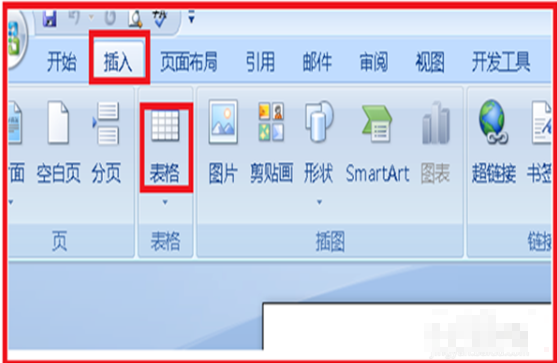
2、选择一行表格,至于多少行,根据自己的需要进行选择。

3、插入的表格出现在空白文档中,单击选中全部表格,单击右键,找到表格属性,单击表格属性。
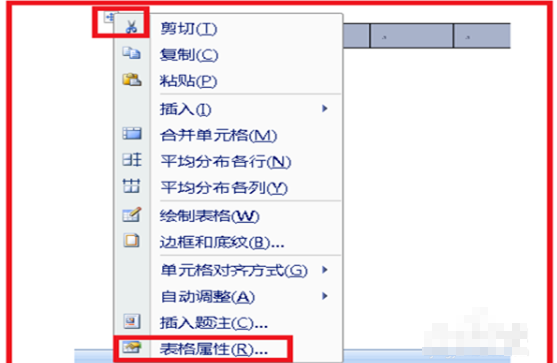
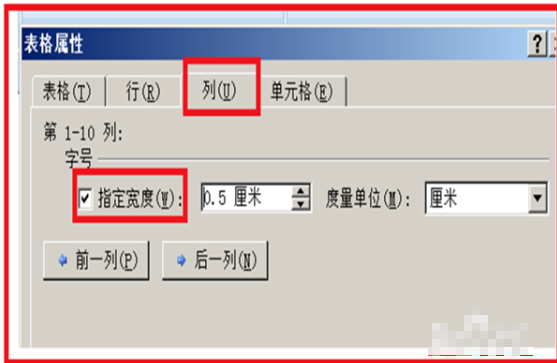
4、单击列,设置表格的宽度,看看怎么合适怎么美观输入合适的数字,单击下方的确定。
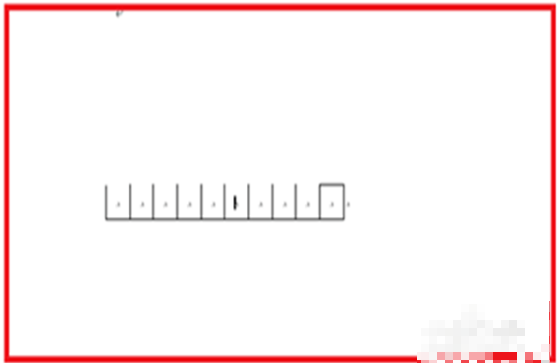
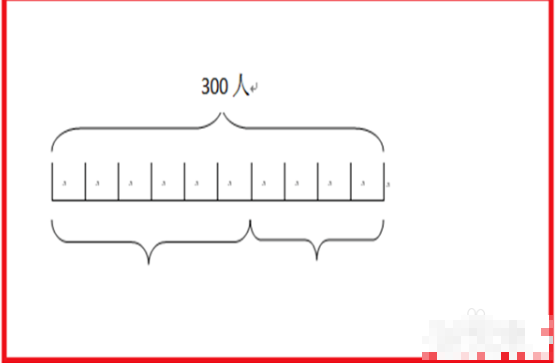
5、设置确定后,会看到表格宽度变了,这时候再单击表格左上角的一个全部选中的标志,单击后,在右上侧就会出现一个橡皮的标志擦除,单击一下擦除。用橡皮擦除表格的上线,就成了线段图。这样比单个绘制要快许多。

6、然后再找到插入,单击一下插入,找到形状,单击一下,找到中括号的形状,单击一下。
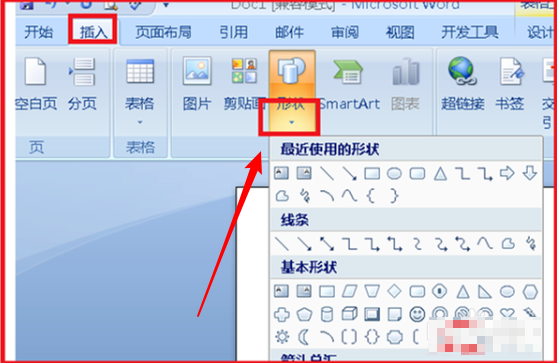
7、线条出现在文档中,单击选中线条,单击右键,单击复制,在文档的其它空白部位,再单击右键,单击粘贴,多复制粘贴这样的线条,备用。
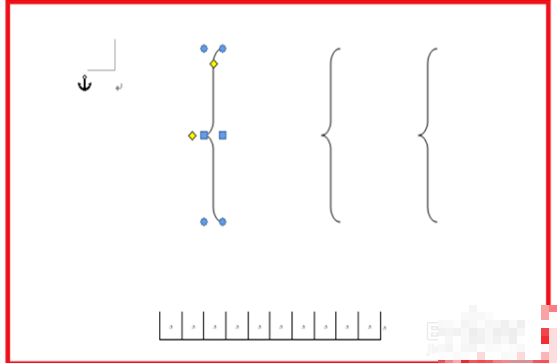
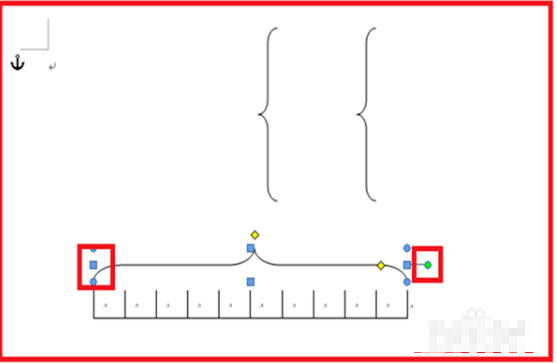
8、选中线条,旋转,拖动,把线条拖到制定的位置,拉伸,变形大小合适为止,如果不出现旋转的标志,可以先拉伸一下,就出现了。

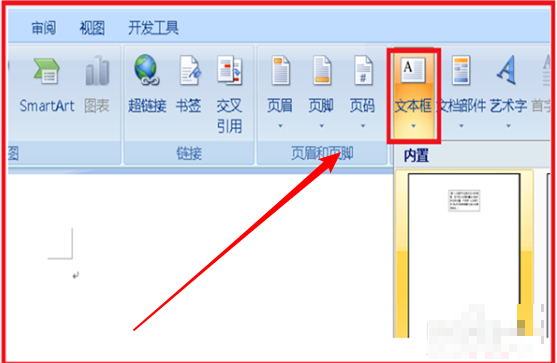
9、然后开始在线条的上方还有下方输入具体的数学数字,还是单击插入,单击文本框,在文本框中输入数字,单击文本框选中,单击右键,找到设置文本框格式。
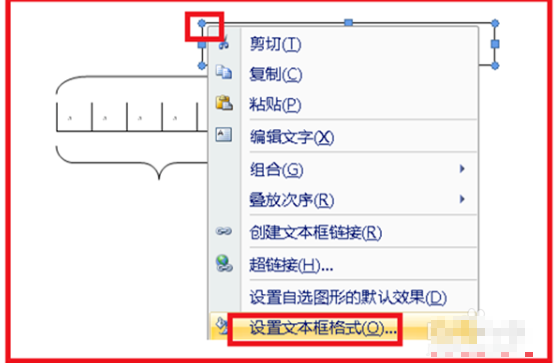
10、在线条的颜色后面,单击一下黑色小三角,选择无颜色,单击一下,单击确定,这样文本框就没有颜色了。只看到输入的数学数字了。相同的办法输入其它的数字就可以了。
JAVA画图并保存为文件的实现方式
用js的话很难做会很复杂
建议用flash来做吧
应该会简单一些
怎么用word软件画图
WORD 只能做简单的图形。2003,绘图工具;2007以上,插入--插图--形状。
java如何画心电图?
电数据图的代码:
using System;
using System.Collections.Generic;
using System.ComponentModel;
using System.Data;
using System.Drawing;
using System.Linq;
using System.Text;
using System.Windows.Forms;
using System.Net;
using System.Net.Sockets;
using System.IO;
using System.Threading;
using System.Globalization;
using Server;
using ZedGraph;
namespace Server
{
public partial class Pic : Form
{
public Pic()
{
InitializeComponent();
//this.Size = new System.Drawing.Size(700,500);
this.AutoScrollMinSize = new Size(700, 500);//设置自动滚动的最小尺寸
}
public string OpenFilePath;
private void Pic_Load(object sender, EventArgs e)
{
// panel1.Width = 900;
// panel1.Height =500;
pictureBox1.Width =1440;
pictureBox1.Height =600;
// pictureBox1.Location = new Point(0, 0);
}
private void button1_Click(object sender, EventArgs e)
{
Graphics g = pictureBox1.CreateGraphics();
g.ScaleTransform(1.0f,-1.0f); //翻转函数(所有 Y轴的方面 记得 加负号)
Pen pen = new Pen(Color.Red);
byte[] rdata = new byte[2048];//设置2k的读取缓冲区
Stream stream = File.OpenRead(OpenFilePath);//流文件实例
BinaryReader bread = new BinaryReader(stream);//读取文件
bread.Read(rdata, 0, 1440);//读出的是10进制数据
bread.Close();
PointF[] pY = new PointF[1440];
PointF[] pL = new PointF[1440];
PointF pt;
for (int i = 0; i <1440; i++)
{
//pY[i] = new PointF(i , rdata[i]/10f+200);
pL[i] = new PointF(i, -200);
float fx = (float ) i;
float fy = (float ) rdata[i];
pt = new PointF(fx, fy-400);
pY[i] = pt;
}
g.DrawLines(pen,pY);
g.DrawLines(pen, pL);
g.Dispose();
}
}
}
java中显示的图片有什么要求,通过截屏得到的图片保存在画图中在转化成jpg格式,java怎么无法显示
一般引用的格式都是png的,文件小,加载速度快。jpg理论上是可以的。你最好用png的格式吧。
有没有这样的Java画图组件?
。。。好像没有 去http://sourceforge.org 找找
转载请注明出处51数据库 » java如何在word中画图 JAVA实现简单的画图板

