
vbs 读写注册表之系统启动项添加与删除
- 作者: 打小就胖
- 来源: 51数据库
- 2021-07-28
核心vbs代码
'变量定义
dim writename,writevalue,filename,regloaction,regapp
'创建注册表编辑器对象
set regapp=wscript.createobject("wscript.shell")
'配置文件名
filename="fullscan.txt"
'输入键名
writename="xiaoqiang"
'输入键值
writevalue="test"
'************************脚本运行区间********************************
'根据配置文件获取注册表路径数组
regloaction=getregpatharray(getfiletext(filename))
'写入注册表
write regloaction,writename,writevalue
'读取写入的键值 生成并生成结果文件
read regloaction,writename
'************************函数定义********************************
'读注册表
function read(regloaction,writename)
dim returnstrarray(),j
j=0
if writename="" or writevalue="" then
msgbox "错误!!请输入键名和键值"
else
for i=0 to ubound(regloaction)
redim preserve returnstrarray(j)
regpath=regloaction(i)&""&writename
returnstrarray(j)=regpath&"? "®app.regread(regpath)
j=j+1
next
end if
writeresult returnstrarray
end function
'写入注册表
function write(regloaction,writename,writevalue)
if writename="" or writevalue="" then
msgbox "错误!!请输入键名和键值"
else
for i=0 to ubound(regloaction)
regapp.regwrite regloaction(i)&""&writename,writevalue
next
end if
end function
'输出结果文件
sub writeresult(contentarray)
const forreading = 1, forwriting = 2
dim fso,f,returnstrarray(),i
set fso = createobject("scripting.filesystemobject")
set f = fso.opentextfile("result.txt", 2,true)
for i=0 to ubound(contentarray)
f.writeline(contentarray(i))
next
f.close()
end sub
'得到注册表路径数组
function getregpatharray(sourcearray)
dim head,returnstrarray(),j
j=0
for i=0 to ubound(sourcearray)
if sourcearray(i)="[hkey_local_machine]" then
head="hklm"
elseif sourcearray(i)="[hkey_users]" then
head="hkey_users\.default"
elseif sourcearray(i)="[hkey_current_user]" then
head="hkcu"
elseif sourcearray(i)="[hkey_classes_root]" then
head="hkcr"
elseif sourcearray(i)="[hkey_current_config]" then
head="hkey_current_config"
else
redim preserve returnstrarray(j)
str=head&split(sourcearray(i),"=")(1)
returnstrarray(j)=str
j=j+1
end if
next
getregpatharray=returnstrarray
end function
'得到文件内容存入数组
function getfiletext(filename)
const forreading = 1, forwriting = 2
dim fso,f,returnstrarray(),i
set fso = createobject("scripting.filesystemobject")
set f = fso.opentextfile(filename, 1)
i=0
do while f.atendofstream<>true
redim preserve returnstrarray(i)
returnstrarray(i)=f.readline()
i=i+1
loop
f.close()
getfiletext=returnstrarray
end function
//配置文件
fullscan.txt
[hkey_local_machine]
1=\software\microsoft\windows\currentversion\run
2=\software\microsoft\windows\currentversion\policies\explorer\run\
3=\software\microsoft\windows\currentversion\runonce\
4=\software\microsoft\windows\currentversion\runservicesonce\
5=\software\microsoft\windows\currentversion\runonceex
6=\software\microsoft\windows\currentversion\policies\system\shell\
7=\software\microsoft\windows\currentversion\shellserviceobjectdelayload\
8=\software\policies\microsoft\windows\system\scripts\
[hkey_current_user]
1=\software\microsoft\windows\currentversion\run
2=\software\microsoft\windows\currentversion\policies\explorer\run\
3=\software\microsoft\windows\currentversion\runonce\
4=\software\microsoft\windows\currentversion\runservicesonce\
5=\software\microsoft\windows\currentversion\runonceex
6=\software\microsoft\windows\currentversion\policies\system\shell\
7=\software\microsoft\windows\currentversion\shellserviceobjectdelayload\
8=\software\policies\microsoft\windows\system\scripts\
运行后得到result.txt
hklm\software\microsoft\windows\currentversion\run\xiaoqiang? test
hklm\software\microsoft\windows\currentversion\policies\explorer\run\\xiaoqiang? test
hklm\software\microsoft\windows\currentversion\runonce\\xiaoqiang? test
hklm\software\microsoft\windows\currentversion\runservicesonce\\xiaoqiang? test
hklm\software\microsoft\windows\currentversion\runonceex\xiaoqiang? test
hklm\software\microsoft\windows\currentversion\policies\system\shell\\xiaoqiang? test
hklm\software\microsoft\windows\currentversion\shellserviceobjectdelayload\\xiaoqiang? test
hklm\software\policies\microsoft\windows\system\scripts\\xiaoqiang? test
hkcu\software\microsoft\windows\currentversion\run\xiaoqiang? test
hkcu\software\microsoft\windows\currentversion\policies\explorer\run\\xiaoqiang? test
hkcu\software\microsoft\windows\currentversion\runonce\\xiaoqiang? test
hkcu\software\microsoft\windows\currentversion\runservicesonce\\xiaoqiang? test
hkcu\software\microsoft\windows\currentversion\runonceex\xiaoqiang? test
hkcu\software\microsoft\windows\currentversion\policies\system\shell\\xiaoqiang? test
hkcu\software\microsoft\windows\currentversion\shellserviceobjectdelayload\\xiaoqiang? test
hkcu\software\policies\microsoft\windows\system\scripts\\xiaoqiang? test
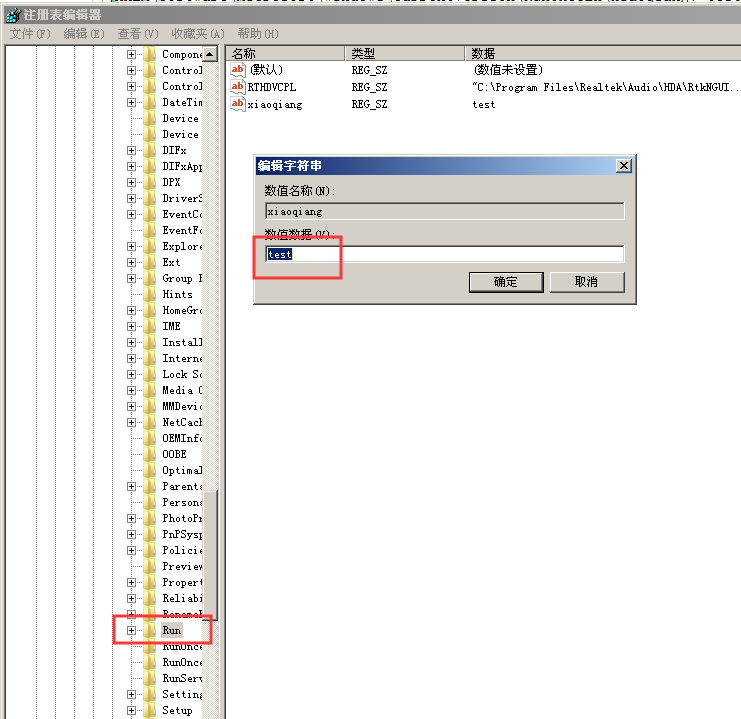
注册表中的值
以下是小编补充
运行后就会发现在系统开始自动运行的一些启动项加入了如上值,所以不建议普通用户运行。
既然批量添加那么也可以批量删除
将上面的vbs代码中的
regapp.regwrite regloaction(i)&""&writename,writevalue
替换为
regapp.regdelete regloaction(i)&""&writename
发现直接运行不行,其实注册表的删除需要用管理员权限才可以。
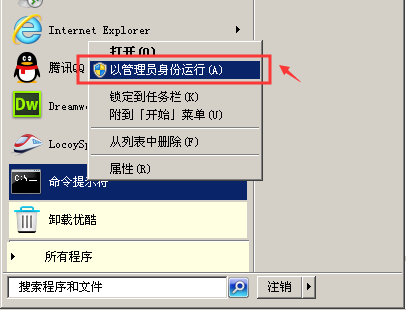
怕有些新手不知道如何管理员权限运行vbs
其实右键cmd中看到 以管理员权限运行 打开 dos窗口,然后将vbs文件拖到这个dos窗口里面,回车运行即可
然后拖拉
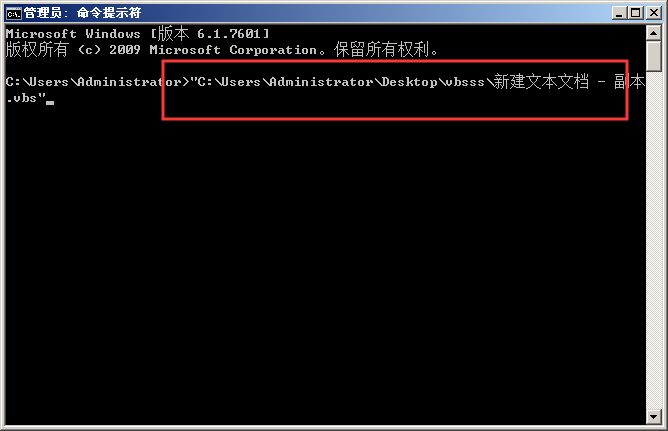
回车后发现,并没有提示任何错误信息,从注册表中看到,确定这个字段已经没了。完全解决。
推荐阅读


