jQuery 源码解析(二十二) DOM操作模块 复制元素 详解
- 作者: 胖妞要瘦
- 来源: 51数据库
- 2021-08-03
本节说一下dom操作模块里的复制元素子模块,该模块可以复制一个dom节点,并且可选择的设置是否复制其数据缓存对象(包含事件信息)和是否深度复制(子孙节点等),api如下:
- $.clone(elem, dataandevents, deepdataandevents) ;jquery底层方法,返回dom引用 ;elem是要复制的dom元素,dataandevents和deepdataandevents分别表示是否复制克隆元素的数据和事件 和 是否复制深度复制数据和事件
- $.fn.clone(dataandevents,deepdataandevents) ;jquery实例方法,返回jquery对象 ;参数同上,如果指定了参数1,参数2为空时,则参数2等于参数1
writer by:大沙漠 qq:22969969
还是先举个栗子:
<!doctype html>
<html lang="en">
<head>
    <meta charset="utf-8">
    <title>document</title>
    <script src="http://www.51sjk.com/Upload/Articles/1/0/267/267584_20210708020312519.js"></script>
</head>
<body>
    <div style="width: 150px;height: 50px;background: #cfc;">
        <p>今天天气很好</p>
    </div>
    <button id="b1">按钮1</button>
    <button id="b2">按钮2</button>
    <button id="b3">按钮3</button>
    <button id="b4">按钮4</button>

    <script>
        $('div').click(function(){console.log('div click');})                     //给div绑定一个click事件
        $('p').click(function(){console.log('p click');})                         //给p绑定一个click事件

        /*点击按钮1、按钮2、按钮3、按钮4都将会复制div,并添加到body的末尾,再点击复制出来的区块里的p元素时输出如下:*/
        $('#b1').click(function(){$('div').clone().appendto('body');})            //没有任何输出
        $('#b2').click(function(){$('div').clone(true,false).appendto('body');})  //输出:clone_d1 click
        $('#b3').click(function(){$('div').clone(true,true).appendto('body');})   //输出:clone_p1 click、clone_d1 click
        $('#b4').click(function(){$('div').clone(true).appendto('body');})        //输出:clone_p1 click、clone_d1 click  ;因为参数2省略,默认等于参数1
    </script>
</body>
</html>
渲染如下:
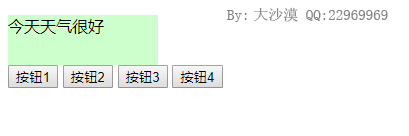
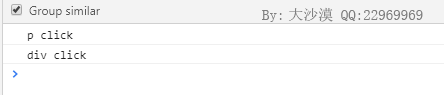
我们在div和p上分别绑定了两个事件,点击p元素(今天天气很好这个文本)控制台输出如下:
另外我们点击任意一个按钮都会克隆div元素,渲染如下:
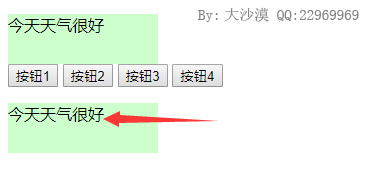
只不过点击克隆出来的元素的p元素,也就是箭头点击的文字,控制台输出的内容不同,对于四个按钮分别如下:
- 按钮1 ;无输出 ;clone()未传入参数,因此不会复制数据缓存对象
- 按钮2 ;输出:一行:div click ;clone()传入了true和false,因此只会对div的数据缓存对象做一次拷贝,对于p就不会拷贝了
- 按钮3 ;输出两行:p click和div click ;clone()传入了两个true,会进行深层次的拷贝,子孙节点的数据对象都会拷贝过来
- 按钮4 ;输出两行:p click和div click ;clone()只传入一个true,这和按钮3是一样的,且看下面代码分析
源码分析
先介绍一下$.clone(),也就是jquery的底层方法,如下:
jquery.extend({
    clone: function( elem, dataandevents, deepdataandevents ) {         //复制dom元素,并修正不兼容属性。dataandevents:是否复制数据和事件。deepdataandevents:是否复制后代元素的数据和事件。
        var srcelements,
            destelements,
            i,
            // ie<=8 does not properly clone detached, unknown element nodes
            clone = jquery.support.html5clone || !rnoshimcache.test( "<" + elem.nodename ) ?    //如果浏览器支持html5元素,或者不支持html5且原始元素不含有html5元素
                elem.clonenode( true ) :                                                            //调用原生方法.clone(deep)复制dom元素
                shimclonenode( elem );                                                              //否则调用函数shimclonenode()通过"安全文档片段"复制html5元素

        if ( (!jquery.support.nocloneevent || !jquery.support.noclonechecked) &&                //修正不兼容性
                (elem.nodetype === 1 || elem.nodetype === 11) && !jquery.isxmldoc(elem) ) {
            // ie copies events bound via attachevent when using clonenode.
            // calling detachevent on the clone will also remove the events
            // from the original. in order to get around this, we use some
            // proprietary methods to clear the events. thanks to mootools
            // guys for this hotness.

            clonefixattributes( elem, clone );

            // using sizzle here is crazy slow, so we use getelementsbytagname instead
            srcelements = getall( elem );
            destelements = getall( clone );

            // weird iteration because ie will replace the length property
            // with an element if you are cloning the body and one of the
            // elements on the page has a name or id of "length"
            for ( i = 0; srcelements[i]; ++i ) {
                // ensure that the destination node is not null; fixes #9587
                if ( destelements[i] ) {
                    clonefixattributes( srcelements[i], destelements[i] );
                }
            }
        }

        // copy the events from the original to the clone
        if ( dataandevents ) {                      //如果复制数据和事件
            clonecopyevent( elem, clone );              //调用clonecopyevent()数据

            if ( deepdataandevents ) {                  //如果是深度复制
                srcelements = getall( elem );               //获取源dom节点所有子节点的dom引用
                destelements = getall( clone );             //获取目标dom节点所有子节点的dom引用

                for ( i = 0; srcelements[i]; ++i ) {        //遍历源dom节点的子节点
                    clonecopyevent( srcelements[i], destelements[i] );  //逐个复制数据缓存
                }
            }
        }

        srcelements = destelements = null;

        // return the cloned set
        return clone;                               //最后返回clone,也就是复制出来的dom元素
    },
})
$.clone()调用原生的clonenode()方法拷贝了一份dom,对于数据缓存则用clonecopyevent()进行拷贝,该函数实现如下:
function clonecopyevent( src, dest ) {      //复制数据和事件   ;$.clone()函数调用  ;src是源dom节点,dest是目标节点

    if ( dest.nodetype !== 1 || !jquery.hasdata( src ) ) {  //如果dest不是元素节点或 src不含有数据,则直接返回
        return;
    }

    var type, i, l,
        olddata = jquery._data( src ),                      //获取原对象内部数据
        curdata = jquery._data( dest, olddata ),            //设置目标对象的内部数据   ;这时src和dest两个对象内的事件对象(events和handle属性)都是指向同一个的
        events = olddata.events;                            //原对象的事件对象

    if ( events ) {                                         //如果源dom对象有绑定事件处理函数,则删除目标dom对象的事件信息,再重新绑定
        delete curdata.handle;                                  //删除目标对象的监听句柄
        curdata.events = {};                                    //重置目标对象的事件列表

        for ( type in events ) {                                //遍历源dom对象的事件列表
            for ( i = 0, l = events[ type ].length; i < l; i++ ) {  //遍历绑定的每个函数
                jquery.event.add( dest, type + ( events[ type ][ i ].namespace ? "." : "" ) + events[ type ][ i ].namespace, events[ type ][ i ], events[ type ][ i ].data );   //依次在目标dom对象上进行绑定事件操作
            }
        }
    }

    // make the cloned public data object a copy from the original
    if ( curdata.data ) {                                   //如果源dom对象含有自定义事件对象
        curdata.data = jquery.extend( {}, curdata.data );       //也单独拷贝一份,再保存到curdata.data中
    }
}
在源码里可以看到,如果有绑定了事件对象则会调用jquery.event.add()依次进行绑定,实现就是这样子的。
对于实例方法$.fn.clone()来说,它的实现如下:
jquery.fn.extend({
    clone: function( dataandevents, deepdataandevents ) {           //创建匹配元素集合的深度复制副本。dataandevents:可选的布尔值,表示是否复制数据和事件,默认为false。deepdataandevents:可选的布尔值,表示是否深度复制数据和事件,默认为false。
        dataandevents = dataandevents == null ? false : dataandevents;                      //修正dataandevents参数
        deepdataandevents = deepdataandevents == null ? dataandevents : deepdataandevents;  //修正deepdataandevents参数

        return this.map( function () {                                      //调用发那个发.map()遍历匹配元素集合,在回调函数函数中调用jquery.clone()复制每个匹配元素。
            return jquery.clone( this, dataandevents, deepdataandevents );      //调用底层的jquery.clone()方法
        });
    },
})
这里可以看到,对于$.fn.clone()来说,如果参数2没有传递,则会修正未参数1,上面例子的按钮4就是执行到这里的。
推荐阅读