通过正则表达式使用ajax检验注册信息功能
- 作者: u234293239
- 来源: 51数据库
- 2021-08-29
本期博客内容应该不算多,我们此次的目的是通过正则表达式并利用ajax可以实现动态交互的特点,检验注册的用户名以及密码是否合法。
entity层
该层主要包含一个用户类user,代码如下:
package cn.cpx.springmvc.entity;
import java.util.date;
/**
 * 用户实体类
 * @author autumn_leaf
 *
 */
public class user {

 private int uid;
 private string uname;
 private string upwd;
 private string uphone;
 private double ubalance;
 private int ustate;
 private int urole;
 private string uimage;//用户头像
 private date ubirth;

 public int getuid() {
 return uid;
 }
 public void setuid(int uid) {
 this.uid = uid;
 }
 public string getuname() {
 return uname;
 }
 public void setuname(string uname) {
 this.uname = uname;
 }
 public string getupwd() {
 return upwd;
 }
 public void setupwd(string upwd) {
 this.upwd = upwd;
 }
 public string getuphone() {
 return uphone;
 }
 public void setuphone(string uphone) {
 this.uphone = uphone;
 }
 public double getubalance() {
 return ubalance;
 }
 public void setubalance(double ubalance) {
 this.ubalance = ubalance;
 }
 public int getustate() {
 return ustate;
 }
 public void setustate(int ustate) {
 this.ustate = ustate;
 }
 public int geturole() {
 return urole;
 }
 public void seturole(int urole) {
 this.urole = urole;
 }

 public string getuimage() {
 return uimage;
 }
 public void setuimage(string uimage) {
 this.uimage = uimage;
 }

 public date getubirth() {
 return ubirth;
 }
 public void setubirth(date ubirth) {
 this.ubirth = ubirth;
 }

 public user(int uid, string uname, string upwd, string uphone, double ubalance, int ustate, int urole,string uimage,date ubirth) {
 super();
 this.uid = uid;
 this.uname = uname;
 this.upwd = upwd;
 this.uphone = uphone;
 this.ubalance = ubalance;
 this.ustate = ustate;
 this.urole = urole;
 this.uimage = uimage;
 this.ubirth = ubirth;
 }
 public user() {
 super();
 }
 public user(string uname, string upwd, string uphone) {
 super();
 this.uname = uname;
 this.upwd = upwd;
 this.uphone = uphone;
 }

 //添加注册信息
 public user(string uname, string upwd, string uphone, date ubirth) {
 super();
 this.uname = uname;
 this.upwd = upwd;
 this.uphone = uphone;
 this.ubirth = ubirth;
 }

 public user(string uname, string upwd, string uphone, string uimage) {
 super();
 this.uname = uname;
 this.upwd = upwd;
 this.uphone = uphone;
 this.uimage = uimage;
 }

 public user(string uname, string upwd) {
 super();
 this.uname = uname;
 this.upwd = upwd;
 }
 @override
 public string tostring() {
 return "user [uid=" + uid + ", uname=" + uname + ", upwd=" + upwd + ", uphone=" + uphone + ", ubalance="
  + ubalance + ", ustate=" + ustate + ", urole=" + urole + ", uimage=" + uimage + ", ubirth=" + ubirth
  + "]";
 }
}
上述user类我们实际此次只会用到用户名和密码两个属性,其他属性此次不会使用到。
controller层
我们此次为操作方便,dao层和service层就不写了,留给读者自己去思考。我们新建usercontroller类,代码如下:
package cn.cpx.springmvc.controller;
import org.springframework.stereotype.controller;
import org.springframework.web.bind.annotation.requestmapping;
import org.springframework.web.bind.annotation.responsebody;
import cn.cpx.springmvc.entity.user;
@controller
@requestmapping("/user")
public class usercontroller {
 /**
 * 根据输入的用户名查询用户名是否存在,实现前台输入用户名及时验证
 */
 @requestmapping("/checkuname")
 @responsebody
 public string checkuname(user user) throws exception {
 //根据user(前台输入的用户名)查询数据库中用户名
 //下面的判断最好写在service中
 //使用string result = userservice.checkuname(user);
 if("chen".equals(user.getuname())) {
  return "{"msg":"no"}";
 }
 return "{"msg":"ok"}";
 }
}
加上@responsebody注解,是为了确保返回json形式的数据,我们返回列表形式的字符串,并进行转义,如果用户名已经存在(这里仅有chen),则返回msg:no,相反,返回msg:ok。
视图层
我们新建register.jsp,代码如下:
<%@ page language="java" contenttype="text/html; charset=utf-8"
pageencoding="utf-8"%>
<!doctype html>
<html>
<head>
<meta charset="utf-8">
<title>insert title here</title>
<script type="text/javascript" src="${pagecontext.request.contextpath}/js/jquery-1.8.3.js"></script>
<script>
//使用功能dom对象获取表单信息
function checkname() {
//console.log(1);
var name = document.getelementbyid("uname").value;
//console.log("用户名:"+name);
//console.log(document.getelementbyid("uname").placeholder);
//根据用户输入内容,完成页面验证,用户名只能是0-9,a-z,a-z,也可以输入中文
//综合正则表达式验证
var unamecode = /^[0-9a-z一-龥]{3,10}$/;
if (unamecode.test(name)) {
console.log("用户名命名合法!");
//还要和后台进行验证,验证用户名是否重复,使用ajax动态交互
$.ajax({
type : 'post',
url : 'user/checkuname.action',//请求的url地址,建议使用绝对地址
data : 'uname='+name,//请求携带的参数
datatype:'json',//如果后台返回的数据是string改造的,这里需要指定返回类型,否则data.msg取不到值
success : function(data) {//sucess中function的data可以解析后台的数据
console.log(data);
console.log(data.msg);
if("ok" == data.msg) {
document.getelementbyid("unamemsg").innerhtml = "<font color='green'>√用户名合法!</font>";
}else {
document.getelementbyid("unamemsg").innerhtml = "<font color='red'>×用户名重复!</font>";
}
},
error : function() {//失败回调函数
console.log("解析失败!");
}
});
//document.getelementbyid("unamemsg").innerhtml = "<font color='orange'>√用户名合法!</font>";
} else {
console.log("命名不合法!");
//document.getelementbyid("unamemsg").innerhtml = "<font color='orange'>×用户名不合法!</font>";
document.getelementbyid("unamemsg").innerhtml = "x 用户名不合法!";
//使用js可以改变css的样式
document.getelementbyid("unamemsg").style.color = "red";
document.getelementbyid("unamemsg").style.fontsize = "20px";
}
}
//失去焦点事件
function checkpwd() {
var pwd = document.getelementbyid("upwd").value;
//强密码(必须包含大小写字母和数字的组合,不能使用特殊字符,长度在6-12之间)
var upwdcode = /^(?=.*\d)(?=.*[a-z])(?=.*[a-z])[a-za-z0-9]{6,12}$/;
if (upwdcode.test(pwd)) {
document.getelementbyid("upwdmsg").innerhtml = "<font color='blue'>√密码合法!</font>";
} else {
document.getelementbyid("upwdmsg").innerhtml = "<font color='blue'>×密码不合法!</font>"
}
}
</script>
</head>
<body>
<form method="post">
<input type="text" name="uname" id="uname" placeholder="请输入用户名"
onkeyup="checkname()" /> <span id="unamemsg"></span><br />
<input type="password" name="upwd" id="upwd" placeholder="请输入密码"
onblur="checkpwd()" /> <span id="upwdmsg"></span><br/>
</form>
</body>
</html>
以上的代码我们进行一些解释:
①检查用户名要求是3-10位,数字0-9,字母a-z(a-z)以及中文都可以,但是不能为chen,后面加了一个提示信息,在后面span标签可以显示,在ajax函数中,由于后台接收的uname是string类型,而我们要确保返回json数据,所以加了一句'datatype:json';
②检验密码其实原理差不多,我们也是通过正则表达式,要求密码必须包含大小写字母和数字的组合,不能使用特殊字符,长度在6-12之间,密码这边相对简单一些,因为不需要与后台动态交互,所以不使用ajax。
关于正则表达式如何写以及如何检验,这里提供一个网址供大家日常学习,链接为正则表达式在线测试。
接下来我们进行运行,截图如下:
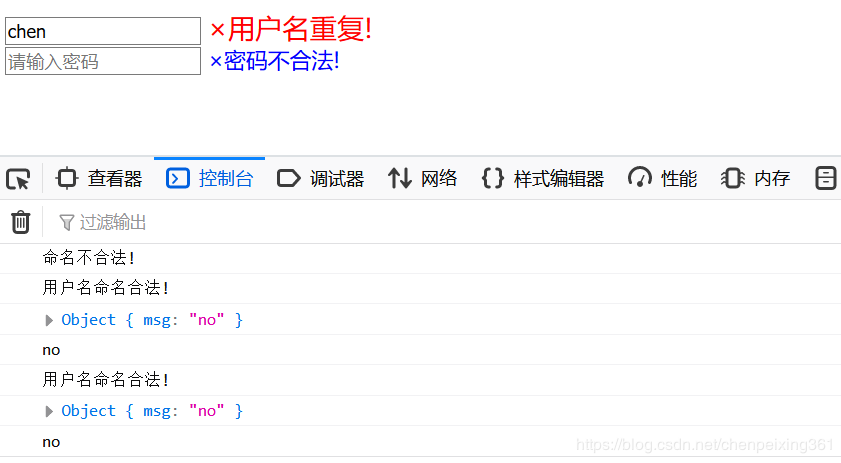
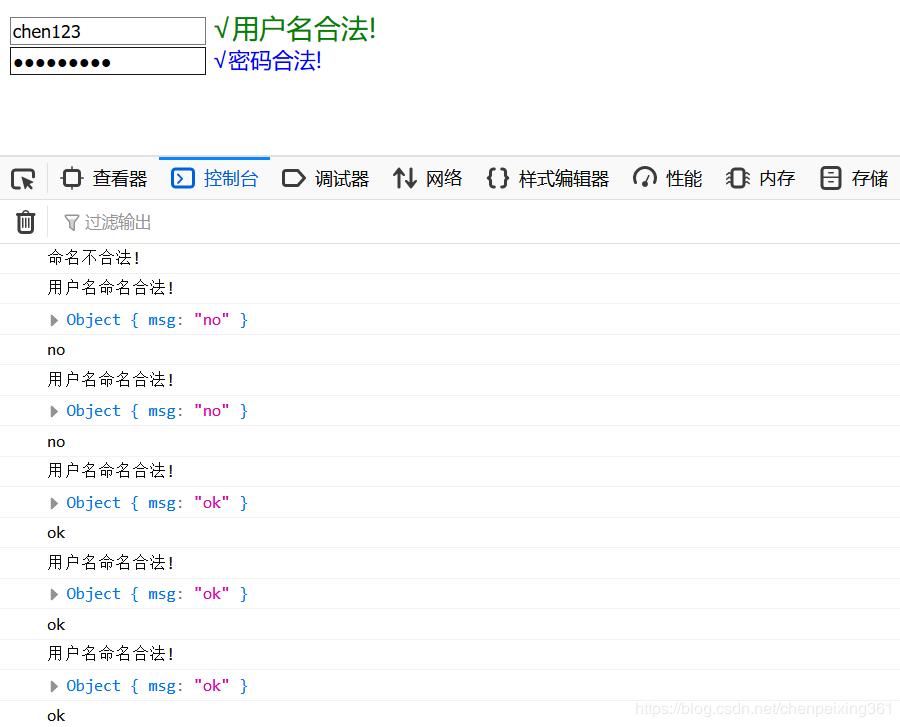
我们使用了两种不同的事件,用户名检验使用的是onkeyup,它是按键松开事件,密码检验使用的是onblur,它是失去焦点事件,好了,检验结果也符合我们前面写的逻辑思维了,本期博客就到这里了,我们下期见!
总结
以上所述是小编给大家介绍的通过正则表达式使用ajax检验注册信息功能,希望对大家有所帮助