opencv实现图像缩放效果
- 作者: 不狠不能日刺猬
- 来源: 51数据库
- 2021-07-05
本文实例为大家分享了opencv实现图像缩放效果的具体代码,供大家参考,具体内容如下
图像缩放:
图像缩放即对图像的大小进行调整,即放大或者缩小
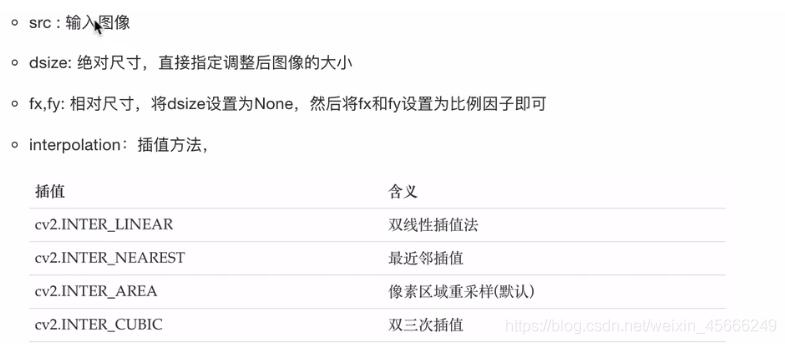
cv2.resize(src,dsize,fx=0,fy=0,interpolation=cv2.inter_linear)
参数:
实现代码:
import cv2 as cv
import matplotlib.pyplot as plt
# 中文显示配置
plt.rcparams['font.sans-serif']=['simhei']  # 用来正常显示中文标签
plt.rcparams['axes.unicode_minus']=false  # 用来正常显示负号

# 载入图像
img0 = cv.imread('img/img1.jpeg')

# 图像缩放
# 绝对尺寸缩放
rows, cols = img0.shape[:2]
res0 = cv.resize(img0,(3*cols,3*rows),interpolation=cv.inter_cubic)
# 相对尺寸缩放,若用相对缩放则第二个参数要设置为none
res1 = cv.resize(img0, none, fx = 0.5, fy = 0.5)

# 查看图像大小
print(res0.shape)
print(res1.shape)
print(img0.shape)

# 图像显示
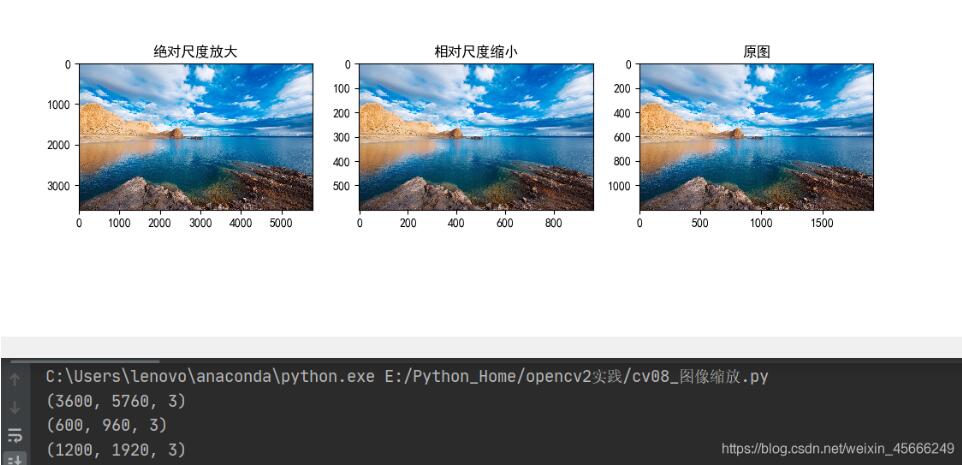
fig, axes = plt.subplots(nrows=1,ncols=3,figsize=(10,8),dpi=100)
axes[0].imshow(res0[:,:,::-1])
axes[0].set_title("绝对尺度放大")
axes[1].imshow(res1[:,:,::-1])
axes[1].set_title("相对尺度缩小")
axes[2].imshow(img0[:,:,::-1])
axes[2].set_title("原图")
plt.show()
运行结果:
以上就是本文的全部内容,希望对大家的学习有所帮助,也希望大家多多支持。
推荐阅读