mybatis逆向工程使用
- 作者: 丿此般幸福75695311
- 来源: 51数据库
- 2020-10-01
搭建逆向工程
1.创建一个Maven项目:File——New Project——Maven
2.在pom文件中,添加MBG插件,IDE会自动帮我们下载插件
(如果没反应,可以点开右侧Maven Project选项卡刷新以下)
mybatis_generator org.mybatis.generator mybatis-generator-maven-plugin 1.3.0
3.在src/main/resource目录下创建 generatorConfig.xml文件
(官方配置以及说明: http://mybatis。github。io/generator/configreference/xmlconfig.html )
4.点击Maven Project——项目——Plugins——mybatis generator——Run Maven build
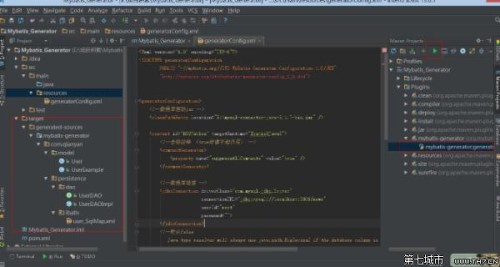
5.可以根据自己项目的配置,把生成的代码拷贝到自己的项目中去
官方文档中提供的运行逆向工程的几种方法
running mybatis generator
mybatis generator (mbg) can be run in the following ways:
(1)from the command prompt with an xml configuration
(2)as an ant task with an xml configuration
(3)as a maven plugin
(4)from another java program with an xml configuration
(5)from another java program with a java based configuration
(6)还可以通过eclipse的插件生成代码
建议使用java程序方式(from another java program with an xml configuration),不依赖开发工具。
1.创建一个Maven项目:File——New Project——Maven
2.在pom文件中,添加MBG插件,IDE会自动帮我们下载插件
(如果没反应,可以点开右侧Maven Project选项卡刷新以下)
3.在src/main/resource目录下创建 generatorConfig.xml文件
(官方配置以及说明: http://mybatis。github。io/generator/configreference/xmlconfig.html )
4.点击Maven Project——项目——Plugins——mybatis generator——Run Maven build
5.可以根据自己项目的配置,把生成的代码拷贝到自己的项目中去
官方文档中提供的运行逆向工程的几种方法
running mybatis generator
mybatis generator (mbg) can be run in the following ways:
(1)from the command prompt with an xml configuration
(2)as an ant task with an xml configuration
(3)as a maven plugin
(4)from another java program with an xml configuration
(5)from another java program with a java based configuration
(6)还可以通过eclipse的插件生成代码
建议使用java程序方式(from another java program with an xml configuration),不依赖开发工具。
推荐阅读