教你如何使用MvcPager实现分页效果
- 作者: 为了理想而存在
- 来源: 51数据库
- 2022-09-20
| 导读 | 这篇文章主要为大家详细介绍了MVC使用MvcPager实现分页效果,文中示例代码介绍的非常详细,具有一定的参考价值,感兴趣的小伙伴们可以参考一下 |
本文实例为大家分享了MVC使用MvcPager实现分页效果的具体代码,供大家参考,具体内容如下
一、数据库表
USE [StudentDB]
GO

/****** Object:  Table [dbo].[UserInfo]    Script Date: 07/27/2018 13:59:03 ******/
SET ANSI_NULLS ON
GO

SET QUOTED_IDENTIFIER ON
GO

SET ANSI_PADDING ON
GO

CREATE TABLE [dbo].[UserInfo](
    [customerID] [int] IDENTITY(1,1) NOT NULL,
    [customerName] [varchar](50) NOT NULL,
    [PID] [varchar](50) NOT NULL,
    [telephone] [varchar](50) NOT NULL,
    [address] [varchar](20) NULL,
PRIMARY KEY CLUSTERED
(
    [customerID] ASC
)WITH (PAD_INDEX  = OFF, STATISTICS_NORECOMPUTE  = OFF, IGNORE_DUP_KEY = OFF, ALLOW_ROW_LOCKS  = ON, ALLOW_PAGE_LOCKS  = ON) ON [PRIMARY],
 CONSTRAINT [UQ_PID] UNIQUE NONCLUSTERED
(
    [PID] ASC
)WITH (PAD_INDEX  = OFF, STATISTICS_NORECOMPUTE  = OFF, IGNORE_DUP_KEY = OFF, ALLOW_ROW_LOCKS  = ON, ALLOW_PAGE_LOCKS  = ON) ON [PRIMARY]
) ON [PRIMARY]

GO

SET ANSI_PADDING OFF
GO

ALTER TABLE [dbo].[UserInfo]  WITH CHECK ADD  CONSTRAINT [CK_PID] CHECK  ((len([PID])=(15) OR len([PID])=(18)))
GO

ALTER TABLE [dbo].[UserInfo] CHECK CONSTRAINT [CK_PID]
GO

ALTER TABLE [dbo].[UserInfo]  WITH CHECK ADD  CONSTRAINT [CK_telephone] CHECK  ((len([telephone])=(11)))
GO

ALTER TABLE [dbo].[UserInfo] CHECK CONSTRAINT [CK_telephone]
GO
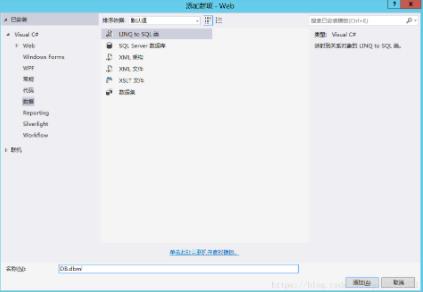
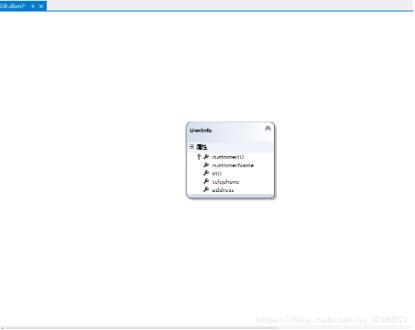
二、建立Linq
三、在Model创建UserInfo
using System;
using System.Collections.Generic;
using System.Linq;
using System.Web;

namespace Web.Models
{
    public class UserInfo
    {
        private int customerID;

        public int CustomerID
        {
            get { return customerID; }
            set { customerID = value; }
        }

        private string customerName;

        public string CustomerName
        {
            get { return customerName; }
            set { customerName = value; }
        }
        private string pid;

        public string Pid
        {
            get { return pid; }
            set { pid = value; }
        }
        private string telephone;

        public string Telephone
        {
            get { return telephone; }
            set { telephone = value; }
        }
        private string address;

        public string Address
        {
            get { return address; }
            set { address = value; }
        }
    }
}
四、在Controllers创建Home控制器
添加MvcPager.dll,并引用MvcPager的命名空间Webdiyer.WebControls.Mvc。
using System;
using System.Collections.Generic;
using System.Linq;
using System.Web;
using System.Web.Mvc;
using Web.Models;
using Webdiyer.WebControls.Mvc;

namespace Web.Controllers
{
    public class HomeController : Controller
    {
        //
        // GET: /Page/
        //默认分页
        private const int defaultPageSize = 5;

        //
        public ActionResult Index(int? id)
        {
            using (DBDataContext db = new DBDataContext())
            {
                IQueryable p = from c in db.UserInfo
                                         select new UserInfo { CustomerID = c.customerID, CustomerName = c.customerName, Telephone = c.telephone, Pid = c.PID, Address = c.address };
                PagedList m = p.ToPagedList(id ?? 1, defaultPageSize);
                return View(m);
            }
        }

    }
}
五、添加视图Index
fo>>" %>

< %@="" import="" namespace="Web.Models" %="">
< %@="" import="" namespace="Webdiyer.WebControls.Mvc" %="">

< !doctype="" html="">

< html="">
< head="" runat="server">
    < meta="" name="viewport" content="width=device-width">
    < title="">Index
    < %--样式表--%="">
    < link="" href="../../Content/Site.css" rel="stylesheet" type="text/css">
    < script="" src="../../Scripts/jquery-1.8.2.min.js" type="text/javascript">
< ead="">
< body="">
    < div="" class="divfloat">
        < div="" id="divpages">
            < table="">
                < tr="">
                    < th="">编号
                    < h="">
                    < th="">姓名
                    < h="">
                    < th="">身份证号
                    < h="">
                    < th="">电话号码
                    < h="">
                    < th="">地址
                    < h="">
                < r="">
                < %foreach="" (userinfo="" od="" in="" model)="" {="" %="">
                < tr="">
                    < td="">
                        <%=od.CustomerID.ToString() % >
                    < /td>
                    < td>
                        < %=od.CustomerName.ToString() % >
                    < /td>
                    < td>
                        < %=od.Pid.ToString() % >
                    < /td>
                    < td>
                        < %=od.Telephone.ToString() % >
                    < /td>
                    < td>
                        < %=od.Address.ToString() % >
                    < /td>
                < /tr>
                < %
                  } % >
            < /table>
            new AjaxOptions() { UpdateTargetId = "divpages" })%>--%>
            < %="Html.Pager(Model," new="" pageroptions="" {="" pageindexparametername="id" ,="" cssclass="pages" ,="" firstpagetext="首页" ,="" lastpagetext="末页" ,="" prevpagetext="上一页" ,="" nextpagetext="下一页" ,="" currentpageritemwrapperformatstring="{0}",
    ShowPageIndexBox = true,
    NumericPagerItemWrapperFormatString = "{0}",
    PageIndexBoxType = PageIndexBoxType.DropDownList,

    ShowGoButton = false,PageIndexBoxWrapperFormatString=" 转到{0}",SeparatorHtml = "" })%>
以上就是本文的全部内容,希望对大家的学习有所帮助。
推荐阅读