JSP中文验证码
- 作者: 醉心者
- 来源: 51数据库
- 2021-07-09
<%@ page pageencoding = "gb2312" contenttype="image/jpeg" import = "javax.imageio.*,java.util.*,java.awt.image.*,java.awt.*" %>
<%!
//在此处 获取并生成随机颜色
color getrandcolor(random random, int ff, int cc) {
if (ff > 255)
ff = 255;
if (cc > 255)
cc = 255;
int r = ff + random.nextint(cc - ff);
int g = ff + random.nextint(cc - ff);
int b = ff + random.nextint(cc - ff);
return new color(r, g, b);
} %>
<%
//在此处 设置jsp页面无缓存
response.setheader( "pragma" , "no-cache" );
response.setheader( "cache-control" , "no-cache" );
response.setdateheader( "expires" , 0);
// 设置图片的长宽
int width = 130;
int height = 30;
//设定被随机选取的中文字,此处中文字内容过多,不一一列出,只是举例说明下。
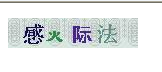
string base = "青半火法题建赶位唱海七女任件感准音答哥际旧神座章压慢叔背细" ;
//设置 备选随机汉字的个数
int length = base.length();
//创建缓存图像
bufferedimage image = new bufferedimage(width, height, bufferedimage.type_int_rgb);
//获取图像对象
graphics g = image.getgraphics();
//创建随机函数
random random = new random();
//设定图像背景色
g.setcolor(getrandcolor(random, 188, 235));
g.fillrect(0, 0, width, height);
//设置随机备选的字体类型
string[] fonttypes = { "宋体" , "新宋体" ,
"黑体" , "楷体" , "隶书" };
int fonttypeslength = fonttypes.length;
// 在图片背景上增加噪点,增加图片分析难度
g.setcolor(getrandcolor(random, 180, 199));
g.setfont( new font( "times new roman" , font.plain, 14));
for ( int i = 0; i < 4; i++) {
g.drawstring( "@*@*@*@*@*@*@*" ,
0, 5 * (i + 2));
}
// 取随机产生的验证码 (4 个汉字 )
// 保存生成的汉字字符串
string srand = "" ;
for ( int i = 0; i < 4; i++) {
int start = random.nextint(length);
string rand = base.substring(start, start + 1);
srand += rand;
// 设置图片上字体的颜色
g.setcolor(getrandcolor(random, 10, 150));
// 设置字体格式
g.setfont( new font(fonttypes[random.nextint(fonttypeslength)],
font.bold, 18 + random.nextint(6)));
// 将此汉字画到验证图片上面
g.drawstring(rand, 24 * i + 10 + random.nextint(8), 24);
}
// 将验证码存入s ession中
session.setattribute( "rand" , srand);
g.dispose();
//将 图象输出到jsp页面中
imageio.write(image, "jpeg" , response.getoutputstream());
//关闭流
out.clear();
out=pagecontext.pushbody();
%>
<%@ page pageencoding = "gb2312" contenttype="image/jpeg" import = "javax.imageio.*,java.util.*,java.awt.image.*,java.awt.*" %>
<%!
//在此处 获取并生成随机颜色
color getrandcolor(random random, int ff, int cc) {
if (ff > 255)
ff = 255;
if (cc > 255)
cc = 255;
int r = ff + random.nextint(cc - ff);
int g = ff + random.nextint(cc - ff);
int b = ff + random.nextint(cc - ff);
return new color(r, g, b);
} %>
<%
//在此处 设置jsp页面无缓存
response.setheader( "pragma" , "no-cache" );
response.setheader( "cache-control" , "no-cache" );
response.setdateheader( "expires" , 0);
// 设置图片的长宽
int width = 130;
int height = 30;
//设定被随机选取的中文字,此处中文字内容过多,不一一列出,只是举例说明下。
string base = "青半火法题建赶位唱海七女任件感准音答哥际旧神座章压慢叔背细" ;
//设置 备选随机汉字的个数
int length = base.length();
//创建缓存图像
bufferedimage image = new bufferedimage(width, height, bufferedimage.type_int_rgb);
//获取图像对象
graphics g = image.getgraphics();
//创建随机函数
random random = new random();
//设定图像背景色
g.setcolor(getrandcolor(random, 188, 235));
g.fillrect(0, 0, width, height);
//设置随机备选的字体类型
string[] fonttypes = { "宋体" , "新宋体" ,
"黑体" , "楷体" , "隶书" };
int fonttypeslength = fonttypes.length;
// 在图片背景上增加噪点,增加图片分析难度
g.setcolor(getrandcolor(random, 180, 199));
g.setfont( new font( "times new roman" , font.plain, 14));
for ( int i = 0; i < 4; i++) {
g.drawstring( "@*@*@*@*@*@*@*" ,
0, 5 * (i + 2));
}
// 取随机产生的验证码 (4 个汉字 )
// 保存生成的汉字字符串
string srand = "" ;
for ( int i = 0; i < 4; i++) {
int start = random.nextint(length);
string rand = base.substring(start, start + 1);
srand += rand;
// 设置图片上字体的颜色
g.setcolor(getrandcolor(random, 10, 150));
// 设置字体格式
g.setfont( new font(fonttypes[random.nextint(fonttypeslength)],
font.bold, 18 + random.nextint(6)));
// 将此汉字画到验证图片上面
g.drawstring(rand, 24 * i + 10 + random.nextint(8), 24);
}
// 将验证码存入s ession中
session.setattribute( "rand" , srand);
g.dispose();
//将 图象输出到jsp页面中
imageio.write(image, "jpeg" , response.getoutputstream());
//关闭流
out.clear();
out=pagecontext.pushbody();
%>
摘自 落日小屋