
C#用记事本编写简单WinForm窗体程序
- 作者: Heiy
- 来源: 51数据库
- 2020-08-07
这篇文章主要为大家详细介绍了C#用记事本编写简单WinForm窗体程序,具有一定的参考价值,感兴趣的小伙伴们可以参考一下
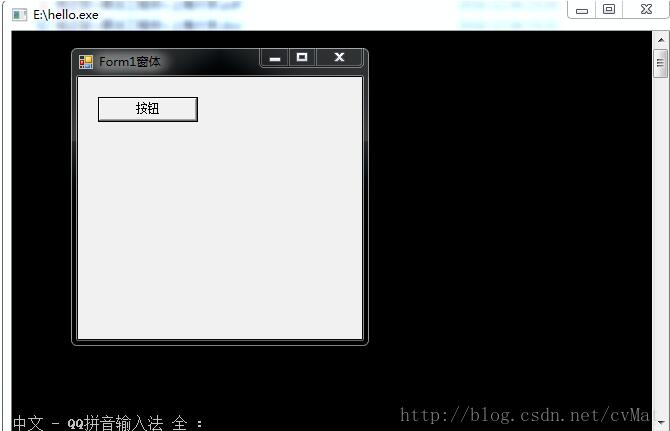
平时我们编写WinForm程序经常使用VS进行拖控件的方式,这样做虽然简单,但是无法深入了解WinForm程序的本质。其实,用记事本也可以编写出VS编写的WinForm程序。还是直接看代码吧:
1、打开记事本,写入以下代码,另存为hello.cs文件
using System;
using System.Windows.Forms;

namespace Hello
{
 public class Form1:Form
 {
  private System.Windows.Forms.Button btnClose;
  public Form1()
  {
    this.Text = "Form1窗体";
    btnClose = new System.Windows.Forms.Button();
    //将窗体挂起
    this.SuspendLayout();

    //设置按钮属性
    this.btnClose.Location = new System.Drawing.Point(20,20);
    this.btnClose.Size = new System.Drawing.Size(100,25);
    this.btnClose.Name = "btnClose";
    this.btnClose.Text = "按钮";

    this.btnClose.UseVisualStyleBackColor = true;

    //设置按钮控件点击事件
    this.btnClose.Click += new System.EventHandler(this.btnClose_Click);
    //将构造的控件添加到窗体Controls控件集合
    this.Controls.Add(btnClose);
  }
  //按钮点击事件
   private void btnClose_Click(object sender,EventArgs e)
   {
   this.Close();
   }
 }
 public class Program
 {
  //程序入口
  public static void Main()
  {
   Application.Run(new Form1());
  }
 }
}
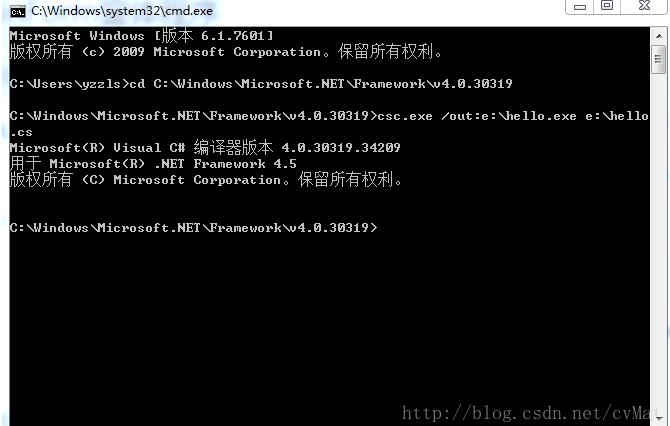
2、在Windows搜索框输入 cmd,打开控制台,输入以下代码切换目录
cd C:\Windows\Microsoft.NET\Framework\v4.0.30319
3、目录切换完毕后,输入以下代码运行
csc.exe /out:e:\hello.exe e:\hello.cs
/out:e:\hello.exe用于指定可执行文件存放的目录和名称
e:\hello.cs用于指定源文件的文件路径
以上就是本文的全部内容,希望对大家的学习有所帮助,
推荐阅读
- C#通过fleck实现wss协议的WebSocket多人Web实时聊天(附源码)
- 团队城市未满足要求:MSBuildTools12.0_x86_Path 存在
- 使用 MSBuild.exe 在发布模式下构建 C# 解决方案
- 当我发布 Web 应用程序时,AfterPublish 脚本不运行
- 构建时 T4 转换的产品仅在下一个构建中使用
- ASP.NET Core Application (.NET Framework) for Windows x64 only error in project.assets.json
- 新的 .csproj 格式 - 如何将整个目录指定为“链接文件"到子目录?
- 如何将条件编译符号(DefineConstants)传递给 msbuild
- MSBuild 支持 Visual Studio 2017 RTM 中的 T4 模板
- NuGet 包还原找不到包,没有源
热点文章

团队城市未满足要求:MSBuildTools12.0_x86_Path 存在
0
使用 MSBuild.exe 在发布模式下构建 C# 解决方案
0
当我发布 Web 应用程序时,AfterPublish 脚本不运行
0
构建时 T4 转换的产品仅在下一个构建中使用
0
ASP.NET Core Application (.NET Framework) for Windows x64 only error in project.assets.json
0
新的 .csproj 格式 - 如何将整个目录指定为“链接文件"到子目录?
0
如何将条件编译符号(DefineConstants)传递给 msbuild
0
MSBuild 支持 Visual Studio 2017 RTM 中的 T4 模板
0
NuGet 包还原找不到包,没有源
0
使用 C# 6.0 功能运行 TFS 构建
0
