
WPF通过线程使用ProcessBar的方法详解
- 作者: 奥迪汽车首席设计师
- 来源: 51数据库
- 2020-08-07
这篇文章主要给大家介绍了关于WPF通过线程使用ProcessBar的相关资料,文中通过示例代码介绍的非常详细,对大家学习或者使用WPF具有一定的参考学习价值,需要的朋友们下面来一起学习学习吧
前言
WPF下使用进度条也是非常方便的,如果直接采用循环然后给ProcessBar赋值,理论上是没有问题的,不过这样会卡主主UI线程,我们看到的效果等全部都结束循环后才出现最后的值。
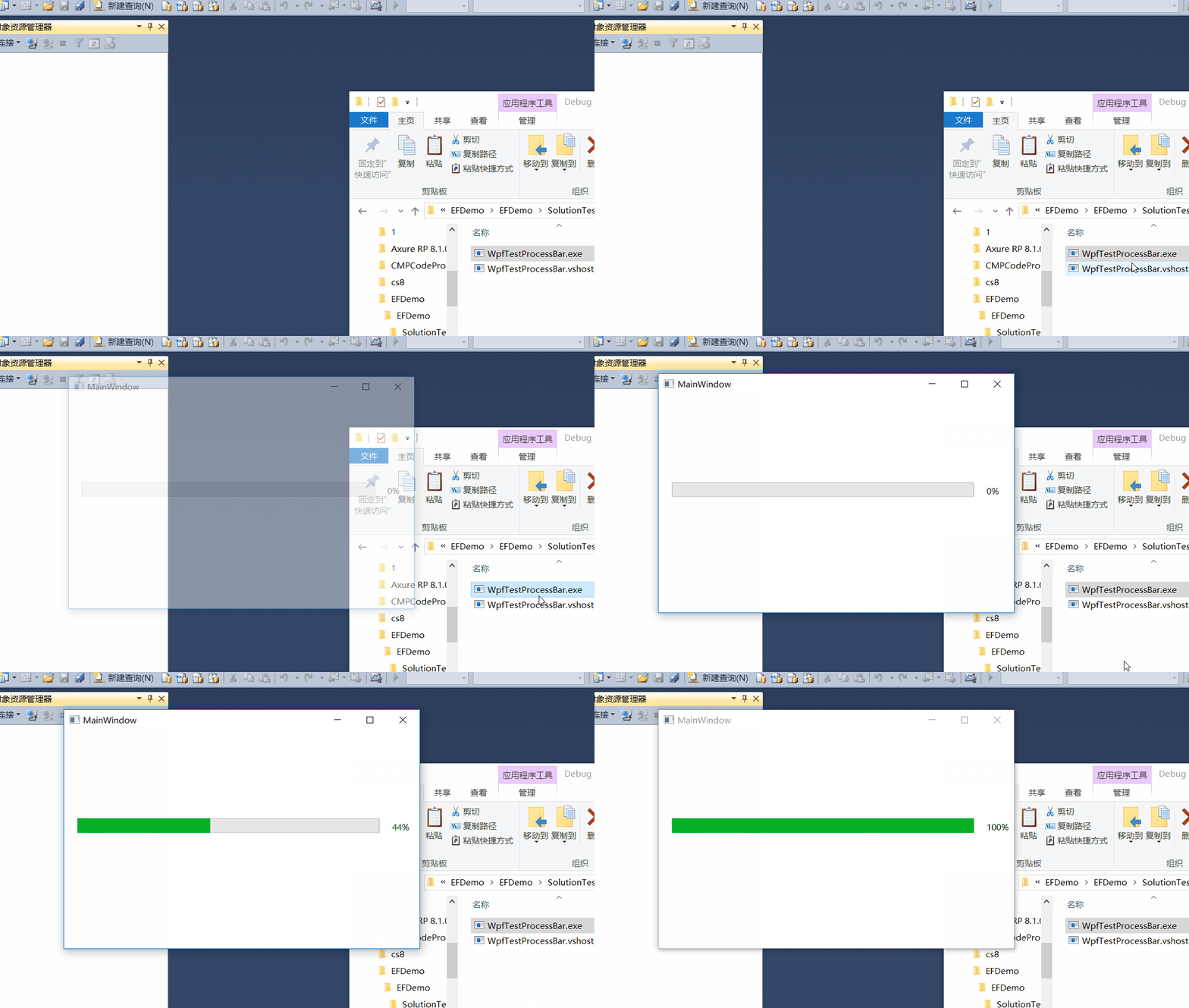
所以需要采用线程或者后台方式给进度条赋值的方式,以下通过线程来触发事件触发的方式来实现给进度条赋值。这样就可以模拟我们在实际过程中处理数据的一种进度方式。
方法示例:
using System;
using System.Collections.Generic;
using System.Linq;
using System.Text;
using System.Threading;
using System.Threading.Tasks;
using System.Windows;
using System.Windows.Controls;
using System.Windows.Data;
using System.Windows.Documents;
using System.Windows.Input;
using System.Windows.Media;
using System.Windows.Media.Imaging;
using System.Windows.Navigation;
using System.Windows.Shapes;

namespace WpfTestProcessBar
{
 /// <summary>
 /// MainWindow.xaml 的交互逻辑
 /// </summary>
 public partial class MainWindow : Window
 {
  public delegate void ProgressDelegate(int percent);
  public MainWindow()
  {
   InitializeComponent();
   ProgressEvent += MainWindow_ProgressEvent;
   beginImport();
  }
  void MainWindow_ProgressEvent(int percent)
  {
   Dispatcher.Invoke(new Action<System.Windows.DependencyProperty, object>(Pro.SetValue), System.Windows.Threading.DispatcherPriority.Background, new object[] { ProgressBar.ValueProperty, Convert.ToDouble(percent+ 1) });
   Dispatcher.Invoke(new Action<System.Windows.DependencyProperty, object>(label.SetValue), System.Windows.Threading.DispatcherPriority.Background, new object[] { Label.ContentProperty, Convert.ToString((percent + 1)+"%") });

  }
  private event ProgressDelegate ProgressEvent;
  private void beginImport()
  {
   Pro.Maximum = 100;
   Pro.Value = 0;
   label.Content = "0%";
   ThreadPool.QueueUserWorkItem(state =>
   {
    Thread.Sleep(2000);
    for (int i = 0; i < 100; i++)
    {
     if (ProgressEvent != null)
     {
      ProgressEvent(i);
     }
     Thread.Sleep(10);
    }
   });
  }
 }
}
以上只是一种实现方式,希望给有需要的人提供帮助。
效果如下:
总结
以上就是这篇文章的全部内容了,希望本文的内容对大家的学习或者工作具有一定的参考学习价值,
推荐阅读
- C#通过fleck实现wss协议的WebSocket多人Web实时聊天(附源码)
- 团队城市未满足要求:MSBuildTools12.0_x86_Path 存在
- 使用 MSBuild.exe 在发布模式下构建 C# 解决方案
- 当我发布 Web 应用程序时,AfterPublish 脚本不运行
- 构建时 T4 转换的产品仅在下一个构建中使用
- ASP.NET Core Application (.NET Framework) for Windows x64 only error in project.assets.json
- 新的 .csproj 格式 - 如何将整个目录指定为“链接文件"到子目录?
- 如何将条件编译符号(DefineConstants)传递给 msbuild
- MSBuild 支持 Visual Studio 2017 RTM 中的 T4 模板
- NuGet 包还原找不到包,没有源
热点文章

团队城市未满足要求:MSBuildTools12.0_x86_Path 存在
0
使用 MSBuild.exe 在发布模式下构建 C# 解决方案
0
当我发布 Web 应用程序时,AfterPublish 脚本不运行
0
构建时 T4 转换的产品仅在下一个构建中使用
0
ASP.NET Core Application (.NET Framework) for Windows x64 only error in project.assets.json
0
新的 .csproj 格式 - 如何将整个目录指定为“链接文件"到子目录?
0
如何将条件编译符号(DefineConstants)传递给 msbuild
0
MSBuild 支持 Visual Studio 2017 RTM 中的 T4 模板
0
NuGet 包还原找不到包,没有源
0
使用 C# 6.0 功能运行 TFS 构建
0
