
关于Unity C# Mathf.Abs()取绝对值性能测试详解
- 作者: 浮生若梦
- 来源: 51数据库
- 2020-08-08
这篇文章主要给大家介绍了关于Unity C# Mathf.Abs()取绝对值性能测试的相关资料,文中通过示例代码介绍的非常详细,对大家学习或者使用Unity C#具有一定的参考学习价值,需要的朋友们下面来一起学习学习吧
前言
之前有人提到过取绝对值时 直接写三目运算符比用Mathf.Abs()效率高 没觉得能高太多
今天测了一下 真是不测不知道 一测吓一跳 直接写三目运算符比Mathf.Abs()效率高2-3倍
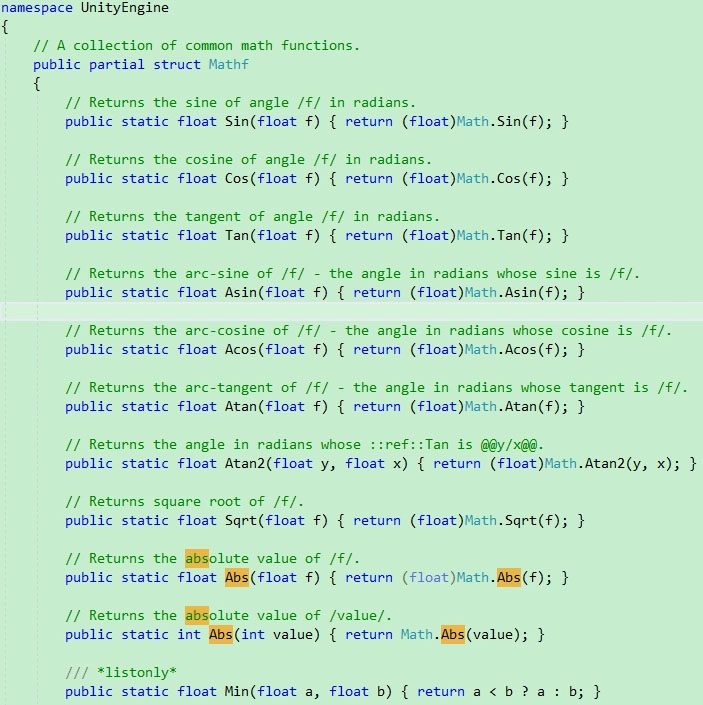
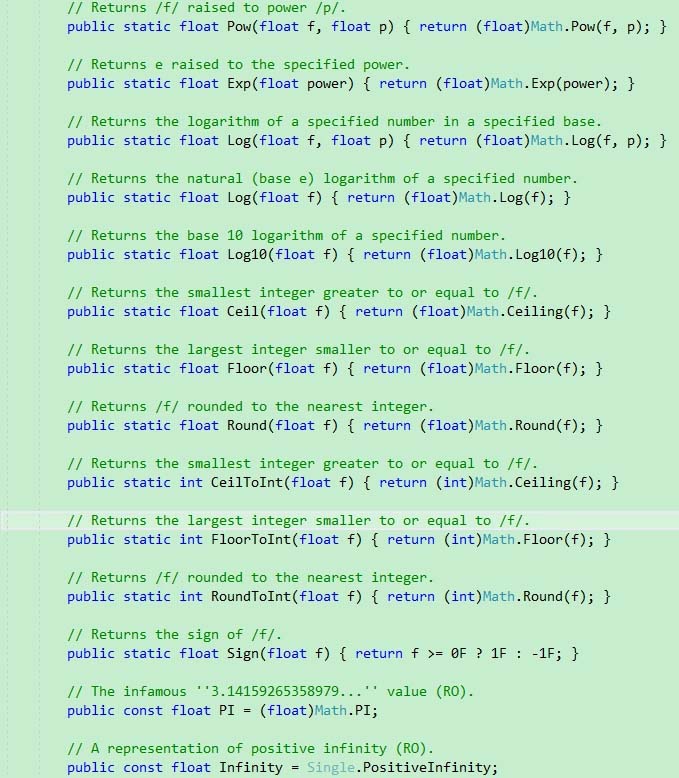
这性能差距有点不太合理啊! 看下源码发现 很多Mathf的方法就是多封装了一层Math里的方法 把double型转成float型了 即便很简单得方法也没有重新实现
官方有点偷懒了 所以性能差距才会这么大 以后要求性能高的地方要注意 老老实实写一遍 能提升不少性能
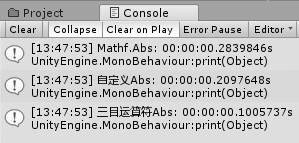
测试代码:
using UnityEngine;
using UnityEditor;
using System.Diagnostics;

/// <summary>
/// 执行时间测试
/// ZhangYu 2019-04-04
/// </summary>
public class TimeTest : MonoBehaviour {

 public int executeTimes = 1;
 private static Stopwatch watch;

 private void OnValidate() {
 times = executeTimes;
 }

 private static int times = 1;
 [MenuItem("CONTEXT/TimeTest/执行")]
 private static void Execute() {
 watch = new Stopwatch();

 // 数据
 float a = 1;

 // Mathf.Abs
 watch.Reset();
 watch.Start();
 for (int i = 0; i < times; i++) {
 a = Mathf.Abs(a);
 }
 watch.Stop();
 string msgMathfAbs = string.Format("Mathf.Abs: {0}s", watch.Elapsed);

 // 自己实现Abs
 watch.Reset();
 watch.Start();
 for (int i = 0; i < times; i++) {
 a = MyAbs(a);
 }
 watch.Stop();
 string msgMyAbs = string.Format("自定义Abs: {0}s", watch.Elapsed);

 // 三目运算符Abs
 watch.Reset();
 watch.Start();
 for (int i = 0; i < times; i++) {
 a = a < 0 ? -a : a;
 }
 watch.Stop();
 string msg3Abs = string.Format("三目运算符Abs: {0}s", watch.Elapsed);

 print(msgMathfAbs);
 print(msgMyAbs);
 print(msg3Abs);
 }

 // == 执行次数:10000000

 // Mathf.Abs
 // (1)0.2803558s
 // (2)0.2837749s
 // (3)0.2831089s
 // (4)0.2829929s
 // (5)0.2839846s

 // 自定义Abs
 // (1)0.2162217s
 // (2)0.2103635s
 // (3)0.2103390s
 // (4)0.2092863s
 // (5)0.2097648s
 private static float MyAbs(float a) {
 return a < 0 ? -a : a;
 }

 // 三目运算符Abs
 // (1)0.0893028s
 // (2)0.1000181s
 // (3)0.1017959s
 // (4)0.1001749s
 // (5)0.1005737s

}
Mathf.Abs()源码:
// Returns the absolute value of /f/.
public static float Abs(float f) { return (float)Math.Abs(f); }

// Returns the absolute value of /value/.
public static int Abs(int value) { return Math.Abs(value); }
官方Mathf部分源码:
更高性能取绝对值方法:
https://www.jb51.net/article/159706.htm...
总结
以上就是这篇文章的全部内容了,希望本文的内容对大家的学习或者工作具有一定的参考学习价值,
推荐阅读
- C#通过fleck实现wss协议的WebSocket多人Web实时聊天(附源码)
- 团队城市未满足要求:MSBuildTools12.0_x86_Path 存在
- 使用 MSBuild.exe 在发布模式下构建 C# 解决方案
- 当我发布 Web 应用程序时,AfterPublish 脚本不运行
- 构建时 T4 转换的产品仅在下一个构建中使用
- ASP.NET Core Application (.NET Framework) for Windows x64 only error in project.assets.json
- 新的 .csproj 格式 - 如何将整个目录指定为“链接文件"到子目录?
- 如何将条件编译符号(DefineConstants)传递给 msbuild
- MSBuild 支持 Visual Studio 2017 RTM 中的 T4 模板
- NuGet 包还原找不到包,没有源
热点文章

团队城市未满足要求:MSBuildTools12.0_x86_Path 存在
0
使用 MSBuild.exe 在发布模式下构建 C# 解决方案
0
当我发布 Web 应用程序时,AfterPublish 脚本不运行
0
构建时 T4 转换的产品仅在下一个构建中使用
0
ASP.NET Core Application (.NET Framework) for Windows x64 only error in project.assets.json
0
新的 .csproj 格式 - 如何将整个目录指定为“链接文件"到子目录?
0
如何将条件编译符号(DefineConstants)传递给 msbuild
0
MSBuild 支持 Visual Studio 2017 RTM 中的 T4 模板
0
NuGet 包还原找不到包,没有源
0
使用 C# 6.0 功能运行 TFS 构建
0
