
C#拷贝整个文件夹及子目录和其中文件的方法
- 作者: N年卜洗澡
- 来源: 51数据库
- 2020-08-10
这篇文章主要介绍了C#拷贝整个文件夹以及子目录和其中文件,本文通过实例代码给大家介绍的非常详细,具有一定的参考借鉴价值,需要的朋友可以参考下
下面一段代码给大家介绍C#拷贝整个文件夹以及子目录和其中文件,具体代码如下所示:
private void CopyDirectory( string srcPath, string desPath)
   {
    string folderName = srcdir.Substring(srcdir.LastIndexOf( "\" )+1);
    string desfolderdir = desPath + "\" + folderName;
    if (desdir.LastIndexOf( "\" ) == (desPath.Length - 1))
    {
     desfolderdir = desPath + folderName;
    }
    string [] filenames = Directory.GetFileSystemEntries(srcPath);
    foreach ( string file in filenames)
    {
     if (Directory.Exists(file))
     {
      string currentdir = desfolderdir + "\" + file.Substring(file.LastIndexOf( "\" ) + 1);
      if (!Directory.Exists(currentdir))
      {
       Directory.CreateDirectory(currentdir);
      }
      CopyDirectory(file, desfolderdir);
     }
     else
     {
      string srcfileName = file.Substring(file.LastIndexOf( "\" )+1);
      srcfileName = desfolderdir + "\" + srcfileName;
      if (!Directory.Exists(desfolderdir))
      {
       Directory.CreateDirectory(desfolderdir);
      }

      File.Copy(file, srcfileName);
     }
    }
   }
ps:C# 拷贝指定文件夹下的所有文件及其文件夹到指定目录
要拷贝的文件及其文件夹结构
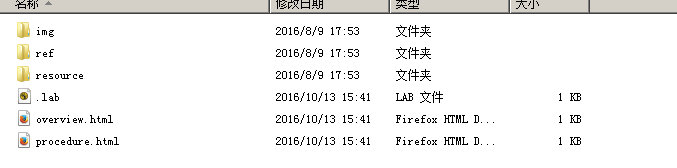
其中.lab文件不能覆盖
/// <summary>
/// 拷贝oldlab的文件到newlab下面
/// </summary>
/// <param name="sourcePath">lab文件所在目录(@"~\labs\oldlab")</param>
/// <param name="savePath">保存的目标目录(@"~\labs\newlab")</param>
/// <returns>返回:true-拷贝成功;false:拷贝失败</returns>
public bool CopyOldLabFilesToNewLab(string sourcePath, string savePath)
{
  if (!Directory.Exists(savePath))
  {
    Directory.CreateDirectory(savePath);
  }
  #region //拷贝labs文件夹到savePath下
  try
  {
    string[] labDirs = Directory.GetDirectories(sourcePath);//目录
    string[] labFiles = Directory.GetFiles(sourcePath);//文件
    if (labFiles.Length > 0)
    {
      for (int i = 0; i < labFiles.Length; i++)
      {
        if (Path.GetExtension(labFiles[i]) != ".lab")//排除.lab文件
        {
          File.Copy(sourcePath + "\" + Path.GetFileName(labFiles[i]), savePath + "\" + Path.GetFileName(labFiles[i]), true);
        }
      }
    }
    if (labDirs.Length > 0)
    {
      for (int j = 0; j < labDirs.Length; j++)
      {
        Directory.GetDirectories(sourcePath + "\" + Path.GetFileName(labDirs[j]));
        //递归调用
        CopyOldLabFilesToNewLab(sourcePath + "\" + Path.GetFileName(labDirs[j]), savePath + "\" + Path.GetFileName(labDirs[j]));
      }
    }
  }
  catch (Exception)
  {
    return false;
  }
  #endregion
  return true;
}
推荐阅读
- C#通过fleck实现wss协议的WebSocket多人Web实时聊天(附源码)
- 团队城市未满足要求:MSBuildTools12.0_x86_Path 存在
- 使用 MSBuild.exe 在发布模式下构建 C# 解决方案
- 当我发布 Web 应用程序时,AfterPublish 脚本不运行
- 构建时 T4 转换的产品仅在下一个构建中使用
- ASP.NET Core Application (.NET Framework) for Windows x64 only error in project.assets.json
- 新的 .csproj 格式 - 如何将整个目录指定为“链接文件"到子目录?
- 如何将条件编译符号(DefineConstants)传递给 msbuild
- MSBuild 支持 Visual Studio 2017 RTM 中的 T4 模板
- NuGet 包还原找不到包,没有源
热点文章

团队城市未满足要求:MSBuildTools12.0_x86_Path 存在
0
使用 MSBuild.exe 在发布模式下构建 C# 解决方案
0
当我发布 Web 应用程序时,AfterPublish 脚本不运行
0
构建时 T4 转换的产品仅在下一个构建中使用
0
ASP.NET Core Application (.NET Framework) for Windows x64 only error in project.assets.json
0
新的 .csproj 格式 - 如何将整个目录指定为“链接文件"到子目录?
0
如何将条件编译符号(DefineConstants)传递给 msbuild
0
MSBuild 支持 Visual Studio 2017 RTM 中的 T4 模板
0
NuGet 包还原找不到包,没有源
0
使用 C# 6.0 功能运行 TFS 构建
0
