
C#窗体间常用的几种传值方式及委托与事件详解
- 作者: 请叫我的男神
- 来源: 51数据库
- 2020-08-10
这篇文章主要给大家介绍了关于C#窗体间常用的几种传值方式及委托与事件的相关资料,文中通过示例代码介绍的非常详细,对大家学习或者使用小程序具有一定的参考学习价值,需要的朋友们下面来一起学习学习吧
前言
窗体间的传值,最好使用委托方式传值,开始之前,我们先来说一下委托与事件的关系。
委托:是一个类。
事件:是委托类型的一个特殊实例,只能在类的内部触发执行。
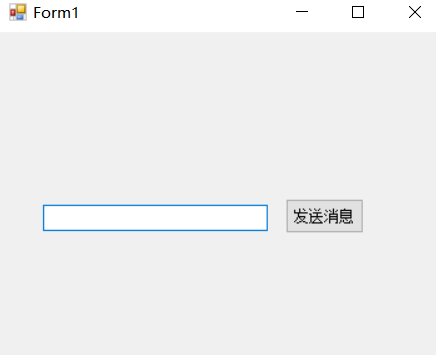
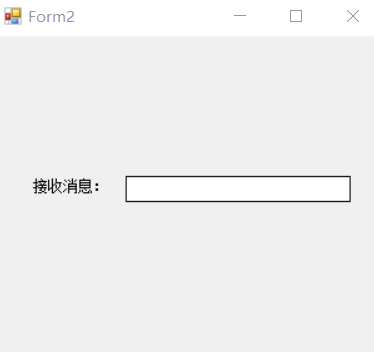
首先创建2个窗体,这里我们以form1为发送窗体,form2为接收窗体
form1窗体
form2窗体
方式一(最简单的方式)
form1窗体代码
using System;
using System.Collections.Generic;
using System.ComponentModel;
using System.Data;
using System.Drawing;
using System.Linq;
using System.Text;
using System.Threading.Tasks;
using System.Windows.Forms;


namespace 事件的方式实现窗体间传值
{
 public partial class Form1 : Form
 {
 public Form1()
 {
  InitializeComponent();
 }
 public Form2 msgFrm { get; set; }
 private void Form1_Load(object sender, EventArgs e)
 {
  Form2 f2 = new Form2();
  msgFrm = f2;
  f2.Show();
 }

 private void btnSendMsg_Click(object sender, EventArgs e)
 {
  //对象内部的,字段或者元素属性最好不要直接让外部直接访问
  //最好是通过,设置的方法来控制一下
  msgFrm.SetTxt(this.txtMsg.Text);

 }
 }
}
form2窗体代码
using System;
using System.Collections.Generic;
using System.ComponentModel;
using System.Data;
using System.Drawing;
using System.Linq;
using System.Text;
using System.Threading.Tasks;
using System.Windows.Forms;

namespace 事件的方式实现窗体间传值
{
 public partial class Form2 : Form
 {
  public Form2()
  {
   InitializeComponent();
  }
  public void SetTxt(string txt)
  {
   this.txtMsg.Text = txt;
  }
 }
}
方式二(委托方式)
注:委托不熟悉的宝宝们,请自行查阅Func与Action,以及delegate三者区别,这里我们用系统内置的委托Action
form1窗体代码
using System;
using System.Collections.Generic;
using System.ComponentModel;
using System.Data;
using System.Drawing;
using System.Linq;
using System.Text;
using System.Threading.Tasks;
using System.Windows.Forms;


namespace 事件的方式实现窗体间传值
{
 public partial class Form1 : Form
 {
  public Form1()
  {
   InitializeComponent();
  }
  //定义委托
  public Action<string> afterMsgSend { get; set; }
  private void Form1_Load(object sender, EventArgs e)
  {
   Form2 f2 = new Form2();
   afterMsgSend += f2.SetTxt; //给系统内置的委托注册事件
   f2.Show();
  }

  private void btnSendMsg_Click(object sender, EventArgs e)
  {
   if (afterMsgSend == null)
   {
    return;
   }
   afterMsgSend(this.txtMsg.Text);
  }
 }
}
form2窗体代码
using System;
using System.Collections.Generic;
using System.ComponentModel;
using System.Data;
using System.Drawing;
using System.Linq;
using System.Text;
using System.Threading.Tasks;
using System.Windows.Forms;

namespace 事件的方式实现窗体间传值
{
 public partial class Form2 : Form
 {
  public Form2()
  {
   InitializeComponent();
  }
  public void SetTxt(string txt)
  {
   this.txtMsg.Text = txt;
  }
 }
}
方式三(事件方式,更安全哟)
TextBoxMsgChangeEventArg类继承EventArgs代码
using System;
using System.Collections.Generic;
using System.Linq;
using System.Text;
using System.Threading.Tasks;

namespace 事件的方式实现窗体间传值
{
 public class TextBoxMsgChangeEventArg:EventArgs
 {
  public string Text { get; set; }
 }
}
form1窗体代码
using System;
using System.Collections.Generic;
using System.ComponentModel;
using System.Data;
using System.Drawing;
using System.Linq;
using System.Text;
using System.Threading.Tasks;
using System.Windows.Forms;


namespace 事件的方式实现窗体间传值
{
 public partial class Form1 : Form
 {
  public Form1()
  {
   InitializeComponent();
  }
  public event EventHandler AfterMsgChange;
  private void Form1_Load(object sender, EventArgs e)
  {
   Form2 f2 = new Form2();
   AfterMsgChange += f2.AfterTxtChange;
   f2.Show();
  }
  private void btnSendMsg_Click(object sender, EventArgs e)
  {
   AfterMsgChange(this, new TextBoxMsgChangeEventArg() { Text = this.txtMsg.Text });
  }
 }
}
form2窗体
using System;
using System.Collections.Generic;
using System.ComponentModel;
using System.Data;
using System.Drawing;
using System.Linq;
using System.Text;
using System.Threading.Tasks;
using System.Windows.Forms;

namespace 事件的方式实现窗体间传值
{
 public partial class Form2 : Form
 {
  public Form2()
  {
   InitializeComponent();
  }
  public void AfterTxtChange(object sender,EventArgs e)
  {
   //拿到父窗体传来的文本,强转数据类型
   TextBoxMsgChangeEventArg arg = e as TextBoxMsgChangeEventArg;
   this.SetTxt(arg.Text);
  }
 }
}
总结
以上就是这篇文章的全部内容了,希望本文的内容对大家的学习或者工作具有一定的参考学习价值,
推荐阅读
- C#通过fleck实现wss协议的WebSocket多人Web实时聊天(附源码)
- 团队城市未满足要求:MSBuildTools12.0_x86_Path 存在
- 使用 MSBuild.exe 在发布模式下构建 C# 解决方案
- 当我发布 Web 应用程序时,AfterPublish 脚本不运行
- 构建时 T4 转换的产品仅在下一个构建中使用
- ASP.NET Core Application (.NET Framework) for Windows x64 only error in project.assets.json
- 新的 .csproj 格式 - 如何将整个目录指定为“链接文件"到子目录?
- 如何将条件编译符号(DefineConstants)传递给 msbuild
- MSBuild 支持 Visual Studio 2017 RTM 中的 T4 模板
- NuGet 包还原找不到包,没有源
热点文章

团队城市未满足要求:MSBuildTools12.0_x86_Path 存在
0
使用 MSBuild.exe 在发布模式下构建 C# 解决方案
0
当我发布 Web 应用程序时,AfterPublish 脚本不运行
0
构建时 T4 转换的产品仅在下一个构建中使用
0
ASP.NET Core Application (.NET Framework) for Windows x64 only error in project.assets.json
0
新的 .csproj 格式 - 如何将整个目录指定为“链接文件"到子目录?
0
如何将条件编译符号(DefineConstants)传递给 msbuild
0
MSBuild 支持 Visual Studio 2017 RTM 中的 T4 模板
0
NuGet 包还原找不到包,没有源
0
使用 C# 6.0 功能运行 TFS 构建
0
