
c# 接口使用实例
- 作者: 巧木露琪亚
- 来源: 51数据库
- 2021-08-30
用接口实现一个简单的物件的入库,出库
如定义一个物流类接口,包含物件所属快递公司名称属性,物件单号属性及信息显示方法。通过物件出库类信息和物件入库类信息继承该接口。
文档接口如下:
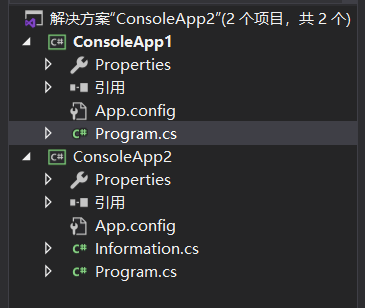
如下:
(一)接口定义
//定义一个接口imyinterface
    interface imyinterface {

      void commodityinformation();//定义一个快递信息显示方法
      string id { get; set; }//定义一个快递单号属性
      string name { get; set; }///定义一个快递所属快递公司名称属性
    }
(二)物件入库类
//入库类
    public class inbound : imyinterface
    {

      string id = "";
      string name = "";

      public string id {

        get { return id; }
        set { id = value; }
      }
      public string name {

        get { return name; }
        set { name = value; }
      }
      void imyinterface.commodityinformation()
      {

        console.writeline("入库信息:\n" + "物件单号:" + id + " " + "所属快递公司:" + name);
      }
    }
(三)物件出库类
//出库类
    public class outbound : imyinterface {

      string id = "";
      string name = "";

      public string id {

        get { return id; }
        set { id = value; }
      }

      public string name {

        get { return name; }
        set { name = value; }
      }

      void imyinterface.commodityinformation() {

        console.writeline("出库信息:\n" + "物件单号:" + id + " " + "所属快递公司:" + name);
      }
    }
(四)调用接口,实现结果
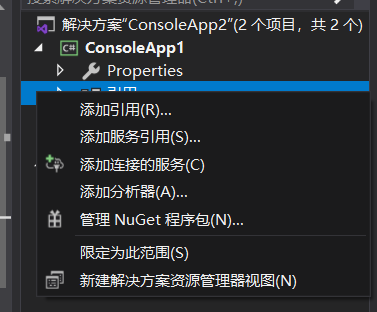
1,所先要引用consoleapp2如下
2,调用接口:
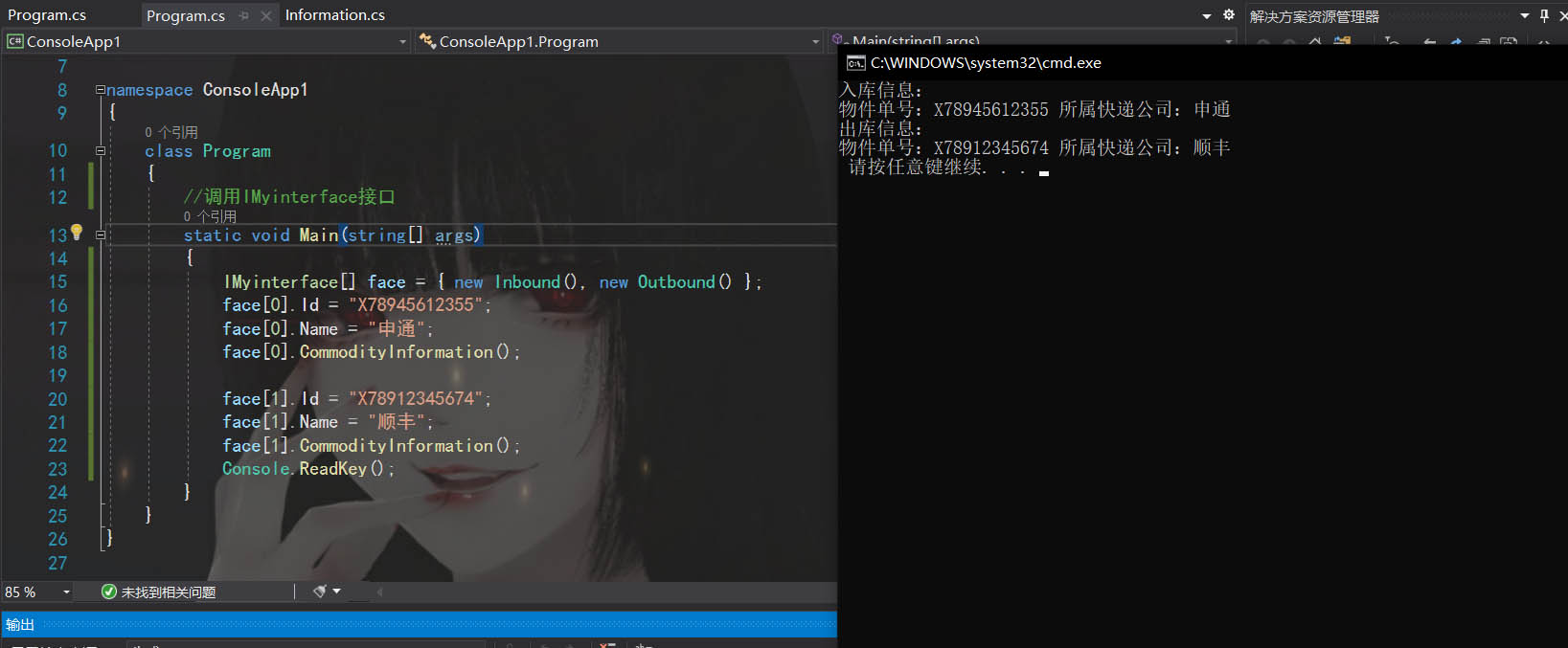
static void main(string[] args)
    {
      imyinterface[] face = { new inbound(), new outbound() };
      face[0].id = "x78945612355";
      face[0].name = "申通";
      face[0].commodityinformation();

      face[1].id = "x78912345674";
      face[1].name = "顺丰";
      face[1].commodityinformation();
      console.readkey();
    }
3,实现结果如下:
以上就是c# 接口使用实例的详细内容,更多关于c# 接口使用的资料请关注其它相关文章!
推荐阅读
- C#通过fleck实现wss协议的WebSocket多人Web实时聊天(附源码)
- 团队城市未满足要求:MSBuildTools12.0_x86_Path 存在
- 使用 MSBuild.exe 在发布模式下构建 C# 解决方案
- 当我发布 Web 应用程序时,AfterPublish 脚本不运行
- 构建时 T4 转换的产品仅在下一个构建中使用
- ASP.NET Core Application (.NET Framework) for Windows x64 only error in project.assets.json
- 新的 .csproj 格式 - 如何将整个目录指定为“链接文件"到子目录?
- 如何将条件编译符号(DefineConstants)传递给 msbuild
- MSBuild 支持 Visual Studio 2017 RTM 中的 T4 模板
- NuGet 包还原找不到包,没有源
热点文章

团队城市未满足要求:MSBuildTools12.0_x86_Path 存在
0
使用 MSBuild.exe 在发布模式下构建 C# 解决方案
0
当我发布 Web 应用程序时,AfterPublish 脚本不运行
0
构建时 T4 转换的产品仅在下一个构建中使用
0
ASP.NET Core Application (.NET Framework) for Windows x64 only error in project.assets.json
0
新的 .csproj 格式 - 如何将整个目录指定为“链接文件"到子目录?
0
如何将条件编译符号(DefineConstants)传递给 msbuild
0
MSBuild 支持 Visual Studio 2017 RTM 中的 T4 模板
0
NuGet 包还原找不到包,没有源
0
使用 C# 6.0 功能运行 TFS 构建
0
