
Unity UGUI实现滑动翻页直接跳转页数
- 作者: z楠宝
- 来源: 51数据库
- 2021-07-12
本文实例为大家分享了unity ugui实现滑动翻页,直接跳转页数的具体代码,供大家参考,具体内容如下
首先看一下最终效果

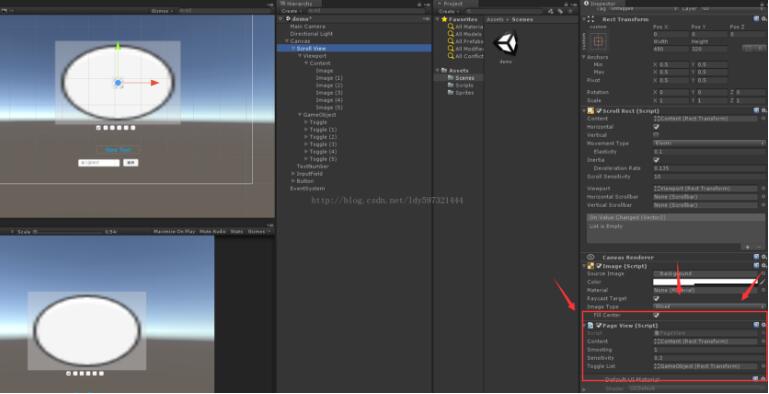
其实这个功能基本上是老生常谈了,所以代码还是很简单
using unityengine;
using system.collections;
using unityengine.ui;
using system.collections.generic;
using unityengine.eventsystems;
using system;

public class pageview : monobehaviour, ibegindraghandler, ienddraghandler
{

 private scrollrect rect;      //滑动组件
 private float targethorizontal = 0;    //滑动的起始坐标
 private bool isdrag = false;     //是否拖拽结束
 private list<float> poslist = new list<float>();   //求出每页的临界角,页索引从0开始
 private int currentpageindex = -1;
 public action<int> onpagechanged;
 public recttransform content;
 private bool stopmove = true;
 public float smooting = 4;  //滑动速度
 public float sensitivity = 0;
 private float starttime;

 private float startdraghorizontal;
 public transform togglelist;

 void start()
 {
  rect = transform.getcomponent<scrollrect>();
  var _rectwidth = getcomponent<recttransform>();
  var tempwidth = ((float)content.transform.childcount * _rectwidth.rect.width);
  content.sizedelta = new vector2(tempwidth, _rectwidth.rect.height);
  //未显示的长度
  float horizontallength = content.rect.width - _rectwidth.rect.width;
  for (int i = 0; i < rect.content.transform.childcount; i++)
  {
   poslist.add(_rectwidth.rect.width * i / horizontallength);
  }
 }

 void update()
 {
  if (!isdrag && !stopmove)
  {
   starttime += time.deltatime;
   float t = starttime * smooting;
   rect.horizontalnormalizedposition = mathf.lerp(rect.horizontalnormalizedposition, targethorizontal, t);
   if (t >= 1)
    stopmove = true;
  }
  //debug.log(rect.horizontalnormalizedposition);
 }

 public void pageto(int index)
 {
  if (index >= 0 && index < poslist.count)
  {
   rect.horizontalnormalizedposition = poslist[index];
   setpageindex(index);
   getindex(index);
  }
 }
 private void setpageindex(int index)
 {
  if (currentpageindex != index)
  {
   currentpageindex = index;
   if (onpagechanged != null)
    onpagechanged(index);
  }
 }

 public void onbegindrag(pointereventdata eventdata)
 {
  isdrag = true;
  //开始拖动
  startdraghorizontal = rect.horizontalnormalizedposition;
 }

 public void onenddrag(pointereventdata eventdata)
 {
  float posx = rect.horizontalnormalizedposition;
  posx += ((posx - startdraghorizontal) * sensitivity);
  posx = posx < 1 ? posx : 1;
  posx = posx > 0 ? posx : 0;
  int index = 0;

  float offset = mathf.abs(poslist[index] - posx);
  //debug.log("offset " + offset);


  for (int i = 1; i < poslist.count; i++)
  {
   float temp = mathf.abs(poslist[i] - posx);
   //debug.log("temp " + temp);
   //debug.log("i" + i);
   if (temp < offset)
   {
    index = i;
    offset = temp;
   }
   //debug.log("index " + index);
  }
  //debug.log(index);
  setpageindex(index);
  getindex(index);
  targethorizontal = poslist[index]; //设置当前坐标,更新函数进行插值
  isdrag = false;
  starttime = 0;
  stopmove = false;

 }

 public void getindex(int index)
 {
  var toogle = togglelist.getchild(index).getcomponent<toggle>();
  toogle.ison = true;
 }
}
using unityengine;
using system.collections;
using unityengine.ui;
using system;

public class gamecontroller : monobehaviour {
 [serializefield]
 private text pagenumber;
 [serializefield]
 private inputfield inputfield;
 [serializefield]
 private pageview pageview;
 // use this for initialization
 void start () {
  pagenumber.text = string.format ("当前页码:0");
  pageview.onpagechanged = pagechanged;
 }

 void pagechanged (int index) {
  pagenumber.text = string.format ("当前页码:{0}" , index.tostring ());
 }

 public void onclick () {
  try {
   int idnex = int.parse (inputfield.text);
   pageview.pageto (idnex);
  } catch(exception ex) {
   debug.logwarning ("请输入数字"+ex.tostring());
  }
 }

 void destroy () {
  pageview.onpagechanged = null;
 }
}
附上项目:地址
以上就是本文的全部内容,希望对大家的学习有所帮助,也希望大家多多支持。
推荐阅读
- C#通过fleck实现wss协议的WebSocket多人Web实时聊天(附源码)
- 团队城市未满足要求:MSBuildTools12.0_x86_Path 存在
- 使用 MSBuild.exe 在发布模式下构建 C# 解决方案
- 当我发布 Web 应用程序时,AfterPublish 脚本不运行
- 构建时 T4 转换的产品仅在下一个构建中使用
- ASP.NET Core Application (.NET Framework) for Windows x64 only error in project.assets.json
- 新的 .csproj 格式 - 如何将整个目录指定为“链接文件"到子目录?
- 如何将条件编译符号(DefineConstants)传递给 msbuild
- MSBuild 支持 Visual Studio 2017 RTM 中的 T4 模板
- NuGet 包还原找不到包,没有源
热点文章

团队城市未满足要求:MSBuildTools12.0_x86_Path 存在
0
使用 MSBuild.exe 在发布模式下构建 C# 解决方案
0
当我发布 Web 应用程序时,AfterPublish 脚本不运行
0
构建时 T4 转换的产品仅在下一个构建中使用
0
ASP.NET Core Application (.NET Framework) for Windows x64 only error in project.assets.json
0
新的 .csproj 格式 - 如何将整个目录指定为“链接文件"到子目录?
0
如何将条件编译符号(DefineConstants)传递给 msbuild
0
MSBuild 支持 Visual Studio 2017 RTM 中的 T4 模板
0
NuGet 包还原找不到包,没有源
0
使用 C# 6.0 功能运行 TFS 构建
0
