
Unity3D基于UGUI实现虚拟摇杆
- 作者: 抱着嫦娥烤玉兔24484406
- 来源: 51数据库
- 2021-08-11
虚拟摇杆在移动游戏开发中,是很常见的需求,今天我们在unity中,使用ugui来实现一个简单的虚拟摇杆功能。
1.打开unity,新创建一个uijoystick.cs脚本,代码如下:
using unityengine;
using unityengine.eventsystems;

public class uijoystick : monobehaviour, idraghandler, ienddraghandler
{
  /// <summary>
 /// 被用户拖动的操纵杆
  /// </summary>
  public transform target;

  /// <summary>
 /// 操纵杆可移动的最大半径
  /// </summary>
  public float radius = 50f;

  /// <summary>
 /// 当前操纵杆在2d空间的x,y位置
  /// 摇杆按钮的值【-1,1】之间
  /// </summary>
  public vector2 position;

 //操纵杆的recttransform组件
 private recttransform thumb;

 void start()
 {
 thumb = target.getcomponent<recttransform>();
 }

  /// <summary>
 /// 当操纵杆被拖动时触发
  /// </summary>
  public void ondrag(pointereventdata data)
 {
 //获取摇杆的recttransform组件,以检测操纵杆是否在摇杆内移动
 recttransform draggingplane = transform as recttransform;
 vector3 mousepos;

 //检查拖动的位置是否在拖动rect内,
 //然后设置全局鼠标位置并将其分配给操纵杆
 if (recttransformutility.screenpointtoworldpointinrectangle (draggingplane, data.position, data.presseventcamera, out mousepos)) {
  thumb.position = mousepos;
 }

 //触摸向量的长度(大小)
 //计算操作杆的相对位置
 float length = target.localposition.magnitude;

 //如果操纵杆超过了摇杆的范围,则将操纵杆设置为最大半径
 if (length > radius) {
  target.localposition = vector3.clampmagnitude (target.localposition, radius);
 }

 //在inspector显示操纵杆位置
 position = target.localposition;
 //将操纵杆相对位置映射到【-1,1】之间
 position = position / radius * mathf.inverselerp (radius, 2, 1);
 }
  /// <summary>
 /// 当操纵杆结束拖动时触发
  /// </summary>
  public void onenddrag(pointereventdata data)
 {
 //拖拽结束,将操纵杆恢复到默认位置
 position = vector2.zero;
 target.position = transform.position;
 }
}
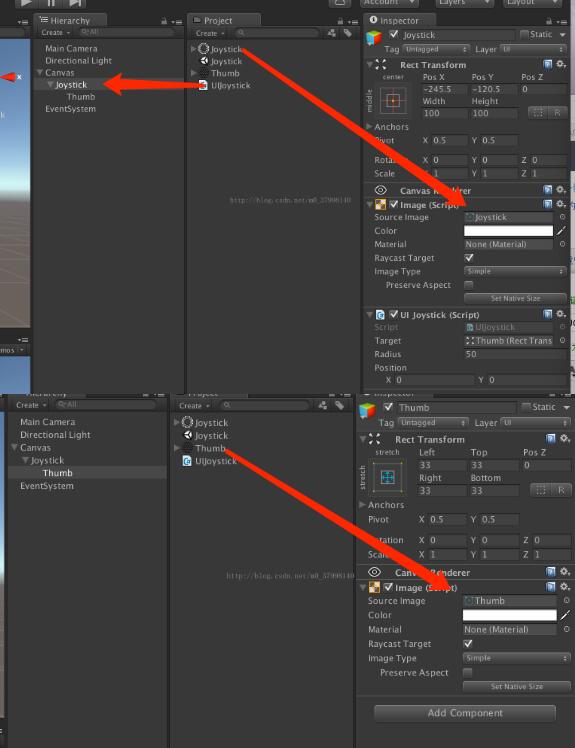
2.如图创建ugui,所用资源可在网上自行下载。
效果图如下:
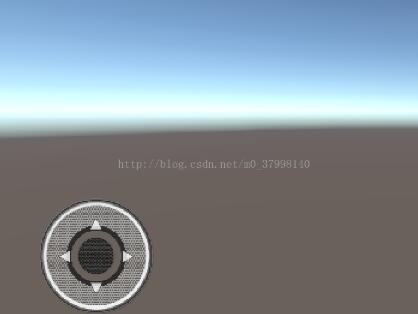
3.打包运行即可。这样一个简单的虚拟摇杆就实现了。
下面是对以上虚拟摇杆代码的扩展(ps:只是多了一些事件,便于其他脚本访问使用)废话不多说来代码了
using system;
using unityengine;
using unityengine.ui;
using unityengine.eventsystems;


//
// joystick component for controlling player movement and actions using unity ui events.
// there can be multiple joysticks on the screen at the same time, implementing different callbacks.
//
public class uijoystick : monobehaviour, ibegindraghandler, idraghandler, ienddraghandler
{
  ///
  /// callback triggered when joystick starts moving by user input.
  ///
  public event action ondragbegin;

  ///
  /// callback triggered when joystick is moving or hold down.
  ///
  public event action ondrag;

  ///
  /// callback triggered when joystick input is being released.
  ///
  public event action ondragend;

  ///
  /// the target object i.e. jostick thumb being dragged by the user.
  ///
  public transform target;

  ///
  /// maximum radius for the target object to be moved in distance from the center.
  ///
  public float radius = 50f;

  ///
  /// current position of the target object on the x and y axis in 2d space.
  /// values are calculated in the range of [-1, 1] translated to left/down right/up.
  ///
  public vector2 position;

  //keeping track of current drag state
  private bool isdragging = false;

  //reference to thumb being dragged around
 private recttransform thumb;

  //initialize variables
 void start()
 {
 thumb = target.getcomponent();

 //in the editor, disable input received by joystick graphics:
    //we want them to be visible but not receive or block any input
 #if unity_editor
  graphic[] graphics = getcomponentsinchildren();
 // for(int i = 0; i < graphics.length; i++)
 // graphics[i].raycasttarget = false;
 #endif
 }

  ///
  /// event fired by ui eventsystem on drag start.
  ///
  public void onbegindrag(pointereventdata data)
  {
    isdragging = true;
    if(ondragbegin != null)
      ondragbegin();
  }

  ///
  /// event fired by ui eventsystem on drag.
  ///
  public void ondrag(pointereventdata data)
  {
    //get recttransforms of involved components
    recttransform draggingplane = transform as recttransform;
    vector3 mousepos;

    //check whether the dragged position is inside the dragging rect,
    //then set global mouse position and assign it to the joystick thumb
    if (recttransformutility.screenpointtoworldpointinrectangle(draggingplane, data.position, data.presseventcamera, out mousepos))
    {
      thumb.position = mousepos;
    }

    //length of the touch vector (magnitude)
    //calculated from the relative position of the joystick thumb
    float length = target.localposition.magnitude;

    //if the thumb leaves the joystick's boundaries,
    //clamp it to the max radius
    if (length > radius)
    {
      target.localposition = vector3.clampmagnitude(target.localposition, radius);
    }

    //set the vector2 thumb position based on the actual sprite position
    position = target.localposition;
    //smoothly lerps the vector2 thumb position based on the old positions
    position = position / radius * mathf.inverselerp(radius, 2, 1);
  }

  //set joystick thumb position to drag position each frame
  void update()
  {
    //in the editor the joystick position does not move, we have to simulate it
 //mirror player input to joystick position and calculate thumb position from that
 #if unity_editor
  target.localposition = position * radius;
  target.localposition = vector3.clampmagnitude(target.localposition, radius);
 #endif

    //check for actual drag state and fire callback. we are doing this in update(),
    //not ondrag, because ondrag is only called when the joystick is moving. but we
    //actually want to keep moving the player even though the jostick is being hold down
    if(isdragging && ondrag != null)
      ondrag(position);
  }

  ///
  /// event fired by ui eventsystem on drag end.
  ///
  public void onenddrag(pointereventdata data)
  {
    //we aren't dragging anymore, reset to default position
    position = vector2.zero;
    target.position = transform.position;

    //set dragging to false and fire callback
    isdragging = false;
    if (ondragend != null)
      ondragend();
  }
}
以上就是本文的全部内容,希望对大家的学习有所帮助,也希望大家多多支持。
推荐阅读
- C#通过fleck实现wss协议的WebSocket多人Web实时聊天(附源码)
- 团队城市未满足要求:MSBuildTools12.0_x86_Path 存在
- 使用 MSBuild.exe 在发布模式下构建 C# 解决方案
- 当我发布 Web 应用程序时,AfterPublish 脚本不运行
- 构建时 T4 转换的产品仅在下一个构建中使用
- ASP.NET Core Application (.NET Framework) for Windows x64 only error in project.assets.json
- 新的 .csproj 格式 - 如何将整个目录指定为“链接文件"到子目录?
- 如何将条件编译符号(DefineConstants)传递给 msbuild
- MSBuild 支持 Visual Studio 2017 RTM 中的 T4 模板
- NuGet 包还原找不到包,没有源
热点文章

团队城市未满足要求:MSBuildTools12.0_x86_Path 存在
0
使用 MSBuild.exe 在发布模式下构建 C# 解决方案
0
当我发布 Web 应用程序时,AfterPublish 脚本不运行
0
构建时 T4 转换的产品仅在下一个构建中使用
0
ASP.NET Core Application (.NET Framework) for Windows x64 only error in project.assets.json
0
新的 .csproj 格式 - 如何将整个目录指定为“链接文件"到子目录?
0
如何将条件编译符号(DefineConstants)传递给 msbuild
0
MSBuild 支持 Visual Studio 2017 RTM 中的 T4 模板
0
NuGet 包还原找不到包,没有源
0
使用 C# 6.0 功能运行 TFS 构建
0
