
记录一次使用NPOI遇到的问题
- 作者: 许昌S减肥终点站
- 来源: 51数据库
- 2021-08-11
在.net 下一般使用npoi操作excel相信大家都不陌生,但是本人在操作过程中遇到一个比较奇怪的问题,特写此博客记录与大家分享。
例子是使用winform,点击按钮时弹出打开文件对话框,然后选择文件来读取excel。
最开始代码时这样写的:
 1 private void button1_click(object sender, eventargs e)
 2         {
 3             openfiledialog ofd = new openfiledialog {filter = "excel文件|*.xls"};
 4             if (ofd.showdialog() == dialogresult.ok)
 5             {
 6                 using (filestream fs = new filestream(ofd.filename, filemode.open, fileaccess.read))
 7                 {
 8                     iworkbook workbook = new hssfworkbook(fs);
 9                     isheet sheet = workbook.getsheetat(0);
10
11                     //总共有多少行
12                     int lastrownum = sheet.lastrownum;
13                     int firstrownum = sheet.firstrownum;
14
15                     for (int i = firstrownum + 1; i <= lastrownum; i++)
16                     {
17                         irow row = sheet.getrow(i);
18                         if (row == null)
19                         {
20                             continue;
21                         }
22                         string name = row.cells[0]?.tostring();
23
24                         if (string.isnullorempty(name))
25                         {
26                             //空行
27                             continue;
28                         }
29
30                         string birthplace = row.cells[1]?.tostring();
31                         string major = row.cells[2]?.tostring();
32                         string classname = row.cells[3]?.tostring();
33                         double height = row.cells[4].numericcellvalue;
34                         double age = row.cells[5].numericcellvalue;
35
36                         console.writeline($"name:{name},birthplace:{birthplace},major:{major},classname:{classname},height:{height},age:{age}");
37
38                     }
39                 }
40             }
41         }
然后excel是这样的:
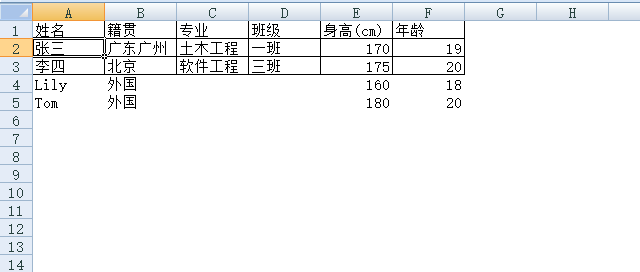
调试时,遇到错误:
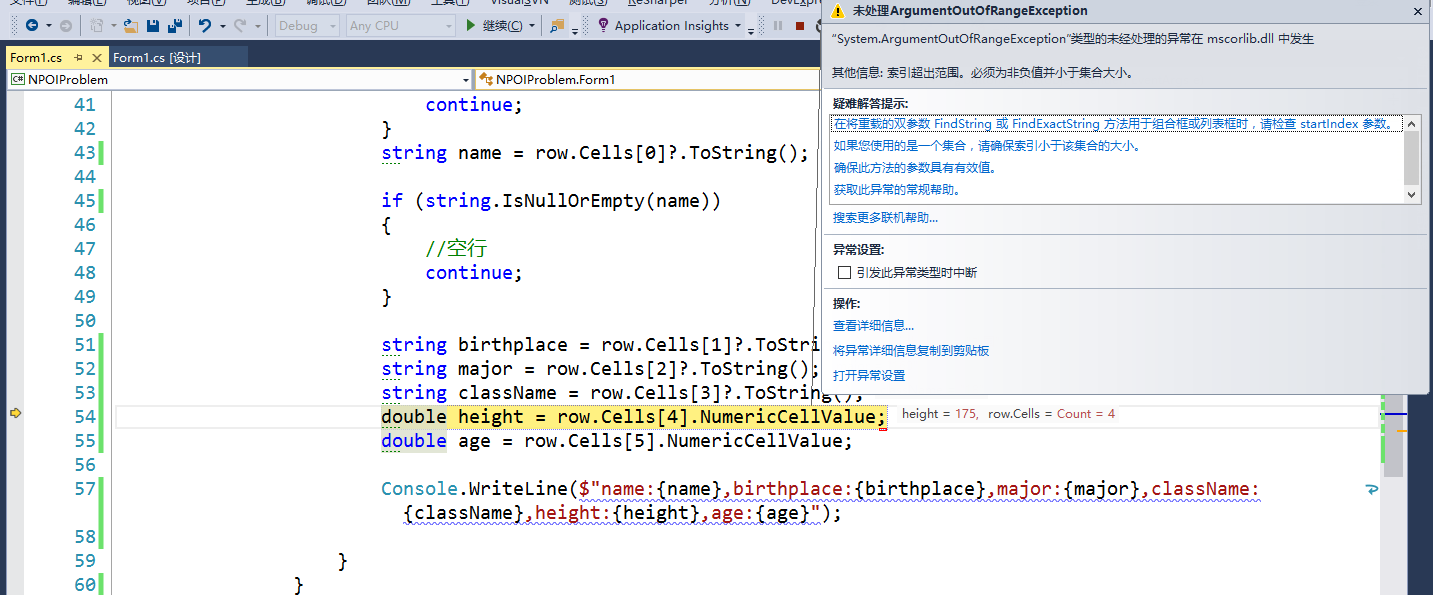
监视变量i,看是循环到第几行:

这里是3,也就是第三行(标题除外),第三行的内容是这样的:
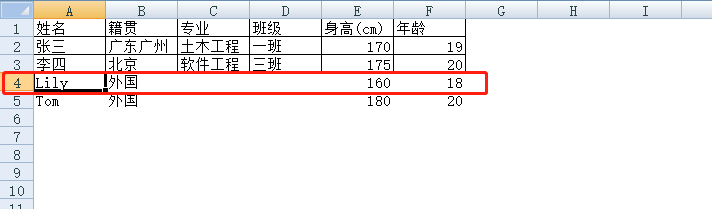
这里解释一下,这个表格使用了白色背景填充,然后前面三行(包括标题在内)使用了实线的细边框。
再在监视里输入代码row.cells.count,获取得到的结果是4,也就是第三行只有4“列”(这里列加了双引号)。明明就有6列,怎么会只有4列,于是再在监视里输入row.lastcellnum,得到的结果是6。

这里可以看出有6列,我们知道获取列有row.cells[i] 或者是 row.getcell(i) , 于是尝试在监视里输入row.getcell(4),看是否会报错:

发现没有报错,而且“值“一栏是正确的列的内容。
于是将代码里row.cells[i] 改成 row.getcell(i) 的形式:
private void button1_click(object sender, eventargs e)
        {
            openfiledialog ofd = new openfiledialog {filter = "excel文件|*.xls"};
            if (ofd.showdialog() == dialogresult.ok)
            {
                using (filestream fs = new filestream(ofd.filename, filemode.open, fileaccess.read))
                {
                    iworkbook workbook = new hssfworkbook(fs);
                    isheet sheet = workbook.getsheetat(0);

                    //总共有多少行
                    int lastrownum = sheet.lastrownum;
                    int firstrownum = sheet.firstrownum;

                    for (int i = firstrownum + 1; i <= lastrownum; i++)
                    {
                        irow row = sheet.getrow(i);
                        if (row == null)
                        {
                            continue;
                        }
                        string name = row.getcell(0)?.tostring();

                        if (string.isnullorempty(name))
                        {
                            //空行
                            continue;
                        }

                        string birthplace = row.getcell(1)?.tostring();
                        string major = row.getcell(2)?.tostring();
                        string classname = row.getcell(3)?.tostring();
                        double height = row.getcell(4).numericcellvalue;
                        double age = row.getcell(5).numericcellvalue;

                        console.writeline($"name:{name},birthplace:{birthplace},major:{major},classname:{classname},height:{height},age:{age}");

                    }
                }
            }
        }
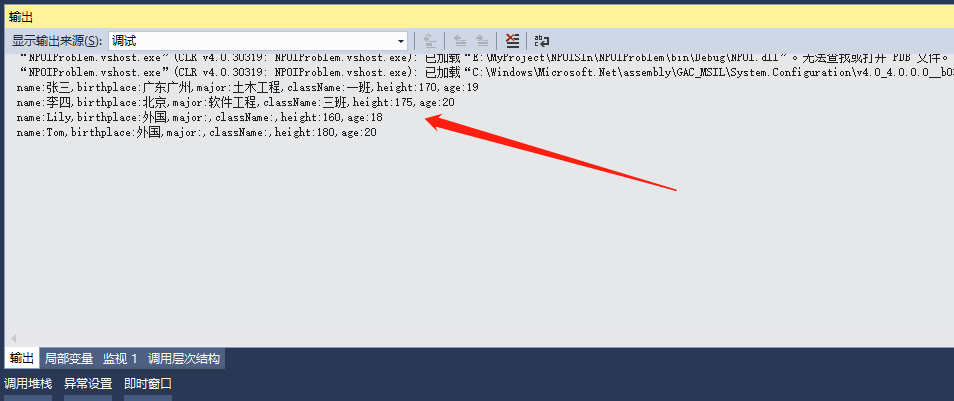
再次调试,没有报错,在输出窗口有以下的信息:
推荐阅读
- C#通过fleck实现wss协议的WebSocket多人Web实时聊天(附源码)
- 团队城市未满足要求:MSBuildTools12.0_x86_Path 存在
- 使用 MSBuild.exe 在发布模式下构建 C# 解决方案
- 当我发布 Web 应用程序时,AfterPublish 脚本不运行
- 构建时 T4 转换的产品仅在下一个构建中使用
- ASP.NET Core Application (.NET Framework) for Windows x64 only error in project.assets.json
- 新的 .csproj 格式 - 如何将整个目录指定为“链接文件"到子目录?
- 如何将条件编译符号(DefineConstants)传递给 msbuild
- MSBuild 支持 Visual Studio 2017 RTM 中的 T4 模板
- NuGet 包还原找不到包,没有源
热点文章

团队城市未满足要求:MSBuildTools12.0_x86_Path 存在
0
使用 MSBuild.exe 在发布模式下构建 C# 解决方案
0
当我发布 Web 应用程序时,AfterPublish 脚本不运行
0
构建时 T4 转换的产品仅在下一个构建中使用
0
ASP.NET Core Application (.NET Framework) for Windows x64 only error in project.assets.json
0
新的 .csproj 格式 - 如何将整个目录指定为“链接文件"到子目录?
0
如何将条件编译符号(DefineConstants)传递给 msbuild
0
MSBuild 支持 Visual Studio 2017 RTM 中的 T4 模板
0
NuGet 包还原找不到包,没有源
0
使用 C# 6.0 功能运行 TFS 构建
0
