
简单计算器设计(WPF)
- 作者: 老实人妙勇
- 来源: 51数据库
- 2021-08-21
要求:
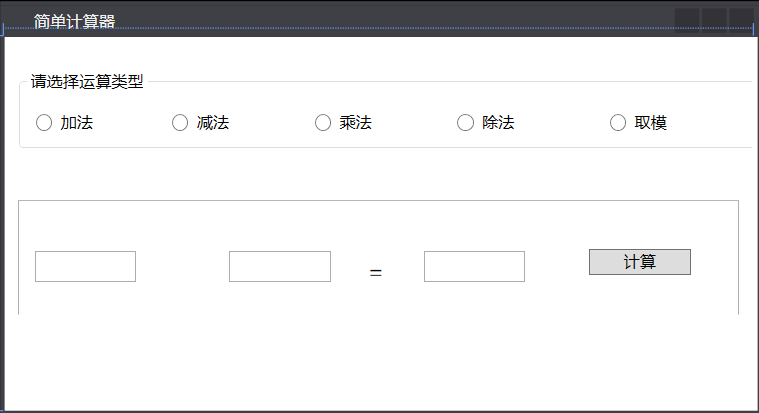
文本框居中,用户不能修改运算结果 当用户选择不同的运算类型时 下方groupbox的标题与所选运算类型相对应 且文本框数字立即清空 单击【计算】按钮时 如果文本框输入的内容非法 结果文本框显示问号
运行效果:
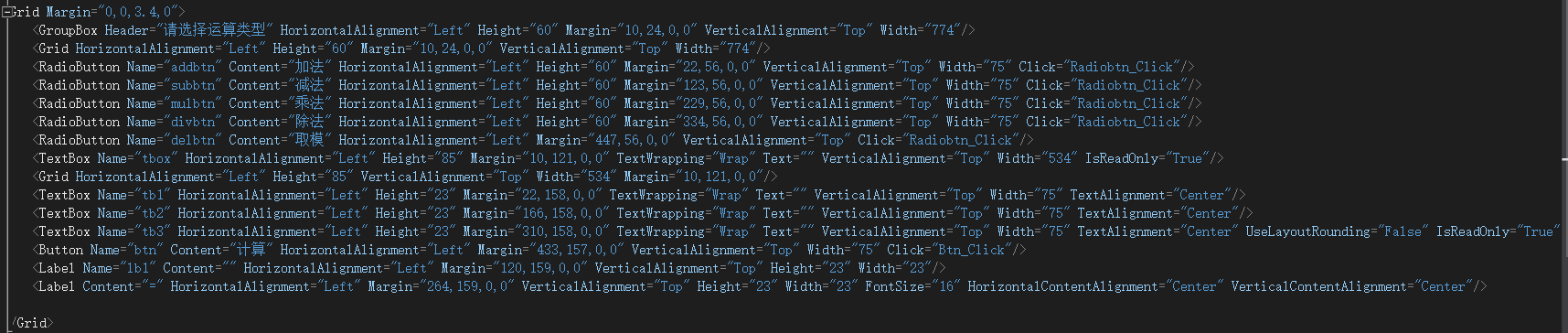
xaml:
后台代码:
 1 namespace a._2._2
 2 {
 3     /// <summary>
 4     /// mainwindow.xaml 的交互逻辑
 5     /// </summary>
 6     public partial class mainwindow : window
 7     {
 8         public mainwindow()
 9         {
10             initializecomponent();
11         }
12
13         private void btn_click(object sender, routedeventargs e)
14         {
15             if(!int.tryparse(tb1.text,out int a) || !int.tryparse(tb2.text,out int b))
16             {
17                 tb3.text = "?";
18             }else if (addbtn.ischecked == true)
19             {
20                 tb3.text = int.parse(tb1.text) + int.parse(tb2.text)+"";
21             }
22             else if (subbtn.ischecked == true)
23             {
24                 tb3.text = int.parse(tb1.text) - int.parse(tb2.text)+"";
25             }
26             else if (mulbtn.ischecked == true)
27             {
28                 tb3.text = int.parse(tb1.text) * int.parse(tb2.text)+"";
29             }
30             else if (divbtn.ischecked == true)
31             {
32                 tb3.text = int.parse(tb1.text) / int.parse(tb2.text)+"";
33             }
34             else if (delbtn.ischecked == true)
35             {
36                 tb3.text = int.parse(tb1.text) % int.parse(tb2.text)+"";
37             }
38         }
39
40         private void radiobtn_click(object sender, routedeventargs e)
41         {
42             if (addbtn.ischecked == true)
43             {
44                 tbox.text = "加法";
45                 lb1.content = "+";
46                 tb1.clear();
47                 tb2.clear();
48                 tb3.clear();
49             }
50             else if (subbtn.ischecked == true)
51             {
52                 tbox.text = "减法";
53                 lb1.content = "-";
54                 tb1.clear();
55                 tb2.clear();
56                 tb3.clear();
57             }
58             else if (mulbtn.ischecked == true)
59             {
60                 tbox.text = "乘法";
61                 lb1.content = "*";
62                 tb1.clear();
63                 tb2.clear();
64                 tb3.clear();
65             }
66             else if (divbtn.ischecked == true)
67             {
68                 tbox.text = "除法";
69                 lb1.content = "/";
70                 tb1.clear();
71                 tb2.clear();
72                 tb3.clear();
73             }
74             else if (delbtn.ischecked == true)
75             {
76                 tbox.text = "取模";
77                 lb1.content = "%";
78                 tb1.clear();
79                 tb2.clear();
80                 tb3.clear();
81             }
82         }
83     }
84 }
推荐阅读
- C#通过fleck实现wss协议的WebSocket多人Web实时聊天(附源码)
- 团队城市未满足要求:MSBuildTools12.0_x86_Path 存在
- 使用 MSBuild.exe 在发布模式下构建 C# 解决方案
- 当我发布 Web 应用程序时,AfterPublish 脚本不运行
- 构建时 T4 转换的产品仅在下一个构建中使用
- ASP.NET Core Application (.NET Framework) for Windows x64 only error in project.assets.json
- 新的 .csproj 格式 - 如何将整个目录指定为“链接文件"到子目录?
- 如何将条件编译符号(DefineConstants)传递给 msbuild
- MSBuild 支持 Visual Studio 2017 RTM 中的 T4 模板
- NuGet 包还原找不到包,没有源
热点文章

团队城市未满足要求:MSBuildTools12.0_x86_Path 存在
0
使用 MSBuild.exe 在发布模式下构建 C# 解决方案
0
当我发布 Web 应用程序时,AfterPublish 脚本不运行
0
构建时 T4 转换的产品仅在下一个构建中使用
0
ASP.NET Core Application (.NET Framework) for Windows x64 only error in project.assets.json
0
新的 .csproj 格式 - 如何将整个目录指定为“链接文件"到子目录?
0
如何将条件编译符号(DefineConstants)传递给 msbuild
0
MSBuild 支持 Visual Studio 2017 RTM 中的 T4 模板
0
NuGet 包还原找不到包,没有源
0
使用 C# 6.0 功能运行 TFS 构建
0
