
详解php微信小程序消息推送配置
- 作者: 在下哥得肛
- 来源: 51数据库
- 2021-06-27
第一步
官网下载对应版本的cryptodemo
下载地址:https://wximg.gtimg.com/shake_tv/mpwiki/cryptodemo.zip
第二步
创建检查文件wxcheck.php
这个文件名可以随便命名,要保证url中检查的文件名与之相同即可。
<?php
    printlog(json_encode($_get));
      $signature = $_get["signature"];
        $timestamp = $_get["timestamp"];
        $nonce = $_get["nonce"];
        $echostr = $_get["echostr"];
        $token = "medisum";
        $tmparr = array($token, $timestamp, $nonce);
        sort($tmparr, sort_string);
        $tmpstr = implode( $tmparr );
        $tmpstr = sha1( $tmpstr );
        printlog("tmpstr:".$tmpstr);
        printlog("signature:".$signature);
        if( $tmpstr == $signature ){
            echo  $echostr;
        }else{
            echo  false;
        }
        /**
         * 打印数据
         * @param  string $txt  日志记录
         * @param  string $file 日志目录
         * @return
         */
        function printlog($txt="",$file="ceshi.log"){
          $myfile = fopen($file, "a+");
          $stringtxt = "[".date("y-m-d h:i:s")."]".$txt."\n";
          fwrite($myfile, $stringtxt);
          fclose($myfile);
        }
?>
文件内容如上,其实这就是微信接入指导的第二步,这里只是改了下形式。
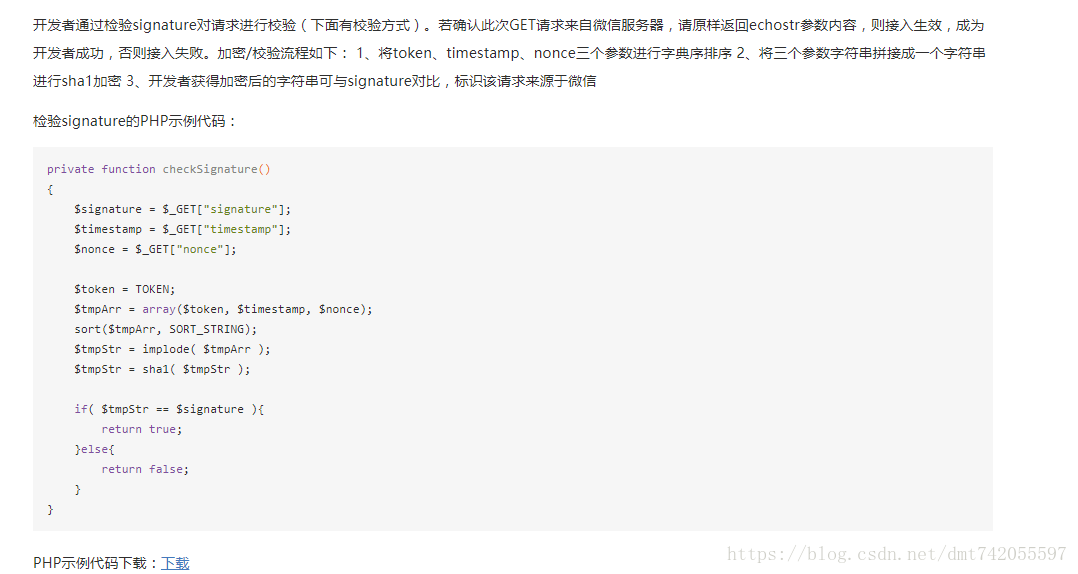
注意:$token的值需要与配置中的一致。
第三步
修改demo.php中对应的值
encodingaeskey、token、appid这几个值最好填写为你小程序及配置中对应的值,其实我也没测试有没有影响,但还是这样做了。
第二、三步完成之后,将wecheck.php这个文件放到demo.php同级的目录下,并将整个文件夹放到服务器的public目录下(我的域名指向是public目录,所以放在这里,各位根据自己的域名指向目录进行更改即可)。
第四步
消息推送配置
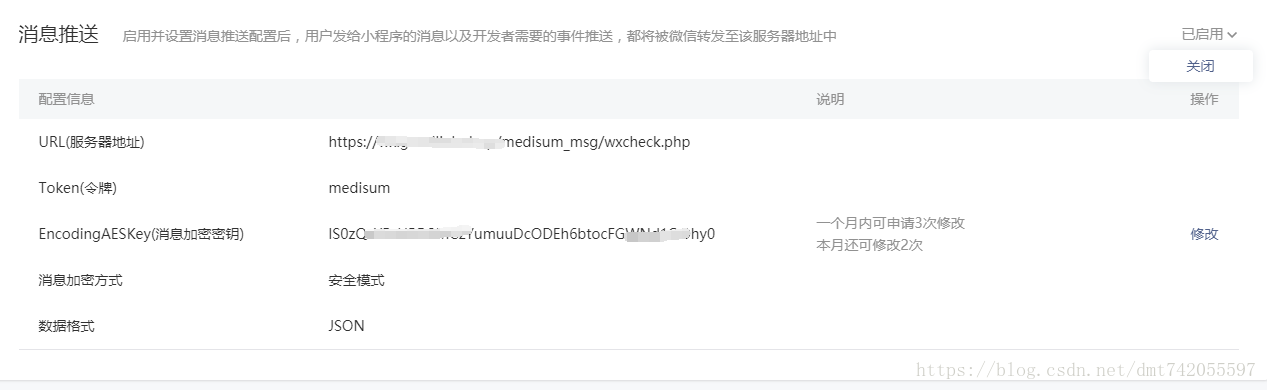
url服务器地址即为:域名+文件夹名+wecheck.php(第一步创建的文件名),token令牌、encodingaeskey与第二、三步对应,提交之后即可成功,有的会提示token验证失败,可能路径或者token配置不正确,检查修改后应该没问题,自行百度,按照我这种方式应该是没问题的。
第五步
提供与官网同步的cryptodemo的php版本,无毒无害
下载链接:https://download.csdn.net/download/dmt742055597/10403220
以上就是详解php微信小程序消息推送配置的详细内容,更多关于php微信小程序的资料请关注其它相关文章!
推荐阅读

