
YII2框架中分页组件的使用方法示例
- 作者: 状元归来
- 来源: 51数据库
- 2021-07-08
本文实例讲述了yii2框架中分页组件的使用方法。分享给大家供大家参考,具体如下:
当数据过多,无法一页显示时,我们经常会用到分页组件,yii2中已经帮我们封装好了分页组件。
首先我们创建操作数据表的ar模型:
<?php

namespace app\models;

use yii\db\activerecord;

class myuser extends activerecord
{
  public static function tablename()
  {
    return '{{%user}}';
  }
}
然后创建分页的控制器:
<?php

namespace app\controllers;

use yii;
use app\models\myuser;
use yii\data\pagination;
use yii\web\controller;

class indexcontroller extends controller
{
  public function actionindex()
  {
    $name = yii::$app->request->get('name', '');
    $where = '1=1 ';
    $param = [];

    //如果查询条件很多,可以按这种方式,拼where条件
    if (!empty($name)) {
      $where .= "and name=:name";
      $param = array_merge($param, [':name' => $name]);
    }

    //设置分页大小,为了演示,我写成了2
    $pagesize = 2;
    $user = myuser::find()->where($where, $param);

    //创建分页组件
    $page = new pagination([
      //总的记录条数
      'totalcount' => $user->count(),
      //分页大小
      'pagesize' => $pagesize,
      //设置地址栏当前页数参数名
      'pageparam' => 'p',
      //设置地址栏分页大小参数名
      'pagesizeparam' => 'pagesize',
    ]);

    //获取数据
    $data = $user->orderby('id desc')
      ->offset($page->offset)
      ->limit($page->limit)
      ->asarray()
      ->all();

    return $this->renderpartial('index', [
      'data' => $data,
      'page' => $page,
    ]);
  }
}
最后就是显示数据分页:
<!doctype html>
<html lang="zh-cn">
<head>
  <meta charset="utf-8">
  <title>分页显示</title>
  <style>
    .page li {
      display: inline-block;
      border: 1px solid #ccc;
      border-radius: 3px;
      padding: 2px 3px;
    }

    .page li.active a {
      font-weight: bold;
    }

    .page li a {
      text-decoration: none;
    }

    .page li a, .page li span {
      color: #666;
    }
  </style>
</head>
<body>
  <ul>
    <?php foreach ($data as $item): ?>
      <li><?php echo $item['id']; ?>    <?php echo $item['name']; ?></li>
    <?php endforeach; ?>
  </ul>
  <?php
  echo \yii\widgets\linkpager::widget([
    'pagination' => $page,
    'firstpagelabel' => '首页',
    'lastpagelabel' => '尾页',
    'nextpagelabel' => '下一页',
    'prevpagelabel' => '上一页',
    //设置class样式
    'options' => ['class' => 'page'],
  ]) ?>
</body>
</html>
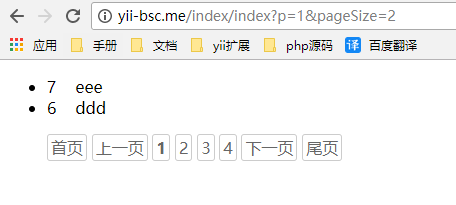
最后效果如下:
推荐阅读

