安卓混合开发ionic插件整理
- 作者: 用户111002940
- 来源: 51数据库
- 2021-07-06
导入angular的脚手架
ng?add?ng-zorro-antd
?
图表命令:npm?install?echarts?--save
npm?install?ngx-echarts?--save
?
arcgis地图包:
npm install angular2-esri-loader esri-loader
首先导入地图包:npm install esir-loader,按照angular加载地图的方式加载即可。
<div id="map" style="height: 100%;width: 100%;z-index: 1;">
</div>
?
?
loadCss('http://hhigh.ufyct.com:10001/arcApi/3.9/js/dojo/dijit/themes/tundra/tundra.css');
loadCss('http://hhigh.ufyct.com:10001/arcApi/3.9/js/esri/css/esri.css');
setDefaultOptions({
????url: 'http://hhigh.ufyct.com:10001/arcApi/3.9/init.js'});
?
?
ngOnInit(): void {
????loadModules(['esri/map',
????????'esri/layers/ArcGISTiledMapServiceLayer',
????????'esri/geometry/Point',
????????'esri/SpatialReference',
????????'esri/layers/GraphicsLayer',
????????'esri/symbols/PictureMarkerSymbol',
????????'esri/InfoTemplate',
????????'esri/graphic'
????]).then(([Map,
???????????????????ArcGISTiledMapServiceLayer,
???????????????????Point,
???????????????????SpatialReference,
???????????????????GraphicsLayer,
???????????????????PictureMarkerSymbol,
???????????????????InfoTemplate,
???????????????????Graphic
???????????????]) => {
????????????// create map with the given options at a DOM node w/ id 'mapNode'
????????????const basemap = new ArcGISTiledMapServiceLayer('http://218.94.6.92:6080/arcgis/rest/services/jssl_vector_L3_L17/MapServer');
????????????const map = new Map('map', {
????????????????zoom : 7,
????????????????logo : false
????????????});
????????????map.addLayer(basemap);
????????????map.centerAt(new Point(118.975941, 31.353283, new SpatialReference ({ wkid: 4490})));
????????????const PointGraphicLayer = new GraphicsLayer();
????????????map.addLayer(PointGraphicLayer);
????????????for (const poj of this.mappoint) {
????????????????const pt = new Point(poj.lon, poj.lat, new SpatialReference ({ wkid: 4490}));
????????????????let symbol = '';
????????????????if (poj.type === '1') {
????????????????????symbol = new PictureMarkerSymbol('../../../../assets/img/ic_cheng.png', 15, 15);
????????????????} else if (poj.type === '2') {
????????????????????symbol = new PictureMarkerSymbol('../../../../assets/img/ic_cheng.png', 15, 15);
????????????????} else if (poj.type === '3') {
????????????????????symbol = new PictureMarkerSymbol('../../../../assets/img/ic_cheng.png', 15, 15);
????????????????}
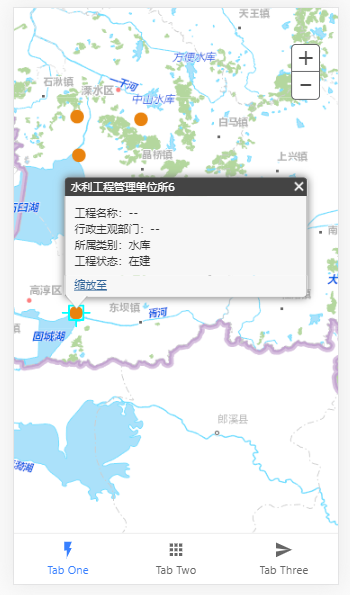
????????????????const infoTemplate = new InfoTemplate(poj.name, '工程名称:--<br>行政主观部门:--<br>所属类别:水库 <br>工程状态:在建 ');
????????????????const graphic = new Graphic(pt, symbol, null, infoTemplate);
????????????????PointGraphicLayer.add(graphic);
????????????}
????????})
????????.catch(err => {
????????????// handle any script or module loading errors
????????????console.error(err);
????????});
}
showhide(flag): void {
????if (flag === 1) {
????????this.isActive = true;
????} else {
????????this.isActive = false;
????}
}
?
预览:
?
?
- 轮播图
<ion-slides #slide1 [options]="slidesOpts" >
????<ion-slide *ngFor="let item of slidesItems">
????????<img src="{{item.img}}" class="slide-image">
????</ion-slide>
</ion-slides>
?
public slidesOpts = {
????//轮播图属性
????speed: 500, autoplay: {
????????delay: 1000, disableOnInteraction: false
????????//这个属性很关键,拖动完自动播放
????},
????loop: true, zoom: false,
};
?
- 水平和纵向滚动字幕
<!--滚动方向 direction 4个值 up down left right ?默认从右向左-->
<marquee direction="left">滚动字幕</marquee>
?
参考:https://blog.csdn.net/qq_42281978/article/details/99840434
?
- 上拉加载
<ion-content>
????<ion-list>
????????<ion-item *ngFor="let item of list">
????????????<ion-label>{{item}}</ion-label>
????????</ion-item>
????</ion-list>
????<ion-infinite-scroll threshold="10%" (ionInfinite)="loadData($event)">
????????<ion-infinite-scroll-content loadingSpinner="crescent"
?????????????????????????????????????loadingText="Loading more data..."></ion-infinite-scroll-content>
????</ion-infinite-scroll>
</ion-content>
?
?
list: any[] = [];
constructor() {
????for (let i = 0; i < 16; i++) {
????????this.list.push(`这是第${i}条数据`);
????}
}
loadData(event) {
????setTimeout(() => {
????????for (let i = 0; i < 10; i++) {
????????????this.list.push(`这是第${i}条数据--服务器获取`);
????????}
????????event.target.complete();
????????// 告诉ion-infinite-scroll数据已经更新完成 不加这句话的话会卡死
????????// 禁用
????????if (this.list.length > 40) {
????????????event.target.disabled = true;
????????}
????}, 1000);
}
?
?
?
?
- 下拉刷新
?
<ion-content>
????<ion-refresher slot="fixed" (ionRefresh)="doRefresh($event)">
????????<ion-refresher-content pullingIcon="arrow-dropdown" pullingText="加载中..." refreshingSpinner="circles"
???????????????????????????????refreshingText="Refreshing..."></ion-refresher-content>
????</ion-refresher>
????<ion-list>
????????<ion-item *ngFor="let item of list">
????????????<ion-label>{{item}}</ion-label>
????????</ion-item>
????</ion-list>
</ion-content>
?
list: any[] = [];
constructor() {
????for (let i = 0; i < 16; i++) {
????????this.list.push(`这是第${i}条数据`);
????}
}
doRefresh(event) {
????setTimeout(() => {
????????for (let i = 10; i < 15; i++) {
????????????this.list.unshift(`我是第${i}条数据`);
????????}
????????event.target.complete();
????????// 告诉ion-refresher 更新数据
????}, 2000);
}
?
- 卡片式布局
?
<ion-card>
????<ion-card-header>
????????<ion-card-subtitle>Card Subtitle</ion-card-subtitle>
????????<ion-card-title>Card Title</ion-card-title>
????</ion-card-header>
????<ion-card-content>
????????Keep close to Nature's heart... and break clear away, once in awhile,
????????and climb a mountain or spend a week in the woods. Wash your spirit clean.
????</ion-card-content>
</ion-card>
<ion-card>
????<ion-item>
????????<ion-icon name="pin" slot="start"></ion-icon>
????????<ion-label>ion-item in a card, icon left, button right</ion-label>
????????<ion-button fill="outline" slot="end">View</ion-button>
????</ion-item>
????<ion-card-content>
????????This is content, without any paragraph or header tags,
????????within an ion-card-content element.
????</ion-card-content>
</ion-card>
<ion-card>
????<ion-item href="#" class="ion-activated">
????????<ion-icon name="wifi" slot="start"></ion-icon>
????????<ion-label>Card Link Item 1 activated</ion-label>
????</ion-item>
????<ion-item href="#">
????????<ion-icon name="wine" slot="start"></ion-icon>
????????<ion-label>Card Link Item 2</ion-label>
????</ion-item>
????<ion-item class="ion-activated">
????????<ion-icon name="warning" slot="start"></ion-icon>
????????<ion-label>Card Button Item 1 activated</ion-label>
????</ion-item>
????<ion-item>
????????<ion-icon name="walk" slot="start"></ion-icon>
????????<ion-label>Card Button Item 2</ion-label>
????</ion-item>
</ion-card>
?
?
?
- 树状列表
在ts文件中不能用ionic自动生成的格式,这样无法调用angular框架中的UI,必须以angular格式的才能用
?
<nz-tree [nzData]="nodes" nzDraggable nzBlockNode (nzOnDrop)="nzEvent($event)"> </nz-tree>
?
?
nodes = [
????{
????????title: '0-0',
????????key: '00',
????????expanded: true,
????????children: [
????????????{
????????????????title: '0-0-0',
????????????????key: '000',
????????????????expanded: true,
????????????????children: [
????????????????????{ title: '0-0-0-0', key: '0000', isLeaf: true },
????????????????????{ title: '0-0-0-1', key: '0001', isLeaf: true },
????????????????????{ title: '0-0-0-2', key: '0002', isLeaf: true }
????????????????]
????????????},
????????????{
????????????????title: '0-0-1',
????????????????key: '001',
????????????????children: [
????????????????????{ title: '0-0-1-0', key: '0010', isLeaf: true },
????????????????????{ title: '0-0-1-1', key: '0011', isLeaf: true },
????????????????????{ title: '0-0-1-2', key: '0012', isLeaf: true }
????????????????]
????????????},
????????????{
????????????????title: '0-0-2',
????????????????key: '002'
????????????}
????????]
????},
????{
????????title: '0-1',
????????key: '01',
????????children: [
????????????{
????????????????title: '0-1-0',
????????????????key: '010',
????????????????children: [
????????????????????{ title: '0-1-0-0', key: '0100', isLeaf: true },
????????????????????{ title: '0-1-0-1', key: '0101', isLeaf: true },
????????????????????{ title: '0-1-0-2', key: '0102', isLeaf: true }
????????????????]
????????????},
????????????{
????????????????title: '0-1-1',
????????????????key: '011',
????????????????children: [
????????????????????{ title: '0-1-1-0', key: '0110', isLeaf: true },
????????????????????{ title: '0-1-1-1', key: '0111', isLeaf: true },
????????????????????{ title: '0-1-1-2', key: '0112', isLeaf: true }
????????????????]
????????????}
????????]
????},
????{
????????title: '0-2',
????????key: '02',
????????isLeaf: true
????}
];
nzEvent(event: NzFormatEmitEvent): void {
????console.log(event);
}
?
?
- 页面弹出缩回动画,用angular中的抽屉就行
<button nz-button nzType="primary" (click)="open()">Open</button>
<nz-drawer
????????[nzClosable]="false"
????????[nzVisible]="visible"
????????nzPlacement="right"
????????nzTitle="Basic Drawer"
????????(nzOnClose)="close()"
>
????<p>Some contents...</p>
????<p>Some contents...</p>
????<p>Some contents...</p>
</nz-drawer>
?
visible = false;
open(): void {
????this.visible = true;
}
close(): void {
????this.visible = false;
}
?
- 图表
?
<div style="width: 100%;height: 50%" echarts [options]="option" class="demo-chart pipType"></div>
option = {
????tooltip: {
????????trigger: 'axis',
????????axisPointer: {
????????????type: 'cross',
????????????crossStyle: {
????????????????color: '#999'
????????????}
????????}
????},
????legend: {
????????data: ['蒸发量', '降水量', '平均温度']
????},
????xAxis: [
????????{
????????????type: 'category',
????????????data: ['1月', '2月', '3月', '4月', '5月', '6月', '7月', '8月', '9月', '10月', '11月', '12月'],
????????????axisPointer: {
????????????????type: 'shadow'
????????????}
????????}
????],
????yAxis: [
????????{
????????????type: 'value',
????????????name: '水量',
????????????min: 0,
????????????max: 250,
????????????interval: 50,
????????????axisLabel: {
????????????????formatter: '{value} ml'
????????????}
????????},
????????{
????????????type: 'value',
????????????name: '温度',
????????????min: 0,
????????????max: 25,
????????????interval: 5,
????????????axisLabel: {
????????????????formatter: '{value} °C'
????????????}
????????}
????],
????series: [
????????{
????????????name: '蒸发量',
????????????type: 'bar',
????????????data: [2.0, 4.9, 7.0, 23.2, 25.6, 76.7, 135.6, 162.2, 32.6, 20.0, 6.4, 3.3]
????????},
????????{
????????????name: '降水量',
????????????type: 'bar',
????????????data: [2.6, 5.9, 9.0, 26.4, 28.7, 70.7, 175.6, 182.2, 48.7, 18.8, 6.0, 2.3]
????????},
????????{
????????????name: '平均温度',
????????????type: 'line',
????????????yAxisIndex: 1,
????????????data: [2.0, 2.2, 3.3, 4.5, 6.3, 10.2, 20.3, 23.4, 23.0, 16.5, 12.0, 6.2]
????????}
????]
};
?
?
?
- tablayout切换页面
?
<nz-tabset>
????<nz-tab nzTitle="Tab 1">
????????Content of Tab Pane 1
????</nz-tab>
????<nz-tab nzTitle="Tab 2">
????????Content of Tab Pane 2
????</nz-tab>
????<nz-tab nzTitle="Tab 3">
????????Content of Tab Pane 3
????</nz-tab>
</nz-tabset>
?
?
- 在线浏览pdf
?
npm install?ng2-pdf-viewer
?
imports: [ ?????
????????PdfViewerModule,
],
?
<ion-content style="width: 100%;height: 100%">
????<pdf-viewer [src]="pdfSource" [show-all]="true" [original-size]="false" [zoom]=1 [render-text]="false"
????????????????[autoresize]="true" style="display: block"></pdf-viewer>
</ion-content>
?
pdfSource = 'http://211.103.127.211:8670/UploadFile/FloodFile/1553184685102at7f4y.pdf' ;
?
- 拨打电话
?
先在config.xml中添加:
<access origin="tel:*" launch-external="yes"/>
?
<a href="tel:10086">拨打10086</a>
?
- ionic中缓存数据(和angular中一样,目前只调研了localStorage)
?
localStorage.setItem('accessToken', token);
?
localStorage.getItem('accessToken')
?
?
- ionic更改app包名
?
修改config.xml的
widget id="com.zzb.ionic"
这个就是android的包名也是ios的appid
?
- ionic调用安卓设备拍照或者选择图库,并展示
?
首先需要导入插件
ionic?cordova?plugin?add?cordova-plugin-camera?(选择文件展示用这个)获取到的路径为base64格式
?
ionic?cordova?plugin add cordova-plugin-image-picker(选择文件上传用这个)
获取到的路径为绝对路径:
file:///data/data/io.ionic.photogallery/cache/tmp_track-305927407.png
?
拍照:
const options: CameraOptions = {
????quality: 100,
????destinationType: this.camera.DestinationType.DATA_URL,
????encodingType: this.camera.EncodingType.JPEG,
????mediaType: this.camera.MediaType.PICTURE
};
this.camera.getPicture(options).then((imageData) => {
????console.log('imageData = ' + imageData);
????// Add new photo to gallery
????this.photos.unshift({
????????data: 'data:image/jpeg;base64,' + imageData
????});
????// Save all photos for later viewing
????this.storage.set('photos', this.photos);
}, (err) => {
????// Handle error
????console.log('Camera issue: ' + err);
});
?
选择图库:
?
?
optionsPick: CameraOptions = {
????quality: 100,
????destinationType: this.camera.DestinationType.DATA_URL,
????encodingType: this.camera.EncodingType.JPEG,
????mediaType: this.camera.MediaType.PICTURE,
????sourceType: this.camera.PictureSourceType.PHOTOLIBRARY,
????correctOrientation: true,
????allowEdit: false,
????targetWidth: 100,
????targetHeight: 100,
};
?
?
this.camera.getPicture(this.optionsPick).then((result) => {
????console.log('result = ' + result);
????this.photos.unshift({
????????data: 'data:image/jpeg;base64,' + result
????});
????this.storage.set('photos', this.photos);
}, (err) => {
});
?
?
选择第二种图库上传文件:
?
optionsPick2: ImagePickerOptions = {
????quality: 100,
????width: 100,
????height: 100,
????maximumImagesCount: 10
};
?
?
?
this.imagePicker.getPictures(this.optionsPick2).then((result) => {
????console.log('result = ' + result);
}, (err) => {
});
?
- ionic安卓权限申请
首先需要在config.xml中配置相关权限,找到:<platform name="android">
?
在这里面配置:
<config-file parent="/*" target="AndroidManifest.xml">
????<uses-permission android:name="android.permission.FLASHLIGHT" />
????<uses-permission android:name="android.permission.INTERNET" />
????<uses-permission android:name="android.permission.WRITE_EXTERNAL_STORAGE" />
????<uses-permission android:name="android.permission.MOUNT_UNMOUNT_FILESYSTEMS" />
????<uses-permission android:name="android.permission.READ_EXTERNAL_STORAGE" />
????<uses-permission android:name="android.permission.CAMERA" />
????<uses-permission android:name="android.permission.ACCESS_FINE_LOCATION" />
????<uses-permission android:name="android.permission.ACCESS_COARSE_LOCATION" />
????<uses-permission android:name="android.permission.ACCESS_NETWORK_STATE" />
????<uses-permission android:name="android.permission.FOREGROUND_SERVICE" />
????<uses-permission android:name="android.permission.CALL_PHONE" />
????<uses-permission android:name="android.permission.CALL_PHONE" />
????<uses-permission android:name="android.permission.CALL_PHONE" />
????<uses-permission android:name="android.permission.CALL_PHONE" />
????<uses-permission android:name="android.permission.CALL_PHONE" />
????<uses-permission android:name="android.permission.REQUEST_INSTALL_PACKAGES" />
????<uses-permission android:name="android.permission.GET_TASKS" />
????<uses-permission android:name="android.permission.REQUEST_INSTALL_PACKAGES" />
</config-file>
?
?
注意添加xmlns:android="http://schemas.android.com/apk/res/android"
?
?
然后在需要的地方编写运行时权限:
constructor(private androidPermissions: AndroidPermissions) {
}
ngOnInit(): void {
????this.androidPermissions.checkPermission(this.androidPermissions.PERMISSION.WRITE_EXTERNAL_STORAGE).then(
????????result => console.log('Has permission?', result.hasPermission),
????????err => this.androidPermissions.requestPermission(this.androidPermissions.PERMISSION.WRITE_EXTERNAL_STORAGE)
????);
????this.androidPermissions.requestPermissions([this.androidPermissions.PERMISSION.WRITE_EXTERNAL_STORAGE,
????????this.androidPermissions.PERMISSION.GET_ACCOUNTS]);
}
?
运行时权限请自行了解安卓6.0系统权限信息(百度就能搜到)
ionic cordova plugin add cordova-plugin-android-permissions
npm install --save @ionic-native/android-permissions
?
?
华为网络权限:
?
首先在引入网络插件
ionic cordova plugin add cordova-plugin-advanced-http
npm install --save @ionic-native/http
?
其次在resources\android目录下新建xml文件夹,在xml文件夹下创建文件:network_security_config.xml
?
编写代码:
<?xml version="1.0" encoding="utf-8"?>
<network-security-config>
????<domain-config cleartextTrafficPermitted="true">
????????<domain includeSubdomains="true">localhost</domain>
????</domain-config>
</network-security-config>
?
?
再在config.xml中找到android模块,在下面编写:
<platform name="android">
????<edit-config file="app/src/main/AndroidManifest.xml" mode="merge" target="/manifest/application" xmlns:android="http://schemas.android.com/apk/res/android">
????????<application android:networkSecurityConfig="@xml/network_security_config" />
????</edit-config>
????<resource-file src="resources/android/xml/network_security_config.xml" target="app/src/main/res/xml/network_security_config.xml" />
?
最后重新打包,发现在AndroidManifest.xml文件中
?
- ionic集成极光推送
?
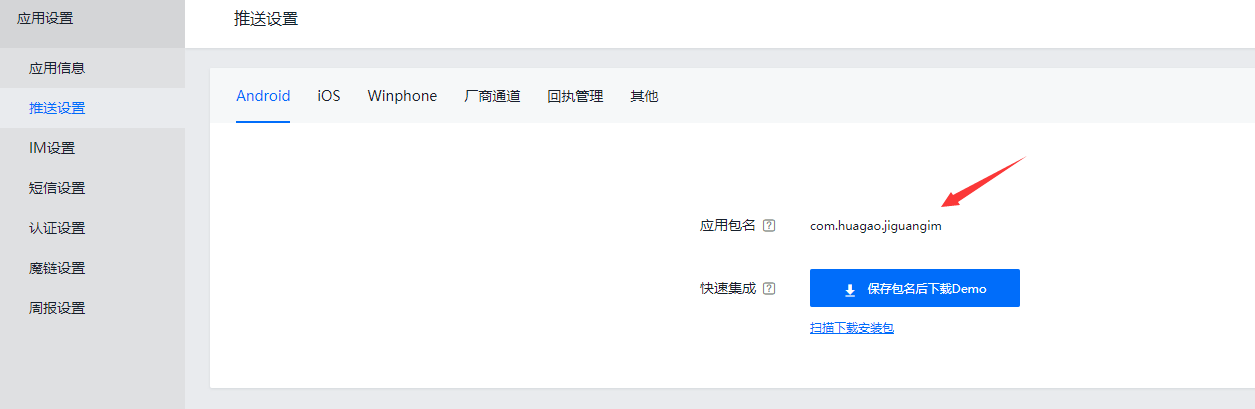
首先先在极光网站上注册应用,填写好包名,记录下appkey
?
?

?
?
?
?
?
第二步,下载极光的插件:详情链接:https://github.com/jpush/jpush-phonegap-plugin
?
cordova plugin add jpush-phonegap-plugin --variable APP_KEY=your_jpush_appkey
?
?
第三步,插件下载好后去修改插件plugin.xml文件中的
?
<config-file target="*JPushConfig.plist" parent="Appkey">
????<string>0496f0e42cbf72275bdeb335</string>
</config-file>
?
<meta-data android:name="JPUSH_APPKEY" android:value="0496f0e42cbf72275bdeb335" /> <!-- ?</>值来自开发者平台取得的AppKey-->
?
这两段代码,讲appkey改为你注册的key
?
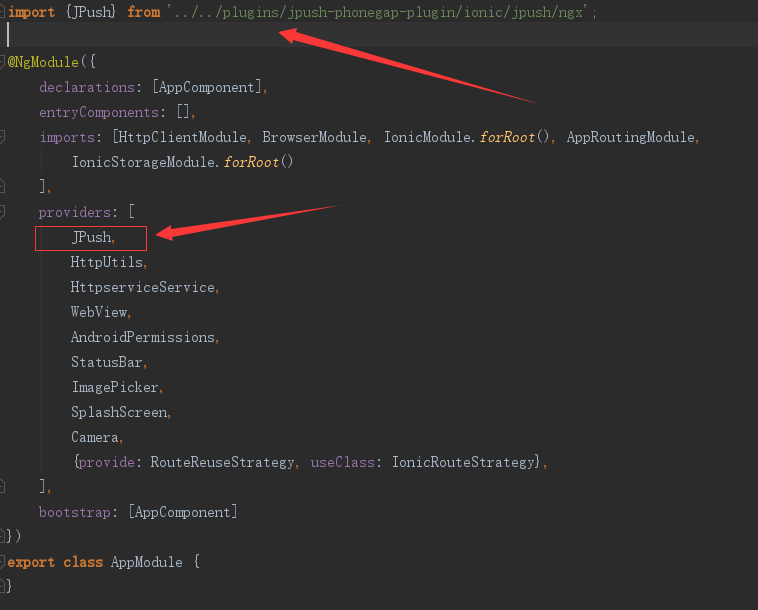
第四步:在app.module.ts这个文件中注册Jpush
?
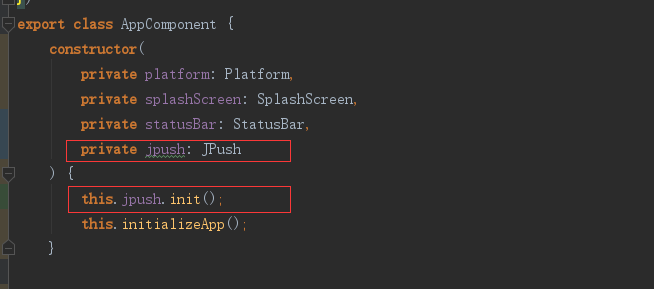
第五步:在app.component.ts文件中初始化Jpush
?
?
?
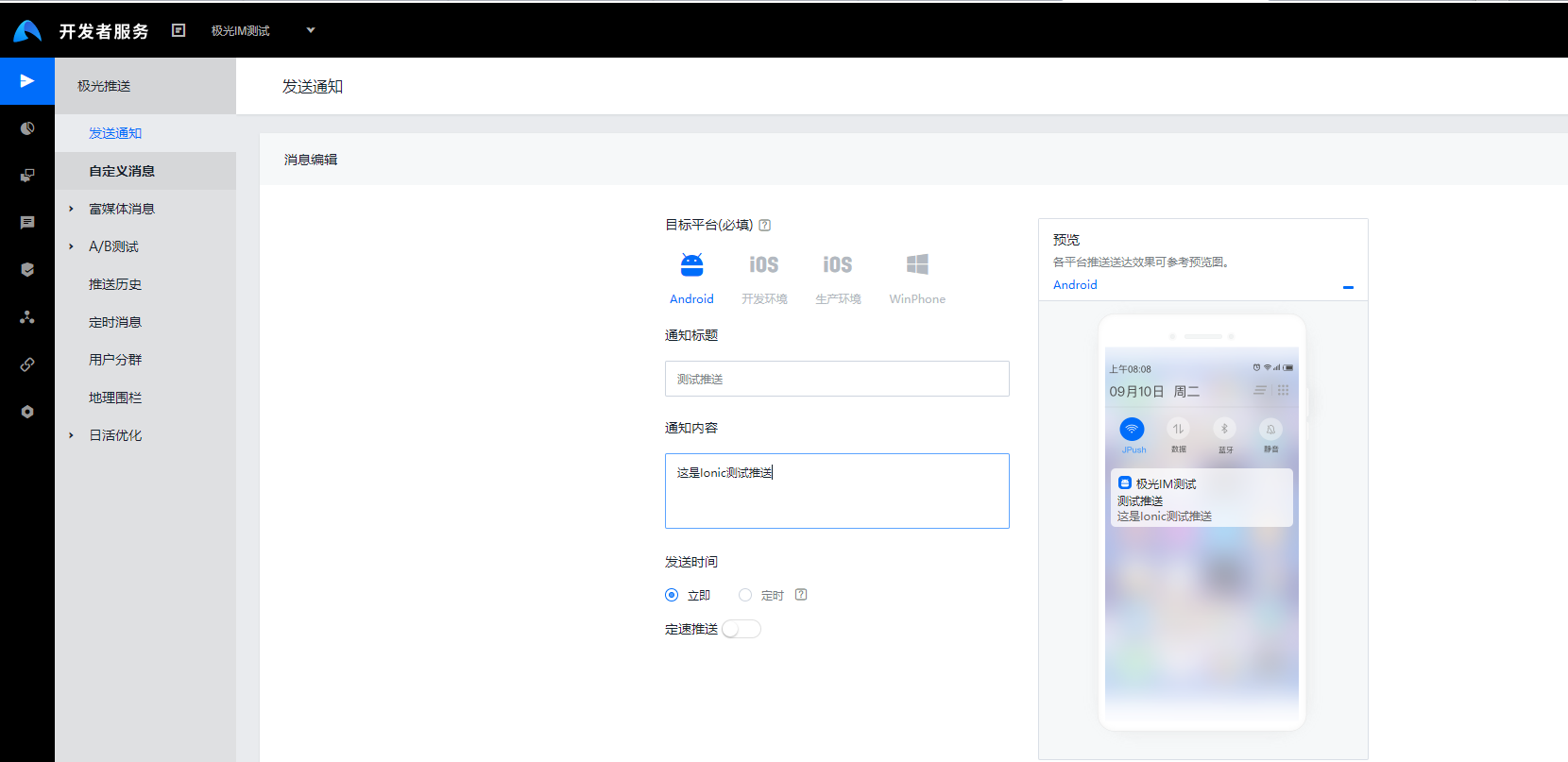
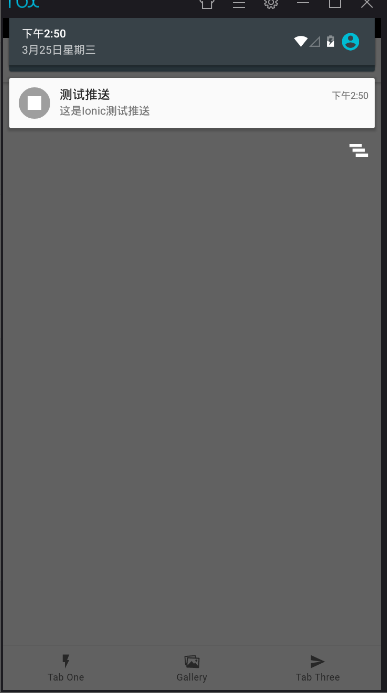
第六步:打包安装后在平台上推送一条消息看是否集成成功。
?
?
?
?

?