
AngularJS 单选框及多选框的双向动态绑定
- 作者: 俏皮女神_经
- 来源: 51数据库
- 2021-08-07
angularjs 在 <input type="text" /> 中实现双向动态绑定十分简单,如下所示:
<input type="text" ng-model="topic.title" />
只需要用ng-model 与 $scope 中的属性对应,即实现了type=”text” 的双向动态绑定。当 <input type="radio" /> 及 <input type="checkbox" /> 时情况略有不同:
1. <inputtype="radio" />
<input type="radio" name="person-action" value="go_home" ng-model="person.action" />回家
<input type="radio" name="person-action" value="go_to_school" ng-model="person.action" />回学校
通过 value 属性指定选中状态下对应的值,并通过 ng-model 将单选框与 $scope 中的属性对应,便实现了 type=”radio” 时的双向动态绑定。
2. <input type="checkbox" />
<input type="checkbox" ng-true-value="true" ng-false-value="false" ng-model="phone.play_sound" />铃声
<input type="checkbox" ng-true-value="true" ng-false-value="false" ng-model="phone.play_vibrate" />震动
<input type="checkbox" ng-true-value="true" ng-false-value="false" ng-model="phone.play_lights" />呼吸灯
通过angularjs 的内置指令 ng-true-value 和 ng-false-value ,指定多选框在选中和未选中状态下对应的值,再通过ng-model 将其与 $scope 中的属性对应,便实现了type=”checkbox” 的双向动态绑定。
但是理想跟现实总是相差太多,在实际操作过程中还是出现了问题。应该是ng-repeat中scope作用域的问题。
经过一番搜索、调试,自己终于将此问题解决了,效果图如下:
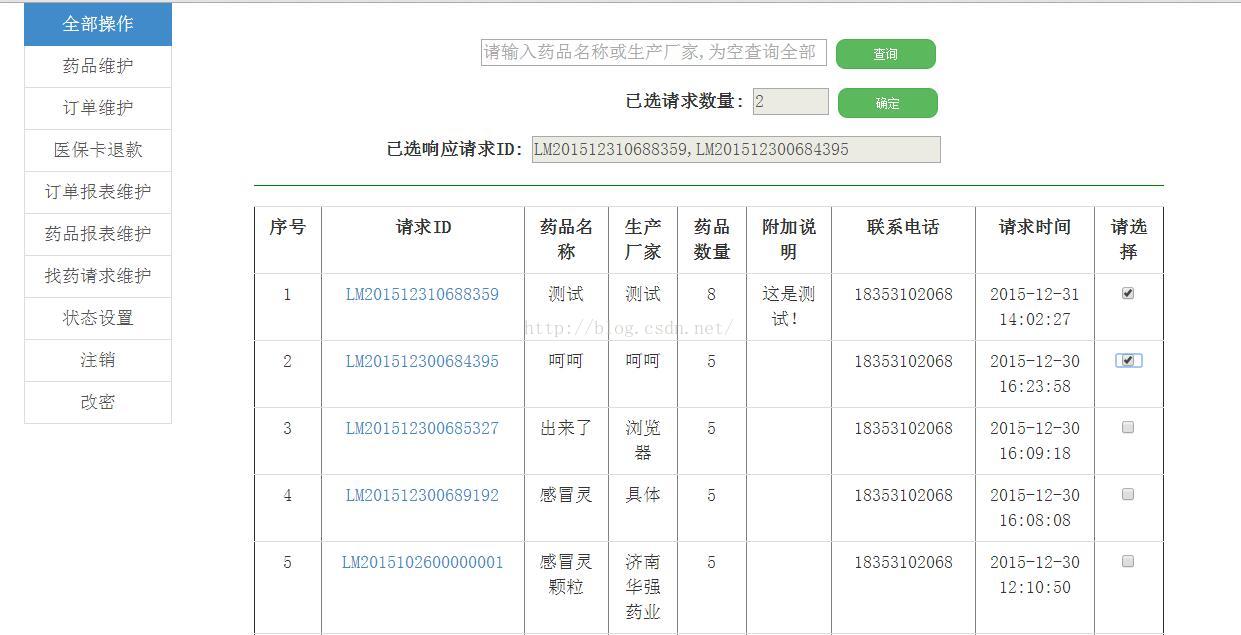
核心源码
js
var str = ""; // 原来存放选中的项
$scope.selected = false; //默认未选中
var chosearr=[]; // 定义数组用于存放前端显示
$scope.check = function(z,x){
console.log("huy:");
console.log(z);
console.log("huyu:");
console.log(x);
if (x == false) { // 选中
   str = str + z + ',';
  } else {
   str = str.replace(z + ',', ''); // 取消选中
  }
  chosearr = (str.substr(0,str.length-1)).split(',');
 console.log("hy:");
 console.log(chosearr);
 $scope.number_request = chosearr.length; // 前端显示所选数量
 $scope.content_request = chosearr; // 前端显示所选请求id
};
html
<tr ng-repeat="item in querydata">
<td ng-bind="$index+1">1</td>
 <td><a ui-sref="#">{{item.postid}}</a></td>
  <td>{{item.medname}}</td>
  <td>{{item.medfact}}</td>
  <td>{{item.medcnt}}</td>
  <td>{{item.remark}}</td>
  <td>{{item.tel}}</td>
  <td>{{item.post_time}}</td>
  <td><input id={{item.postid}} type="checkbox" ng-model="selected" ng-click="check(item.postid,selected)" /></td>
</tr>
参考文献:
以上就是本文的全部内容,希望本文的内容对大家的学习或者工作能带来一定的帮助,同时也希望多多支持!
推荐阅读
热点文章

Angular中响应式表单的三种更新值方法详析
7
Angularjs实现下拉框联动的示例代码
7
详解AngularJS跨页面传值(ui-router)
2
详解AngularJS1.x学习directive 中‘& ’‘=’ ‘@’符号的区别使用
3
angular2路由切换改变页面title的示例代码
4
Angular2 组件间通过@Input @Output通讯示例
5
Angularjs中ng-repeat的简单实例
3
AngularJS 中ui-view传参的实例详解
4
浅谈Angular路由守卫
4
详解基于Angular4+ server render(服务端渲染)开发教程
4
