Android 三大网络通讯方式详解
- 作者: wangkx1990
- 来源: 51数据库
- 2020-08-19
Android平台有三种网络接口可以使用,他们分别是:java.net.*(标准Java接口)、Org.apache接口和Android.net.*(Android网络接口)。下面分别介绍这些接口的功能和作用。
?1.标准Java接口
java.net.*提供与联网有关的类,包括流、数据包套接字(socket)、Internet协议、常见Http处理等。比如:创建URL,以及URLConnection/HttpURLConnection对象、设置链接参数、链接到服务器、向服务器写数据、从服务器读取数据等通信。这些在Java网络编程中均有涉及,我们看一个简单的socket编程,实现服务器回发客户端信息。
下面用个例子来说明:
A、客户端:
新建Android项目工程:SocketForAndroid(这个随意起名字了吧,我是以这个建立的!)
下面是main_activity.xml的代码:
<?xml?version="1.0"?encoding="utf-8"?>
<LinearLayout?xmlns:android="http://schemas.android.com/apk/res/android"
????android:layout_width="fill_parent"
????android:layout_height="fill_parent"
????android:orientation="vertical">

????<TextView
????????android:layout_width="fill_parent"
????????android:layout_height="wrap_content"
????????android:text="@string/hello"?/>

????<EditText
????????android:id="@+id/message"
????????android:layout_width="match_parent"
????????android:layout_height="wrap_content"
????????android:hint="@string/hint"?/>

????<Button
????????android:id="@+id/send"
????????android:layout_width="fill_parent"
????????android:layout_height="wrap_content"
????????android:text="@string/send"?/>
</LinearLayout>
MainActivity.java的代码入下:
package?com.yaowen.socketforandroid;

import?android.os.Bundle;

import?android.support.v7.app.AppCompatActivity;
import?android.view.View;
import?android.widget.Button;
import?android.widget.EditText;

import?java.io.BufferedReader;
import?java.io.BufferedWriter;
import?java.io.IOException;
import?java.io.InputStreamReader;
import?java.io.OutputStreamWriter;
import?java.io.PrintWriter;
import?java.net.Socket;

public?class?MainActivity?extends?AppCompatActivity?{
????private?EditText?message;
????private?Button?send;

????@Override
????protected?void?onCreate(Bundle?savedInstanceState)?{
????????super.onCreate(savedInstanceState);
????????setContentView(R.layout.activity_main);

????????//初始化两个UI控件
????????message?=?(EditText)?findViewById(R.id.message);
????????send?=?(Button)?findViewById(R.id.send);
????????//设置发送按钮的点击事件响应
????????send.setOnClickListener(new?View.OnClickListener()?{
????????????@Override
????????????public?void?onClick(View?v)?{
????????????????Socket?socket?=?null;
????????????????//获取message输入框里的输入的内容
????????????????String?msg?=?message.getText().toString()?+?"/r/n";
????????????????try?{
????????????????????//这里必须是192.168.3.200,不可以是localhost或者127.0.0.1
????????????????????socket?=?new?Socket("192.168.3.200",?18888);
????????????????????PrintWriter?out?=?new?PrintWriter(
????????????????????????????new?BufferedWriter(
????????????????????????????????????new?OutputStreamWriter(
????????????????????????????????????????????socket.getOutputStream()
????????????????????????????????????)
????????????????????????????),?true);
????????????????????//发送消息
????????????????????out.println(msg);
????????????????????//接收数据
????????????????????BufferedReader?in?=?new?BufferedReader(
????????????????????????new?InputStreamReader(
????????????????????????????socket.getInputStream()
????????????????????????)
????????????????????);
????????????????????//读取接收的数据
????????????????????String?msg_in?=?in.readLine();
????????????????????if?(null?!=?msg_in)?{
????????????????????????message.setText(msg_in);
????????????????????????System.out.println(msg_in);
????????????????????}?else?{
????????????????????????message.setText("接收的数据有误!");
????????????????????}
????????????????????//关闭各种流
????????????????????out.close();
????????????????????in.close();
????????????????}?catch?(IOException?e)?{
????????????????????e.printStackTrace();
????????????????}?finally?{
????????????????????try?{
????????????????????????if?(null?!=?socket)?{
????????????????????????????//socket不为空时,最后记得要把socket关闭
????????????????????????????socket.close();
????????????????????????}
????????????????????}?catch?(IOException?e)?{
????????????????????????e.printStackTrace();
????????????????????}
????????????????}
????????????}
????????});
????}
}
最后别忘记添加访问网络权限:
<uses-permission?android:name="android.permission.INTERNET"?/>
B、服务端:
package?service;
import?java.io.BufferedReader;
import?java.io.BufferedWriter;
import?java.io.IOException;
import?java.io.InputStreamReader;
import?java.io.OutputStreamWriter;
import?java.io.PrintWriter;
import?java.net.ServerSocket;
import?java.net.Socket;
public?class?ServerAndroid?implements?Runnable?{
?@Override
?public?void?run()?{
??Socket?socket?=?null;
??try?{
???ServerSocket?server?=?new?ServerSocket(18888);
???//?循环监听客户端链接请求
???while?(true)?{
????System.out.println("start...");
????//?接收请求
????socket?=?server.accept();
????System.out.println("accept...");
????//?接收客户端消息
????BufferedReader?in?=?new?BufferedReader(new?InputStreamReader(socket.getInputStream()));
????String?message?=?in.readLine();
????System.out.println(message);
????//?发送消息,向客户端
????PrintWriter?out?=?new?PrintWriter(new?BufferedWriter(new?OutputStreamWriter(socket.getOutputStream())),
??????true);
????out.println("Server:"?+?message);
????//?关闭流
????in.close();
????out.close();
???}
??}?catch?(IOException?e)?{
???e.printStackTrace();
??}?finally?{
???if?(null?!=?socket)?{
????try?{
?????socket.close();
????}?catch?(IOException?e)?{
?????e.printStackTrace();
????}
???}
??}
?}
?//?启动服务器
?public?static?void?main(String[]?args)?{
??Thread?server?=?new?Thread(new?ServerAndroid());
??server.start();
?}
}
C、启动服务器,控制台会打印出“start…”字符串!
D、运行Android项目文件,如下图:
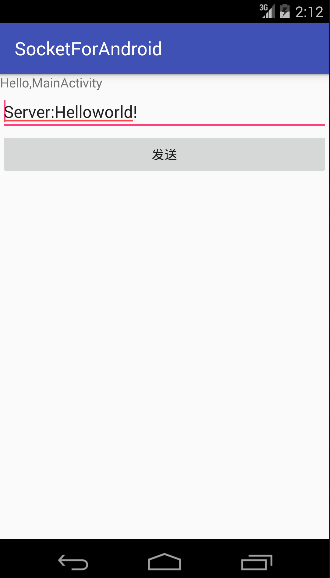
在输入框里输入如下字符串,点发送按钮:
服务器收到客户端发来的消息并打印到控制台:
2、Apache接口
对于大部分应用程序而言JDK本身提供的网络功能已远远不够,这时就需要Android提供的Apache HttpClient了。它是一个开源项目,功能更加完善,为客户端的Http编程提供高效、最新、功能丰富的工具包支持。
下面我们以一个简单例子来看看如何使用HttpClient在Android客户端访问Web。
首先,要在你的机器上搭建一个web应用test,有两个很简单的PHP文件:hello_get.php和hello_post.php!
内容如下:
hello_get.php的代码如下:
<html>
?<body>
??Welcome?<?php?echo?$_GET["name"];??><br>
??You?connected?this?page?on?:?<?php?echo?$_GET["get"];??>
?</body>
</html>
hello_post.php的代码如下:
<html>
<body>
Welcome?<?php?echo?$_POST["name"];??><br>
You?connected?this?page?on?:?<?php?echo?$_POST["post"];??>
</body>
</html>
在原来的Android项目里新建一个Apache活动类:Apache.java,代码如下:
package?com.yaowen.socketforandroid;

import?android.os.Bundle;

import?android.support.v7.app.AppCompatActivity;
import?android.view.View;
import?android.widget.Button;
import?android.widget.TextView;

import?org.apache.http.HttpEntity;
import?org.apache.http.HttpResponse;
import?org.apache.http.NameValuePair;
import?org.apache.http.client.ClientProtocolException;
import?org.apache.http.client.HttpClient;
import?org.apache.http.client.entity.UrlEncodedFormEntity;
import?org.apache.http.client.methods.HttpGet;
import?org.apache.http.client.methods.HttpPost;
import?org.apache.http.impl.client.DefaultHttpClient;
import?org.apache.http.message.BasicNameValuePair;

import?java.io.BufferedReader;
import?java.io.IOException;
import?java.io.InputStreamReader;
import?java.io.UnsupportedEncodingException;
import?java.util.ArrayList;
import?java.util.List;

/**
?*?Created?by?YAOWEN?on?2015/11/10.
?*/
public?class?ApacheActivity?extends?AppCompatActivity?implements?View.OnClickListener?{

????private?TextView?textView;
????private?Button?get1,?post1;

????@Override
????protected?void?onCreate(Bundle?savedInstanceState)?{
????????super.onCreate(savedInstanceState);
????????setContentView(R.layout.apache);

????????textView?=?(TextView)?findViewById(R.id.textView);
????????get1?=?(Button)?findViewById(R.id.get);
????????post1?=?(Button)?findViewById(R.id.post);

????????get1.setOnClickListener(this);
????????post1.setOnClickListener(this);

????}

????@Override
????public?void?onClick(View?v)?{
????????if?(v.getId()?==?R.id.get)?{
????????????//注意:此处ip不能用127.0.0.1或localhost,Android模拟器已将它自己作为了localhost

????????????String?url?=?"http://192.168.3.200/test/hello_get.php?name=yaowen&get=GET";
????????????textView.setText(get(url));
????????}
????????if?(v.getId()?==?R.id.post)?{

????????????String?url="http://192.168.3.200/test/hello_post.php";
????????????textView.setText(post(url));
????????}

????}

????/**
?????*?以post方式发送请求,访问web
?????*
?????*?@param?url?web地址
?????*?@return?响应数据
?????*/
????private?String?post(String?url)?{
????????BufferedReader?reader?=?null;
????????StringBuffer?sb?=?null;
????????String?result?=?"";
????????HttpClient?client?=?new?DefaultHttpClient();
????????HttpPost?requset?=?new?HttpPost(url);
????????//保存要传递的参数
????????List<NameValuePair>?params?=?new?ArrayList<NameValuePair>();
????????//添加参数
????????params.add(new?BasicNameValuePair("name",?"yaowen"));
????????params.add(new?BasicNameValuePair("post","POST"));

????????try?{
????????????HttpEntity?entity?=?new?UrlEncodedFormEntity(params,?"utf-8");
????????????requset.setEntity(entity);
????????????HttpResponse?response?=?client.execute(requset);
????????????if?(response.getStatusLine().getStatusCode()?==?200)?{
????????????????System.out.println("post?success");
????????????????reader?=?new?BufferedReader(new?InputStreamReader(response.getEntity().getContent()));
????????????????sb?=?new?StringBuffer();
????????????????String?line?=?"";
????????????????String?NL?=?System.getProperty("line.separator");
????????????????while?((line?=?reader.readLine())?!=?null)?{
????????????????????sb.append(line);
????????????????}
????????????}

????????}?catch?(UnsupportedEncodingException?e)?{
????????????e.printStackTrace();
????????}?catch?(ClientProtocolException?e)?{
????????????e.printStackTrace();
????????}?catch?(IOException?e)?{
????????????e.printStackTrace();
????????}?finally?{
????????????if?(null?!=?reader)?{
????????????????try?{
????????????????????reader.close();
????????????????}?catch?(IOException?e)?{
????????????????????e.printStackTrace();
????????????????}

????????????}
????????????if?(null?!=?sb)?{
????????????????result?=?sb.toString();
????????????}
????????}

????????return?result;
????}

????/**
?????*?以get方式发送请求,访问web
?????*
?????*?@param?url?web地址
?????*?@return?响应数据
?????*/
????private?static?String?get(String?url)?{
????????BufferedReader?bufferedReader?=?null;
????????StringBuffer?sb?=?null;
????????String?result?=?"";
????????HttpClient?client?=?new?DefaultHttpClient();
????????HttpGet?request?=?new?HttpGet(url);
????????//发送请求,得到响应
????????try?{
????????????HttpResponse?response?=?client.execute(request);
????????????//请求成功
????????????if?(response.getStatusLine().getStatusCode()?==?200)?{
????????????????bufferedReader?=?new?BufferedReader(
????????????????????????new?InputStreamReader(
????????????????????????????????response.getEntity()
????????????????????????????????????????.getContent()
????????????????????????)
????????????????);
????????????????sb?=?new?StringBuffer();
????????????????String?line?=?"";
????????????????String?NL?=?System.getProperty("line.separator");
????????????????while?((line?=?bufferedReader.readLine())?!=?null)?{
????????????????????sb.append(line);
????????????????}
????????????}
????????}?catch?(IOException?e)?{
????????????e.printStackTrace();
????????}?finally?{
????????????if?(null?!=?bufferedReader)?{
????????????????try?{
????????????????????bufferedReader.close();
????????????????????//bufferedReader=null;
????????????????}?catch?(IOException?e)?{
????????????????????e.printStackTrace();
????????????????}

????????????}
????????????if?(null?!=?sb)?{
????????????????result?=?sb.toString();
????????????}
????????}
????????return?result;
????}
}
新建一个apache.XML文件,如下:
<?xml?version="1.0"?encoding="utf-8"?>
<LinearLayout?xmlns:android="http://schemas.android.com/apk/res/android"
????android:layout_width="fill_parent"
????android:layout_height="fill_parent"
????android:orientation="vertical">

????<TextView
????????android:id="@+id/textView"
????????android:layout_width="fill_parent"
????????android:layout_height="wrap_content"
????????android:gravity="center"
????????android:text="通过按钮选择不同方式访问网页"?/>

????<Button
????????android:id="@+id/get"
????????android:layout_width="match_parent"
????????android:layout_height="wrap_content"
????????android:text="get"?/>

????<Button
????????android:id="@+id/post"
????????android:layout_width="match_parent"
????????android:layout_height="wrap_content"
????????android:text="post"?/>
</LinearLayout>
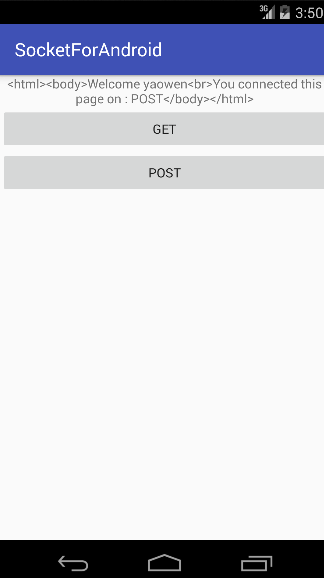
结果运行如下:
3.android.net编程
常常使用此包下的类进行Android特有的网络编程,如:访问WiFi,访问Android联网信息,邮件等功能。
这里就不详细做例子了,因为这个接触比较多~~~。