
Android UI控件系列:LinearLayout(线性布局)
- 作者: 忘事儿的菲芸
- 来源: 51数据库
- 2020-08-16
LinearLayout是在线性方向显示View元素的一个ViewGroup,可以是水平方向,也可以是垂直方向
你可以重复使用LinearLayout,如果你想使用嵌套多层的LinearLayout的话,你可以考虑使用RelativeLayout来替换.
1、开始创建一个工程名字叫做HelloLinearLayout
2、打开res/layout/main.xml文件并且插入如下内容
<?xml version="1.0" encoding="utf-8"?>
<LinearLayout xmlns:android="http://schemas.android.com/apk/res/android"
? ? android:orientation="vertical"
? ? android:layout_width="fill_parent"
? ? android:layout_height="fill_parent"
? ? >
? ? ? ? <LinearLayout
? ? ? ? ? ? ? ? android:orientation="horizontal"
? ? ? ? ? ? ? ? android:layout_width="fill_parent"
? ? ? ? ? ? ? ? android:layout_height="fill_parent"
? ? ? ? ? ? ? ? android:layout_weight="1">
? ? ? ? ? ? ? ? <TextView
? ? ? ? ? ? ? ? ? ? ? ? android:text="red"
? ? ? ? ? ? ? ? ? ? ? ? android:gravity="center_horizontal"
? ? ? ? ? ? ? ? ? ? ? ? android:background="#aa0000"
? ? ? ? ? ? ? ? ? ? ? ? android:layout_width="wrap_content"
? ? ? ? ? ? ? ? ? ? ? ? android:layout_height="fill_parent"
? ? ? ? ? ? ? ? ? ? ? ? android:layout_weight="1"
? ? ? ? ? ? ? ? />
? ? ? ? ? ? ? ? <TextView
? ? ? ? ? ? ? ? ? ? ? ? android:text="green"
? ? ? ? ? ? ? ? ? ? ? ? android:gravity="center_horizontal"
? ? ? ? ? ? ? ? ? ? ? ? android:background="#00aa00"
? ? ? ? ? ? ? ? ? ? ? ? android:layout_width="wrap_content"
? ? ? ? ? ? ? ? ? ? ? ? android:layout_height="fill_parent"
? ? ? ? ? ? ? ? ? ? ? ? android:layout_weight="1"
? ? ? ? ? ? ? ? />
? ? ? ? ? ? ? ? <TextView
? ? ? ? ? ? ? ? ? ? ? ? android:text="blue"
? ? ? ? ? ? ? ? ? ? ? ? android:gravity="center_horizontal"
? ? ? ? ? ? ? ? ? ? ? ? android:background="#0000aa"
? ? ? ? ? ? ? ? ? ? ? ? android:layout_width="wrap_content"
? ? ? ? ? ? ? ? ? ? ? ? android:layout_height="fill_parent"
? ? ? ? ? ? ? ? ? ? ? ? android:layout_weight="1"
? ? ? ? ? ? ? ? />
? ? ? ? ? ? ? ? <TextView
? ? ? ? ? ? ? ? ? ? ? ? android:text="yellow"
? ? ? ? ? ? ? ? ? ? ? ? android:gravity="center_horizontal"
? ? ? ? ? ? ? ? ? ? ? ? android:background="#aaaa00"
? ? ? ? ? ? ? ? ? ? ? ? android:layout_width="wrap_content"
? ? ? ? ? ? ? ? ? ? ? ? android:layout_height="fill_parent"
? ? ? ? ? ? ? ? ? ? ? ? android:layout_weight="1"
? ? ? ? ? ? ? ? />
? ? ? ? </LinearLayout>
? ? ? ? <LinearLayout
? ? ? ? ? ? ? ? android:orientation="vertical"
? ? ? ? ? ? ? ? android:layout_width="fill_parent"
? ? ? ? ? ? ? ? android:layout_height="fill_parent"
? ? ? ? ? ? ? ? android:layout_weight="1">
? ? ? ? ? ? ? ? <TextView
? ? ? ? ? ? ? ? ? ? ? ? android:text="row one"
? ? ? ? ? ? ? ? ? ? ? ? android:textSize="15pt"
? ? ? ? ? ? ? ? ? ? ? ? android:layout_width="fill_parent"
? ? ? ? ? ? ? ? ? ? ? ? android:layout_height="wrap_content"
? ? ? ? ? ? ? ? ? ? ? ? android:layout_weight="1"
? ? ? ? ? ? ? ? />
? ? ? ? ? ? ? ? <TextView
? ? ? ? ? ? ? ? ? ? ? ? android:text="row two"
? ? ? ? ? ? ? ? ? ? ? ? android:textSize="15pt"
? ? ? ? ? ? ? ? ? ? ? ? android:layout_width="fill_parent"
? ? ? ? ? ? ? ? ? ? ? ? android:layout_height="wrap_content"
? ? ? ? ? ? ? ? ? ? ? ? android:layout_weight="1"
? ? ? ? ? ? ? ? />
? ? ? ? ? ? ? ? <TextView
? ? ? ? ? ? ? ? ? ? ? ? android:text="row three"
? ? ? ? ? ? ? ? ? ? ? ? android:textSize="15pt"
? ? ? ? ? ? ? ? ? ? ? ? android:layout_width="fill_parent"
? ? ? ? ? ? ? ? ? ? ? ? android:layout_height="wrap_content"
? ? ? ? ? ? ? ? ? ? ? ? android:layout_weight="1"
? ? ? ? ? ? ? ? />
? ? ? ? ? ? ? ? <TextView
? ? ? ? ? ? ? ? ? ? ? ? android:text="row four"
? ? ? ? ? ? ? ? ? ? ? ? android:textSize="15pt"
? ? ? ? ? ? ? ? ? ? ? ? android:layout_width="fill_parent"
? ? ? ? ? ? ? ? ? ? ? ? android:layout_height="wrap_content"
? ? ? ? ? ? ? ? ? ? ? ? android:layout_weight="1"
? ? ? ? ? ? ? ? />
? ? ? ? </LinearLayout>
</LinearLayout>
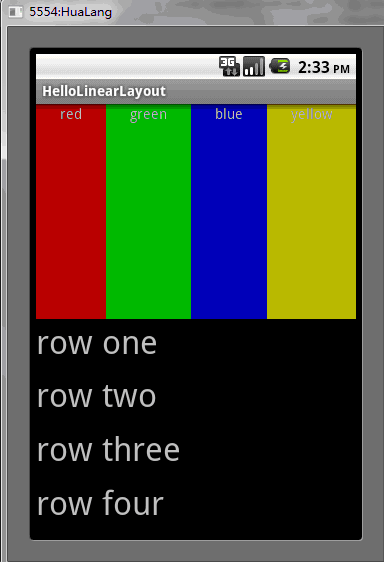
仔细检查这个XML文件。有一个根元素LinearLayout定义了它的方向是垂直的,所有的子View(一共有2个)都是被垂直方向堆起的,第一个子孩子是另一个以水平方向布局的LinearLayout,并且第二个子孩子是一个用垂直方向布局的LinearLayout,这些每一个被嵌套的LinearLayout都包含几个TextView元素,它们的方向是由父LinearLayout标签所定义。
3、现在打开HelloLinearLayout.java并且确定它已经在onCreate()方法中加载了res/layout/main.xml布局文件
  public void onCreate(Bundle savedInstanceState) {
? ? ? ? super.onCreate(savedInstanceState);
? ? ? ? setContentView(R.layout.main);
setContentView(int)方法为Activity加载了布局文件,由资源resource ID所指定—R.layout.main指的是res/layout/main.xml布局文件
4、运行程序,你可以看到如下的情况
推荐阅读
热点文章

android中Bitmap用法(显示,保存,缩放,旋转)实例分析
12
android 仿微信聊天气泡效果实现思路
1
Android的尺度,drawable-xxxxxxx
2

Codeforces Round #656 (Div. 3) (C、D题)
1
Android之handler异步消息处理机制解析
6
GridView中图片显示出现上下间距过大,左右图片显示类似瀑布流的问题
0
AsyncTask的简单使用
5
两个简单Fragment之间的通信(三种方式)
18
uboot修改设置boot参数命令
41
android中实现从相册中一次性获取多张图片与拍照,并将选中的图片显示出来
2
