
Android UI控件系列:ProgressBar(进度条)
- 作者: Meng_surper
- 来源: 51数据库
- 2020-08-16
Android在执行一些后台操作的时候,比如加载游戏,播放歌曲时,用户根本不知道程序执行的进度情况,这时候,可以使用进度条来显示这些进度。
Andorid系统提供两种进度条,长条形进度条(progressBarStyleHorizontal)和圆形进度条(progressBarStyleLarge),Android平台默认的进度条是第二种。另外,还可以在窗体的标题栏设置进度条,这就需要先对窗体的显示风格进行设置“requestWindowFeature(Window.FEATURE_PROGRESS)”;如果要显示这个进度条,还要使用setProgressBarVisibility(true);方法来使其显示
下面是个例子,分别由标题栏进度条,长条形进度条和圆形进度条组成,并用线程控制。
注意:圆形进度条是不会显示具体的进度的,而只是单纯的旋转
package org.hualang.progress;

import android.app.Activity;
import android.os.Bundle;
import android.os.Handler;
import android.os.Message;
import android.view.View;
import android.view.Window;
import android.widget.Button;
import android.widget.ProgressBar;

public class ProgressBarTest extends Activity
{
? ? ? ? //声明ProgressBar对象
? ? ? ? private ProgressBar pro1;
? ? ? ? private ProgressBar pro2;
? ? ? ? private Button btn;
? ? ? ? protected static final int STOP_NOTIFIER = 000;
? ? ? ? protected static final int THREADING_NOTIFIER = 111;
? ? ? ? public int intCounter=0;
? ? ? ? /** Called when the activity is first created. */
? ? ? ? @Override
? ? ? ? public void onCreate(Bundle savedInstanceState)
? ? ? ? {
? ? ? ? ? ? ? ? super.onCreate(savedInstanceState);
? ? ? ? ? ? ? ? //设置窗口模式,,因为需要显示进度条在标题栏
? ? ? ? ? ? ? ? requestWindowFeature(Window.FEATURE_PROGRESS);
? ? ? ? ? ? ? ? //设置标题栏上的进度条可见
? ? ? ? ? ? ? ? setProgressBarVisibility(true);
? ? ? ? ? ? ? ? setContentView(R.layout.main);

? ? ? ? ? ? ? ? //取得ProgressBar
? ? ? ? ? ? ? ? pro1 = (ProgressBar) findViewById(R.id.progress1);
? ? ? ? ? ? ? ? pro2= (ProgressBar) findViewById(R.id.progress2);
? ? ? ? ? ? ? ? btn = (Button)findViewById(R.id.button);
? ? ? ? ? ? ? ? //设置进度条是否自动运转,即设置其不确定模式,false表是不自动运转
? ? ? ? ? ? ? ? pro1.setIndeterminate(false);
? ? ? ? ? ? ? ? pro2.setIndeterminate(false);

? ? ? ? ? ? ? ? //当按钮按下时开始执行,
? ? ? ? ? ? btn.setOnClickListener(new Button.OnClickListener()
? ? ? ? ? ? {
? ? ? ? ? ? ? @Override
? ? ? ? ? ? ? public void onClick(View v)
? ? ? ? ? ? ? {
? ? ? ? ? ? ? ? // TODO Auto-generated method stub

? ? ? ? ? ? ? ? ? ? ? //设置ProgressBar为可见状态
? ? ? ? ? ? ? ? ? ? ? pro1.setVisibility(View.VISIBLE);
? ? ? ? ? ? ? ? ? ? ? pro2.setVisibility(View.VISIBLE);
? ? ? ? ? ? ? ? ? ? ? //设置ProgressBar的最大值
? ? ? ? ? ? ? ? ? ? ? pro1.setMax(100);
? ? ? ? ? ? ? ? ? ? ? //设置ProgressBar当前值
? ? ? ? ? ? ? ? ? ? ? pro1.setProgress(0);
? ? ? ? ? ? ? ? ? ? ? pro2.setProgress(0);

? ? ? ? ? ? ? ? ? ? ? //通过线程来改变ProgressBar的值
? ? ? ? ? ? ? ? ? ? ? ? ? ? ? ? new Thread(new Runnable() {
? ? ? ? ? ? ? ? ? ? ? ? ? ? ? ? ? ? ? ? public void run()
? ? ? ? ? ? ? ? ? ? ? ? ? ? ? ? ? ? ? ? {
? ? ? ? ? ? ? ? ? ? ? ? ? ? ? ? ? ? ? ? ? ? ? ? for (int i = 0; i < 10; i++)
? ? ? ? ? ? ? ? ? ? ? ? ? ? ? ? ? ? ? ? ? ? ? ? {
? ? ? ? ? ? ? ? ? ? ? ? ? ? ? ? ? ? ? ? ? ? ? ? ? ? ? ? try
? ? ? ? ? ? ? ? ? ? ? ? ? ? ? ? ? ? ? ? ? ? ? ? ? ? ? ? {
? ? ? ? ? ? ? ? ? ? ? ? ? ? ? ? ? ? ? ? ? ? ? ? ? ? ? ? ? ? ? ? intCounter = (i + 1) * 20;
? ? ? ? ? ? ? ? ? ? ? ? ? ? ? ? ? ? ? ? ? ? ? ? ? ? ? ? ? ? ? ? Thread.sleep(1000);

? ? ? ? ? ? ? ? ? ? ? ? ? ? ? ? ? ? ? ? ? ? ? ? ? ? ? ? ? ? ? ? if (i == 4)
? ? ? ? ? ? ? ? ? ? ? ? ? ? ? ? ? ? ? ? ? ? ? ? ? ? ? ? ? ? ? ? {
? ? ? ? ? ? ? ? ? ? ? ? ? ? ? ? ? ? ? ? ? ? ? ? ? ? ? ? ? ? ? ? ? ? ? ? Message m = new Message();

? ? ? ? ? ? ? ? ? ? ? ? ? ? ? ? ? ? ? ? ? ? ? ? ? ? ? ? ? ? ? ? ? ? ? ? m.what = ProgressBarTest.STOP_NOTIFIER;
? ? ? ? ? ? ? ? ? ? ? ? ? ? ? ? ? ? ? ? ? ? ? ? ? ? ? ? ? ? ? ? ? ? ? ? ProgressBarTest.this.myMessageHandler.sendMessage(m);
? ? ? ? ? ? ? ? ? ? ? ? ? ? ? ? ? ? ? ? ? ? ? ? ? ? ? ? ? ? ? ? ? ? ? ? break;
? ? ? ? ? ? ? ? ? ? ? ? ? ? ? ? ? ? ? ? ? ? ? ? ? ? ? ? ? ? ? ? }
? ? ? ? ? ? ? ? ? ? ? ? ? ? ? ? ? ? ? ? ? ? ? ? ? ? ? ? ? ? ? ? else
? ? ? ? ? ? ? ? ? ? ? ? ? ? ? ? ? ? ? ? ? ? ? ? ? ? ? ? ? ? ? ? {
? ? ? ? ? ? ? ? ? ? ? ? ? ? ? ? ? ? ? ? ? ? ? ? ? ? ? ? ? ? ? ? ? ? ? ? Message m = new Message();
? ? ? ? ? ? ? ? ? ? ? ? ? ? ? ? ? ? ? ? ? ? ? ? ? ? ? ? ? ? ? ? ? ? ? ? m.what = ProgressBarTest.THREADING_NOTIFIER;
? ? ? ? ? ? ? ? ? ? ? ? ? ? ? ? ? ? ? ? ? ? ? ? ? ? ? ? ? ? ? ? ? ? ? ? ProgressBarTest.this.myMessageHandler.sendMessage(m);
? ? ? ? ? ? ? ? ? ? ? ? ? ? ? ? ? ? ? ? ? ? ? ? ? ? ? ? ? ? ? ? }
? ? ? ? ? ? ? ? ? ? ? ? ? ? ? ? ? ? ? ? ? ? ? ? ? ? ? ? }
? ? ? ? ? ? ? ? ? ? ? ? ? ? ? ? ? ? ? ? ? ? ? ? ? ? ? ? catch (Exception e)
? ? ? ? ? ? ? ? ? ? ? ? ? ? ? ? ? ? ? ? ? ? ? ? ? ? ? ? {
? ? ? ? ? ? ? ? ? ? ? ? ? ? ? ? ? ? ? ? ? ? ? ? ? ? ? ? ? ? ? ? e.printStackTrace();
? ? ? ? ? ? ? ? ? ? ? ? ? ? ? ? ? ? ? ? ? ? ? ? ? ? ? ? }
? ? ? ? ? ? ? ? ? ? ? ? ? ? ? ? ? ? ? ? ? ? ? ? }
? ? ? ? ? ? ? ? ? ? ? ? ? ? ? ? ? ? ? ? }
? ? ? ? ? ? ? ? ? ? ? ? ? ? ? ? }).start();
? ? ? ? ? ? ? ? ? ? ? ? }
? ? ? ? ? ? ? ? });
? ? ? ? }

? ? ? ? ? Handler myMessageHandler = new Handler()
? ? ? ? ? {
? ? ? ? ? ? // @Override
? ? ? ? ? ? ? ? ? public void handleMessage(Message msg)
? ? ? ? ? ? ? ? ? {
? ? ? ? ? ? ? ? ? ? ? ? ? switch (msg.what)
? ? ? ? ? ? ? ? ? ? ? ? ? {
? ? ? ? ? ? ? ? ? ? ? ? ? //ProgressBar已经是对大值
? ? ? ? ? ? ? ? ? ? ? ? ? case ProgressBarTest.STOP_NOTIFIER:
? ? ? ? ? ? ? ? ? ? ? ? ? ? ? ? ? pro1.setVisibility(View.GONE);
? ? ? ? ? ? ? ? ? ? ? ? ? ? ? ? ? pro2.setVisibility(View.GONE);
? ? ? ? ? ? ? ? ? ? ? ? ? ? ? ? ? Thread.currentThread().interrupt();
? ? ? ? ? ? ? ? ? ? ? ? ? ? ? ? ? break;
? ? ? ? ? ? ? ? ? ? ? ? ? case ProgressBarTest.THREADING_NOTIFIER:
? ? ? ? ? ? ? ? ? ? ? ? ? ? ? ? ? if (!Thread.currentThread().isInterrupted())
? ? ? ? ? ? ? ? ? ? ? ? ? ? ? ? ? {
? ? ? ? ? ? ? ? ? ? ? ? ? ? ? ? ? ? ? ? ? // 改变ProgressBar的当前值
? ? ? ? ? ? ? ? ? ? ? ? ? ? ? ? ? ? ? ? ? pro1.setProgress(intCounter);
? ? ? ? ? ? ? ? ? ? ? ? ? ? ? ? ? ? ? ? ? pro2.setProgress(intCounter);

? ? ? ? ? ? ? ? ? ? ? ? ? ? ? ? ? ? ? ? ? // 设置标题栏中前景的一个进度条进度值
? ? ? ? ? ? ? ? ? ? ? ? ? ? ? ? ? ? ? ? ? setProgress(intCounter*100);
? ? ? ? ? ? ? ? ? ? ? ? ? ? ? ? ? ? ? ? ? // 设置标题栏中后面的一个进度条进度值
? ? ? ? ? ? ? ? ? ? ? ? ? ? ? ? ? ? ? ? ? setSecondaryProgress(intCounter*100);//
? ? ? ? ? ? ? ? ? ? ? ? ? ? ? ? ? }
? ? ? ? ? ? ? ? ? ? ? ? ? ? ? ? ? break;
? ? ? ? ? ? ? ? ? ? ? ? ? }
? ? ? ? ? ? ? ? ? ? ? ? ? super.handleMessage(msg);
? ? ? ? ? ? ? ? ?}
? ? ? ? ? };
}
main.xml
<?xml version="1.0" encoding="utf-8"?>
<LinearLayout xmlns:android="http://schemas.android.com/apk/res/android"
? ? android:orientation="vertical"
? ? android:layout_width="fill_parent"
? ? android:layout_height="fill_parent"
? ? >
<TextView
? ? android:layout_width="fill_parent"
? ? android:layout_height="wrap_content"
? ? android:text="进度条实例演示"
? ? />
<ProgressBar
? ? ? ? android:id="@+id/progress1"
? ? ? ? style="?android:attr/progressBarStyleHorizontal"---设置进度条为长条形
? ? ? ? android:layout_width="fill_parent"
? ? ? ? android:layout_height="wrap_content"
? ? ? ? android:visibility="gone"---设置其不可见
/>
<ProgressBar
? ? ? ? android:id="@+id/progress2"
? ? ? ? style="?android:attr/progressBarStyleLarge"---设置进度条为圆形进度条
? ? ? ? android:layout_width="wrap_content"
? ? ? ? android:layout_height="wrap_content"
? ? ? ? android:max="100"---设置其最大值
? ? ? ? android:progress="50"---设置当前进度值
? ? ? ? android:secondaryProgress="70"---设置次要进度值
? ? ? ? android:visibility="gone"
/>
<Button
? ? ? ? android:id="@+id/button"
? ? ? ? android:layout_width="fill_parent"
? ? ? ? android:layout_height="wrap_content"
? ? ? ? android:text="启动进度条"
/>
</LinearLayout>
运行结果如下:

点击启动进度条按钮后,进度条将自动运行

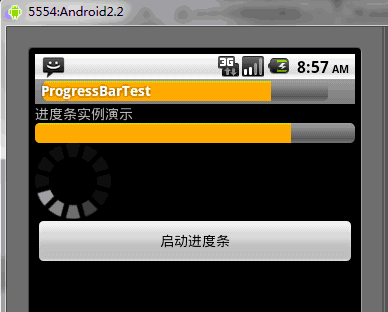
当结束时,自动退出进度条程序,返回第一个图片的样子
推荐阅读
热点文章

android中Bitmap用法(显示,保存,缩放,旋转)实例分析
12

android 仿微信聊天气泡效果实现思路
1
Android的尺度,drawable-xxxxxxx
2

Codeforces Round #656 (Div. 3) (C、D题)
1
Android之handler异步消息处理机制解析
6

GridView中图片显示出现上下间距过大,左右图片显示类似瀑布流的问题
0
AsyncTask的简单使用
5

两个简单Fragment之间的通信(三种方式)
18
uboot修改设置boot参数命令
41
android中实现从相册中一次性获取多张图片与拍照,并将选中的图片显示出来
2
