
Android日期选择控件使用详解
- 作者: 渐渐的贱贱的___
- 来源: 51数据库
- 2021-07-06
本文实例为大家分享了android日期选择控件的使用方法,供大家参考,具体内容如下
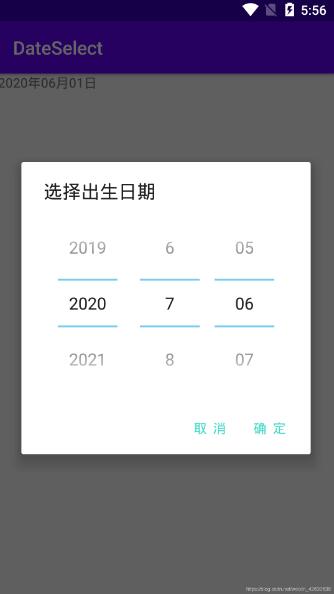
1.创建dialog 布局
<?xml version="1.0" encoding="utf-8"?>
<linearlayout xmlns:android="http://schemas.android.com/apk/res/android"
  android:layout_width="match_parent"
  android:layout_height="match_parent"
  android:gravity="center">

  <datepicker
    android:datepickermode="spinner"
    android:calendarviewshown="false"
    android:id="@+id/date_picker"
    android:layout_width="wrap_content"
    android:layout_height="wrap_content">
  </datepicker>

</linearlayout>
2.mainactivity
public class mainactivity extends appcompatactivity {

  private textview date;

  @override
  protected void oncreate(bundle savedinstancestate) {
    super.oncreate(savedinstancestate);
    setcontentview(r.layout.activity_main);
    date = findviewbyid(r.id.date);

    //点击"日期"按钮布局 设置日期
    date.setonclicklistener(new view.onclicklistener() {
      @override
      public void onclick(view v) {
        //通过自定义控件alertdialog实现
        alertdialog.builder builder = new alertdialog.builder(mainactivity.this);
        view view = (linearlayout) getlayoutinflater().inflate(r.layout.date_dialog, null);
        final datepicker datepicker = (datepicker) view.findviewbyid(r.id.date_picker);
        //设置日期简略显示 否则详细显示 包括:星期\周
        datepicker.setcalendarviewshown(false);
        //设置date布局
        builder.setview(view);
        builder.settitle("选择出生日期");
        builder.setpositivebutton("确 定", new dialoginterface.onclicklistener() {
          @override
          public void onclick(dialoginterface dialog, int which) {
            //日期格式
            int year = datepicker.getyear();
            int month = datepicker.getmonth()+1;
            int dayofmonth = datepicker.getdayofmonth();
            date.settext(year+"年"+month+"月"+dayofmonth+"日");
            dialog.cancel();
          }
        });
        builder.setnegativebutton("取 消", new dialoginterface.onclicklistener() {
          @override
          public void onclick(dialoginterface dialog, int which) {
            dialog.cancel();
          }
        });
        builder.create().show();
      }
    });
  }
}
3.activity_main布局
<?xml version="1.0" encoding="utf-8"?>
<linearlayout xmlns:android="http://schemas.android.com/apk/res/android"
  xmlns:app="http://schemas.android.com/apk/res-auto"
  xmlns:tools="http://schemas.android.com/tools"
  android:layout_width="match_parent"
  android:layout_height="match_parent"
  tools:context=".mainactivity">


  <textview
    android:id="@+id/date"
    android:layout_width="wrap_content"
    android:layout_height="wrap_content"
    android:text="2020年06月01日"></textview>

</linearlayout>
以上就是本文的全部内容,希望对大家的学习有所帮助,也希望大家多多支持。
推荐阅读
热点文章

android中Bitmap用法(显示,保存,缩放,旋转)实例分析
12

android 仿微信聊天气泡效果实现思路
1
Android的尺度,drawable-xxxxxxx
2

Codeforces Round #656 (Div. 3) (C、D题)
1
Android之handler异步消息处理机制解析
6

GridView中图片显示出现上下间距过大,左右图片显示类似瀑布流的问题
0
AsyncTask的简单使用
5
两个简单Fragment之间的通信(三种方式)
18
uboot修改设置boot参数命令
41
android中实现从相册中一次性获取多张图片与拍照,并将选中的图片显示出来
2
