canvas实现图片马赛克的示例代码
- 作者: 请叫我李二哈丶
- 来源: 51数据库
- 2021-08-28
1. 原生canvas实现用到的api
1) getcontext(contextid) ---返回一个用于在画布上绘图的环境
canvas.getcontext('2d') // 返回一个 canvasrenderingcontext2d 对象,使用它可以绘制到 canvas 元素中
2)drawimage
drawimage(imgobj, x, y)  // 按原图大小绘制, x、y为图片在画布中的位置坐标
drawimage(imgobj, x, y, width, height) // 按指定宽高绘制
drawimage(imgobj, sourcex, sourcey, sourcewidth, sourceheight, destx, desty, destwidth, destheight) // 从原来图片上某一个位置开始(sourcex,sourcey),指定长宽进行剪切(sourcewidth,sourceheight),然后将剪切的内容放到位置为(destx,desty),宽度为(destwidth),高度为(destheight)的位置上
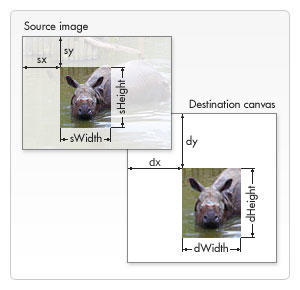
3) getimagedata(x, y, width, height) ---获取矩形区域的图像信息
ctx.getimagedata(0, 0, 10, 10) // 获取左上角坐标为(0, 0),宽高为区域内的图像信息
// 返回imagedata: { width: 10, height: 10, data: uint8clampedarray[400] }
4)beginpath() ---开始一条路径,或重置当前的路径 5)rect(x, y, width, height) ---绘制矩形
6)linewidth ---设置或返回当前线条的宽度
7)fillstyle ---设置或返回用于填充绘画的颜色、渐变或模式
ctx.fillstyle = color|gradient|pattern
8)strokestyle ---设置或返回用于笔触的颜色、渐变或模式
9)globalalpha ---设置或返回绘图的当前透明值
10)fill() ---填充当前的图像(路径)。默认颜色是黑色
【注】如果路径未关闭,那么 fill() 方法会从路径结束点到开始点之间添加一条线,以关闭该路径,然后填充该路径。
11)stroke() ---会实际地绘制出通过 moveto() 和 lineto() 方法定义的路径。默认颜色是黑色
12)todataurl(type, encoderoptions) ---导出图片,type为图片类型, encoderoptions图片质量,[0, 1]
canvas.todataurl("image/png", 1)
2. fabric.js
简化canvas编写的库,为canvas提供所缺少的对象模型
fabric.js能做的事
1)在canvas上创建、填充图形(包括图片、文字、规则图形和复杂路径组成图形)
2)给图形填充渐变颜色
3)组合图形(包括组合图形、图形文字、图片等)
4)设置图形动画集用户交互
5)生成json, svg数据等
3.使用fabric.js实现用到的api
1)声明画布
let canvas =new fabric.canvas('canvas') {
   width: 200,
   height: 200
}
插入图片
let imginstance = new fabric.image(imgelement,{
  left: 0,
  top: 0,
  width: 100,
  height: 100,
  angle: 0
}
3)设置背景图片 setbackgroundimage
canvas.setbackgroundimage(imginstance)
4)renderall() 重新绘制
5)on() 用户交互
canvas.on('mouse:down', function(options) {
   console.log(options.e.clientx, options.e.clienty)
})

// 监听事件
/*
   mouse:down :鼠标按下时
   mouse:move :鼠标移动时
   mouse:up :鼠标抬起时
   after:render :画布重绘后
   object:selected:对象被选中
   object:moving:对象移动
   object:rotating:对象被旋转
   object:added:对象被加入
   object:removed对象被移除
*/
6)getpointer()
7)setwidth()、setheight() 设置canvas的宽高
8)画矩形
let rect = new fabric.rect({
 left: 0,
 top: 0,
 width: 100,
 height: 100
})
add(obj) 添加图形
canvas.add(rect)
10)remove(obj) 移除图形
11)set() 设置对象内容
12)todataurl(obj)
4.原生canvas实现代码
<template>
<div class="container">
  <div class="operations">
    <ul>
      <li @click="mosaic">马赛克</li>
      <li @click="addtext">添加文字</li>
      <li @click="tailor">裁剪</li>
      <li @click="rotate">旋转</li>
      <li @click="exportimg">导出图片</li>
    </ul>
  </div>
  <canvas ref="imgcontent" class="img-wrap">
    你的浏览器太low🌶
  </canvas>
</div>
</template>

<script>
  export default {
    data () {
      return {
        context: '',
        canvas: '',
        ismasic: false,
        istext: false,
        istailor: false,
        istranslate: false,
        squareedgelength: 20,
        angle: 0,
        img: ''
      }
    },
    mounted () {
      this.initdata()
    },
    methods: {
      initdata () {
        let imgcontent = this.$refs.imgcontent
        this.canvas = imgcontent
        this.context = imgcontent.getcontext('2d')
        let  img = new image()
        this.image = img
        img.crossorigin = "anonymous"
        img.src = 'http://oia85104s.bkt.clouddn.com/pictureunlock_193139.pictureunlock.jpg'
        this.canvas.setattribute('width', img.width)
        this.canvas.setattribute('height', img.height)
        let self = this
        img.onload = () => {
          let beginx, beginy, endx, endy
          self.context.drawimage(img, 0, 0)
          self.context.save()

          self.canvas.addeventlistener('mousedown', e => {
            beginx = e.offsetx
            beginy = e.offsety
            self.canvas.addeventlistener('mouseup', e => {
              endx = e.offsetx
              endy = e.offsety
              if (self.ismasic) {
                self.makegrid(beginx, beginy, endx - beginx, endy - beginy)
                return
              }
              if (self.istailor) {
                self.context.drawimage(img, beginx, beginy, endx - beginx, endy - beginy, 0, 0, endx - beginx, endy - beginy)
                return
              }
            })
          })
        }
      },
      drawrect  (x, y, width, height, fillstyle, linewidth, strokestyle, globalalpha) {
        this.context.beginpath()
        this.context.rect(x, y, width, height)
        this.context.linewidth = linewidth
        this.context.strokestyle = strokestyle
        fillstyle && (this.context.fillstyle = fillstyle)
        globalalpha && (this.context.globalalpha = globalalpha)

        this.context.fill()
        this.context.stroke()
      },
      // 打马赛克
      mosaic () {
        let self = this
        this.resetclickstatus()
        this.ismasic = true
      },
      makegrid (beginx, beginy, rectwidth, recthight) {
        const row = math.round(rectwidth / this.squareedgelength) + 1
        const column = math.round(recthight / this.squareedgelength) + 1
        for (let i = 0; i < row * column; i++) {
          let x = (i % row) * this.squareedgelength + beginx
          let y = parseint(i / row) * this.squareedgelength + beginy
          this.setcolor(x, y)
        }
      },
      setcolor (x, y) {
        const imgdata = this.context.getimagedata(x, y, this.squareedgelength, this.squareedgelength).data
        let r = 0, g = 0, b = 0
        console.log(this.context.getimagedata(x, y, this.squareedgelength, this.squareedgelength), json.stringify(imgdata))
        for (let i = 0; i < imgdata.length; i += 4) {
          r += imgdata[i]
          g += imgdata[i + 1]
          b += imgdata[i + 2]
        }
        r = math.round(r / (imgdata.length / 4))
        g = math.round(g / (imgdata.length / 4))
        b = math.round(b / (imgdata.length / 4))
        this.drawrect(x, y, this.squareedgelength, this.squareedgelength, `rgb(${r}, ${g}, ${b})`, 2, `rgb(${r}, ${g}, ${b})`)
      },
      // 添加文字
      addtext () {
        this.resetclickstatus()
        this.istext = true
        console.log('添加文字')
      },
      // 裁剪
      tailor () {
        this.resetclickstatus()
        this.istailor = true
        console.log('裁剪')
      } ,
      // 旋转
      rotate () {
        // if (this.angle === 360) {
        //   this.angle = 90
        // } else {
        //   this.angle += 90
        // }
        // if ([90, 270].includes(this.angle)) {
        //   this.canvas.setattribute('width', this.image.height)
        //   this.canvas.setattribute('height', this.image.width)
        // } else {
        //   this.canvas.setattribute('width', this.image.width)
        //   this.canvas.setattribute('height', this.image.height)
        // }
        const x = this.image.width / 2
        const y = this.image.height / 2
        this.context.clearrect(0,0, this.canvas.width, this.canvas.height)  // 清理画布内容
        this.context.translate(x, y)
        this.context.rotate(90 * math.pi / 180)
        this.context.translate(-x, -y)
        this.context.drawimage(this.image, 0, 0)
      },
      resetclickstatus () {
        this.ismasic = false
        this.istext = false
        this.istailor = false
        this.istranslate = false
      },
      exportimg () {
        this.resetclickstatus()
        const exporturl = this.canvas.todataurl("image/jpeg")
        let a = document.createelement('a')
        a.setattribute('download', '')
        a.
        document.body.appendchild(a)
        a.click()
      }
    }
  }
</script>

<style scoped lang="less">
.operations {
  width: 1200px;
  margin: 0 auto;
  ul {
    display: flex;
    align-items: center;
    margin-bottom: 30px;
    li {
      list-style: none;
      margin-right: 20px;
      cursor: pointer;
    }
  }
}
.img-wrap {
  display: block;
  margin: 0 auto;
}
</style>
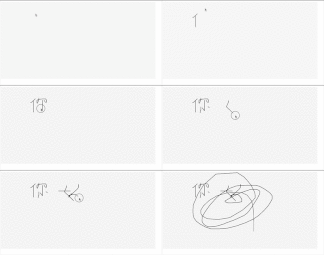
效果图如下:
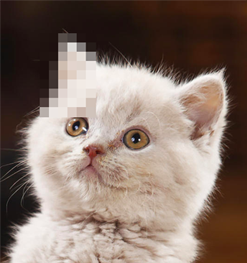
以上就是本文的全部内容,希望对大家的学习有所帮助,也希望大家多多支持。